

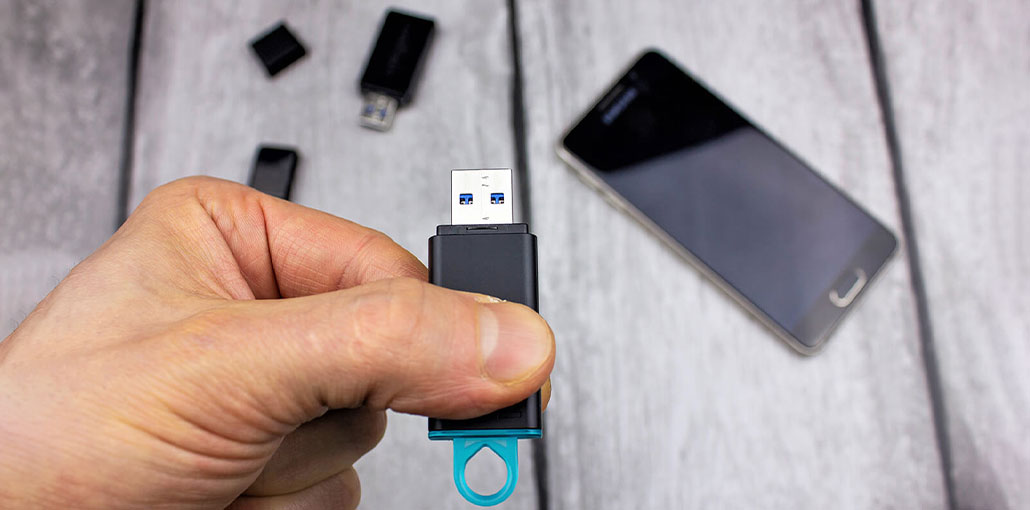
Do you have a photography or videography hobby and can’t manage the storage on your SD card because of the number of images you’ve taken? Perhaps you’re a student with lots of school-related files on your SD cards? In either case, an SD card reader for Android is a great option.
The SD card reader for Android lets users access their SD cards through their Android phone. With the Files Manager application, you can view, edit, and perform a variety of other tasks on the files on your phone.
What makes these card readers the best SD card readers for Android?
Best SD Card Readers for Android
Finding the best SD card reader for Android to meet your requirements can be a challenge. There are many choices available. Which ones are best for you?
1. Socketech SD Card Reader
The Socketech SD Card Reader is a versatile choice if you want one reader that works with different types of devices. According to the original product information, it supports USB-A, USB-C, and micro-USB connections, making it useful for both newer and older devices.
One of its biggest advantages is its ability to read and write two cards and a USB flash drive simultaneously. This can be convenient when you need to move files between different storage devices without repeatedly unplugging the reader.
This Android SD card reader also has an aluminum body and protective caps for its connectors, which makes it more practical for carrying in a bag.
Best for: Users who want broad device compatibility and multiple storage connections.
Key features:
- USB-A, USB-C, and micro-USB connectivity
- Supports multiple storage devices
- Can read and write two cards simultaneously
- Portable aluminum construction
- Plug-and-play design
Also read: Best 7 Drones You Can Buy For Aerial Videography & Photography
2. Hicober USB-C SD Card Reader
The Hicober USB-C SD Card Reader is designed primarily for devices with USB-C ports. It includes slots for both standard SD cards and microSD cards, along with a USB 3.0 port.
One notable feature of this USB-C SD card reader for Android work with two memory cards simultaneously. This can be useful when transferring data between cards or managing files from different storage media.
Its aluminum alloy construction also gives it a sturdy feel. The main drawback is its somewhat larger design compared with smaller, simpler card readers.
Best for: Android users with USB-C devices who need multiple card and USB connections.
Key features:
- USB-C connection
- SD and microSD support
- USB 3.0 port
- Supports simultaneous card use
- Aluminum alloy construction
3. COASD SD Card Reader
If portability and simplicity are your priorities, the COASD SD Card Reader is another option to consider.
The original article describes it as compatible with devices featuring standard USB-A and micro-USB ports. It uses a plug-and-play design, so there is no need to install additional drivers to use the reader.
Its compact design makes it convenient for travel. However, there is an important limitation: the original product information states that it does not support memory cards above 64GB. If you regularly use larger cards, you may want to choose another option.
Best for: Users with smaller-capacity memory cards looking for a compact reader.
Key features:
- USB-A and micro-USB compatibility
- Plug-and-play operation
- Compact design
- Portable
- Supports cards up to the stated 64GB limit
4. SmartQ C256 Micro SD Card Reader
The SmartQ C256 is a budget-friendly SD card reader for Android users who want a small and straightforward card reader.
The reader supports USB-C and USB-A connections, giving it flexibility across compatible Android devices and computers. Its compact size also makes it easy to carry around.
If you don’t need multiple card slots or advanced features, a simple reader such as this can be a practical choice.
Best for: Budget-conscious Android users who want a compact card reader.
Key features:
- USB-C and USB-A compatibility
- Compact design
- Portable
- Budget-friendly
- Designed for microSD cards
5. UGREEN SD Card Reader
UGREEN is well known for producing connectivity accessories, and its SD Card Reader is another option for Android users.
The model covered in the original article features both USB 3.0 and USB-C connectivity. The article also highlights its advertised high-speed data transfer capability and protective caps for the connectors.
The spring-loaded mechanism helps keep the card securely positioned inside the reader, while the protective caps can help keep the connectors free from dust when the device is stored in a bag or pocket.
Best for: Users looking for a fast and versatile SD card reader for Android with USB-A and USB-C connectivity.
Key features:
- USB 3.0 support
- USB-C connectivity
- USB-A connectivity
- Protective connector caps
- Spring-loaded card mechanism
Also read: Top 10 SD Card Recovery Software [Free & Paid]
6. Unitek USB-C SD Card Reader
The Unitek USB-C SD Card Reader is particularly interesting for photographers and users who work with multiple types of memory cards.
Unlike a basic SD/microSD reader, this model supports standard SD, microSD, and CompactFlash (CF) cards. The original article also states that the reader can access all three card types simultaneously.
That makes it a useful SD card reader for Android photographers who use different cameras and therefore have different types of memory cards.
Best for: Photographers and content creators who use SD, microSD, and CompactFlash cards.
Key features:
- USB-C connectivity
- SD card support
- microSD support
- CompactFlash support
- Simultaneous access to supported card types
Comparison of the Best SD Card Reader for Android
| SD Card Reader | Price (US) | Connectivity | Card Support | Best For |
|---|---|---|---|---|
| Socketech SD Card Reader | $12.99 | USB-A, USB-C, Micro-USB | SD, MicroSD | Multiple devices |
| Hicober USB-C SD Card Reader | $14.99 | USB-C, USB 3.0 | SD, MicroSD | USB-C Android devices |
| COASD SD Card Reader | Not currently verified | USB-A, Micro-USB | SD cards | Portable use |
| SmartQ C256 Micro SD Card Reader | $7.99 | USB-C, USB-A | MicroSD | Budget users |
| UGREEN SD Card Reader | From $9.49 | USB-C, USB-A, USB 3.0 | SD, MicroSD | Fast file transfers |
| Unitek USB-C SD Card Reader | From $38.99 | USB-C | SD, MicroSD, CompactFlash | Photographers |
Final Thoughts
Having your own SD card reader for Android is a huge help when you’re in a difficult situation. It’s a simple and quick option to access your data and browse it on your smartphone. If you’re running out of storage space, using an SD card reader for Android can help you transfer files to different storage.
Card readers have unique features that make them the best SD reader for Android. Some are built to last, while others are affordable, and a few have more options than other models. In the end, the most effective SD card reader for Android is the one that is best suited to your requirements.
FAQs: SD Card Reader for Android
Can I use an SD card reader with my Android phone?
Yes. You can use an SD card reader for Android if your phone supports the required USB connection and USB OTG or USB host functionality.
How do I use an SD card reader on Android?
Insert your SD or microSD card into the reader and connect it to your Android phone. Then, open the Files or File Manager app to view, copy, move, or manage your files.
Do Android SD card readers support microSD cards?
Many SD card readers for Android support both standard SD and microSD cards. However, always check the reader's specifications to confirm compatibility.
Do I need an app to use an SD card reader on Android?
In most cases, you can use your Android phone's built-in Files or File Manager app to access the connected memory card. The exact experience may vary depending on your device.




Leave a comment