

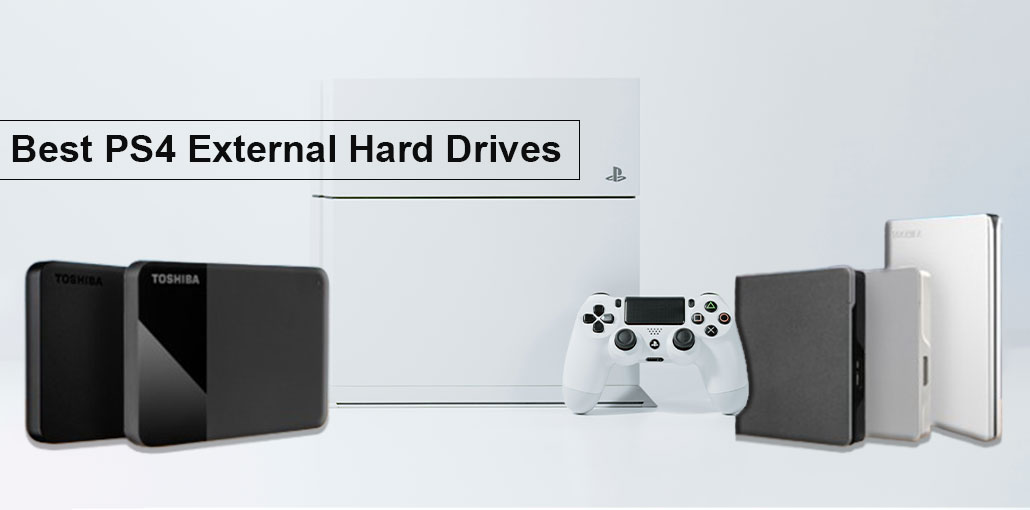
Similar to PC gamers, the world of consoles is constantly under pressure to grow, be more efficient, and robust. However, with the recent decline in external hard drive costs, both console and PC gamers alike are turning to them as a viable alternative storage option.
You can purchase an extremely fast PS4 external hard drive for around $100, and it won’t be 256Gb. Two-TB drives are affordable and now available with some interesting advantages and features. They also provide an external SSD option for gamers improve game loading time. However, these options aren’t cheap, so be cautious.
Today, we examine some of the top hard drives for PS4 gamers. In this blog, we provide a list of the best PS4 external hard drives for 2026.
Things to Consider Before Buying a PS4 External Hard Drive
It’s the buying graphics card, CPU, or, in this instance, the hard drive. Specific aspects must be considered when you buy new hardware to make an informed decision.
To make things easier for you, we’ve compiled a list of the areas we think can affect you as a user buying the best PS4 external hard drive.
Storage capacity
Your storage capacity device is generally the first thing to consider when buying any hard drive. The PlayStation has a small hard drive, which can fill quickly. Consumers need a larger capacity to save files, in-game video clips, and their media libraries.
The PS4 comes with a 500GB-1TB storage choice when you purchase it, and it will keep you occupied for a long time. However, with many users today using the PlayStation as an online media center, 500GB isn’t enough in a world that’s now stuffed with 4K media files.
If you’re an avid gamer who plays their PS4 often, you’ll find yourself needing additional storage. Deciding on the size that best suits your needs will save you money in the long run.
Read/Write speeds
Speeds for writing and reading are important aspects when it comes to hard drives, but more so when you’re specifically looking at the PS4 External hard disk. Both are measured in MB/s and basically indicate how quickly the drive performs tasks.
With the advent of PS4 and the era of downloadable games, your storage device must be able to read data quickly, provide faster loading times, and offer an enjoyable gaming experience.
The latest hard drives are available with similar speed and won’t be discernible in real-world scenarios. However, if you want to find the fastest PS4 external hard drive, you should be aware that this could affect the cost.
Also read: Why Is My PS4 Controller Not Connecting? 6 Easy Fixes Guide
Connectivity
As with all hardware components, connectivity plays an important role in its flexibility and functions. There are numerous types of connectivity available in today’s technology, and each one has its own particular function. However, transfer speeds are the most important aspect of your hard drive connectivity and ought to play a large role in selecting the appropriate drive for your needs.
The types of connections for PS4 external hard drives include USB 3.0, USB-Type C, and USB 3.1 Gen 2. But, if you’re specifically using the drive for PS4 storage, you’ll likely need to utilize USB 3.0. It’s not a huge issue, but the USB 3.0 offers a high transfer speed of up to 5GB/sec, which is enough to meet gamers’ demands.
The future PlayStation could be a better match to higher speeds; however, for the moment, we’d suggest sticking with the regular USB 3.0.
RPM speed
Due to advancements in SSDs and a drop in market price across the board, RPM drives will likely disappear from the market soon. However, for now, they’re an outdated feature and directly linked to your computer’s performance.
RPM speed refers to the speed at which your disk can spin to locate the data you need. Standard drives have 5400-7200RPM, which are efficient for basic tasks, but are far behind the speed at which SSDs are now able to take you. If you’re not able to pay for an SSD, but you want to look for the most affordable budget-friendly RPM drive you can afford.
Best PS4 External Hard Drives 2026
1. Seagate Backup Plus Slim
Hard Drive: Type Portable Desktop HDD
Speed: 5400RPM
Read/Write Speed: 151MB/sec – 134MB/sec
Capacities: 1TB to 5TB
Seagate is a major firm in the storage and hard drives sector. They have been cranking out top-quality hardware components for the longest time; it is possible remember. On the list is a 2TB Seagate Backup Plus Slim. We believe it is the ideal balance of capacity, speed, and price.
The design is elegant and chic due to its thin profile and fabric skin, which comes in a range of colours. Speeds for writing and reading of 151/134Mb/sec, respectively, make it one of the most efficient non-SSD choices in this list.
We believe that overall, Seagate did a fantastic job designing a reliable, cost-effective, economical, and great PS4 external hard drive.
Pros
- Slim and lightweight design
- Fast USB 3.0 transfer speeds
- Durable metal casing
- Affordable large storage options
- Includes backup software
Cons
- Slower than SSD drives
- USB ports can be fragile
- No hardware encryption
- Can become warm during heavy use
2. Western Digital My Passport
Hard Drive: Type Portable HDD
Speed: 5400RPM
Read/Write Speed: 115MB/sec – 113MB/sec
Capacities: 1TB to 4TB
The Western Digital My Passport, as well as a couple of other drives on this list, is featured in our top PS4 external hard drive guide, and for good reasons. Western Digital is another major player in the storage industry and provides customers with a variety of hard drive options.
We’ve chosen the 4TB model as our second-placed hard drive, due to its affordability and large capacity. It’s not equipped with a USB 3.1 port, which could increase the transfer speed from 5GB to 10GB/sec. However, it does have reasonable write and read speeds.
The design is constructed to last, using a premium plastic shell. It’s definitely a plus with an affordable price. The slim black style is pleasing to the eyes and pairs perfectly with the PS4.
Overall, Western Digital gets runner-up for its capacity to hold tons of data while remaining the most affordable.
Pros
- Large storage capacities
- Reliable brand reputation
- Compact and portable design
- Fast USB 3.0 connectivity
- Built-in encryption and password protection
Cons
- Slightly more expensive than similar drives
- Slower than SSD storage
- Plastic casing is less durable than metal
Also read: Hard Drive Not Showing Up? Fix It Fast with These 7 Easy Solutions
3. Seagate Backup Plus Hub
Hard Drive Type: High-Capacity Portable HDD
Speed: 5400RPM
Read/Write Speed: 188MB/sec – 153MB/sec
Capacities: 4TB to 10TB
The Seagate Backup Plus HDD is by far the most capacity hard drive we can offer in this guide. It is available in a range of sizes that range from 4TB to 10TB. For PS4 users, we suggest the 8TB as we believe it is the most efficient price/GB ratio.
It is worth noting that Backup Plus is a desktop external drive, which means it’ll require access to the plug socket to function, but if it’s not an issue, it will provide excellent read and write speeds, a high transfer rate, and storage capacity.
Also, you’ll enjoy the security that comes with purchasing Seagate hardware. If you’re looking for a large capacity, look no further.
Pros
- Massive storage capacity
- Perfect for large game libraries
- Good read/write speeds
- Extra USB ports for additional devices
Cons
- Requires external power
- Not portable
- Larger size than portable drives
4. Western Digital My Passport SSD
Hard Drive Type: External SSD
Speed: N/A
Read/Write Speed: 387MB/sec – 385MB/sec
Capacities: 256GB – 2TB
Then we get to our best PS4 external hard drive recommendation, Western Digital’s My Passport SSD, by far the most powerful storage option in this list.
Sequential read/write speeds of 387/385MB/sec are the absolute best on this list because of the internal technology used in SSD storage options. For those who know it’s not cheap.
Its My Passport SSD is by far the most expensive we suggest, yet it comes with the fastest speeds, making it perfect for PC and console gamers.
The slim design is sturdy and durable, giving the user confidence that this device will endure for many years to come. The only downside is the maximum capacity of 2TB that can be considered a bit small in the present day.
Pros
- Extremely fast speeds
- Compact and lightweight
- Shock-resistant and durable
- Excellent gaming performance
Cons
- Higher price per GB
- Maximum capacity limited to 2TB
- Not ideal for budget buyers
5. Toshiba Canvio Basics
Hard Drive Type: Portable HDD
Speed: 5400RPM
Read/Write Speed: 119MB/sec – 118MB/sec
Capacities: 1TB to 4TB
The Canvio Basics from Toshiba is an excellent little hard drive that is currently the only HDD we would recommend under $50. This makes it the cheapest representative. The design is basic yet refined enough to make it look fashionable. However, it’s nowhere close to as durable or robust as WD or Seagate.
In terms of performance, it’s not the most efficient tool available; however, at the price, it’s difficult to find a device that will increase your PS4 storage capacity.
The Canvio is certainly the simplest to set up. It requires nothing at all and is compact enough to fit into the pockets of your jacket, making it extremely adaptable as a PS4 external hard drive.
Pros
- Very affordable
- Simple plug-and-play setup
- Lightweight and portable
- USB 3.0 support
Cons
- Slower than premium drives
- Basic plastic design
- Limited additional features
Also read: 7 Best DDR5 RAM for Gaming, Editing & Multitasking
How To Buy The Best PS4 External Hard Drive?
Finding the most suitable external storage for PS4 can be a difficult task that needs a lot of research and thought. Don’t worry, our team has spent a long time working with and testing the best PS4 external hard drives, and they are the ideal option for upgrading PS4 storage.
We’ve picked what we consider the best PS4 external hard drive. This doesn’t suggest that a particular one will be the best for you. You must be sure to ask the right questions before making a final decision.
How much space do I need? How fast do I want my storage space to grow? Do I need to access the drive at any time and from any location? If you’ve answered all of these questions, you’ll be in an ideal place to pick the right PS4 external hard drive for your needs.
Below is a list of factors we believe ought to be considered when selecting the ideal PS4 external hard drive.
Conclusion: Best PS4 External Hard Drives for Gamers
There you go, the best PS4 external hard drives you can buy in 2026. We’ve tried to classify them into different categories to ensure that every type of consumer can find a drive that meets their requirements. If they require the most capacity or are looking to save money, there’s a hard drive suitable for them.
I hope that the article was informative and useful, making your decision on a new external hard drive for PS4 easier. My personal choice was the Seagate Backup Plus Slim, with speedy performance and sleek design.
FAQs: PS4 External Hard Drives
Can I use an external hard drive for PS4?
Yes, the Sony PlayStation 4 supports external hard drives through USB. You can connect a USB 3.0 external drive with storage between 250 GB and 8 TB to expand your game storage.
What is the best external hard drive size for PS4?
Most gamers choose 2 TB or 4 TB external hard drives for PS4 because they offer a good balance between price and storage capacity for large PS4 game libraries.
What type of external hard drive works with PS4?
The PS4 supports USB 3.0 or higher external hard drives. Both traditional HDDs and SSD-based external drives work with the console.
Do I need an external power supply for a PS4 external hard drive?
Most portable external hard drives are powered directly by USB, while desktop external drives may require a separate power adapter.
Which brands make the best PS4 external hard drives?
Popular options include external drives from Seagate, Western Digital, and Samsung, known for reliability and gaming performance.




Leave a comment