

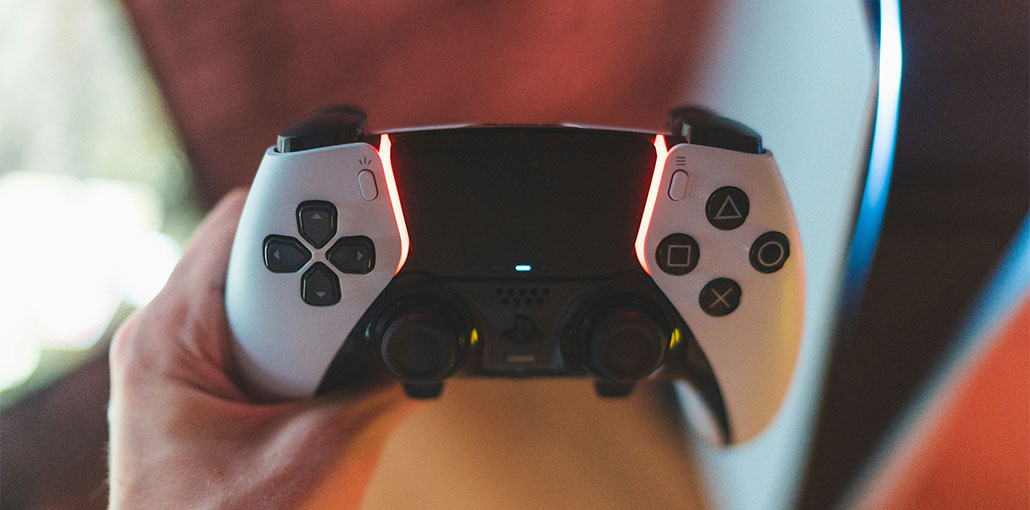
Many players are affected by the PS5 Controller drift problem. What are the causes? How do you fix the PS5 controller drifting? Let’s now explore the answers to this blog.
PS5 will be released worldwide in November 2020. The successor to PS4, PS5 features a new architecture, faster storage, and better resolution support. PS5 is a popular console worldwide. There are also several issues, such as the PS5 controller not charging or the PS5 screen flickering.
Many users have been experiencing the PS5 controller stick drift issue, just like with other DualSense controllers, such as PS4 or Xbox One. What is the cause of the stick drift on PS5 controller problem? What causes it, and how to fix it? Continue reading.
What Does PS5 Controller Drift Mean?
PS5 stick drift is a phenomenon where the analog sticks will move by themselves even if you don’t touch your controller. For example, you may find your characters suddenly move in Fortnite if you don’t touch the DualSense. The PS5 DualSense drift problem is so frustrating that it makes playing games difficult.
What Causes PS5 Controller Drift?
The most common reasons behind PS5 stick drift include:
- Worn-out joystick sensors caused by long-term use
- Dust, dirt, or debris trapped inside the analog stick housing
- Thumb friction that gradually damages the joystick components
- Outdated PS5 system software
- Trigger Effect Intensity settings are interfering with controller input
Also read: How to Stop PS5 Overheating: Easy Fixes and Solutions
How to Fix PS5 Controller Drift Issues
How do you fix PS5 controller drifting? We explain the 7 most effective ways after reviewing user feedback and postings. Let’s keep trying them until we find a solution.
1. Adjust the Input Threshold (Dead Zone)
The input threshold (also known as the dead zone) is a region where your thumbstick doesn’t register movement. You can try to eliminate a PS5 DualSense drift if it is only a slight one. However, this fix will only work for certain games. You can use the guide below to adjust the input threshold of the DualSense.
How to do it:
- Open controller settings inside the game (example: COD Black Ops Cold War)
- Locate the thumb stick or controller sensitivity settings
- Increase the dead zone for the drifting stick
2. Clean the DualSense Controller
A clogged PS5 controller is one of the most common causes of PS5 controller drift. It’s time you cleaned your DualSense PS5 controller. Follow the instructions below to clean your DualSense controller.
Steps to clean safely:
- Turn off the controller and disconnect it
- Use a soft cloth or cotton swab
- Apply a small amount of 70–99% isopropyl alcohol
- Gently clean around the analog stick and housing
- Rotate the stick while cleaning to remove hidden debris
3. Turn Bluetooth Off and On
Users have reported that power recycling Bluetooth can solve the PS5 controller stick drift problem. Although it may sound strange, you should give it a shot. Follow the steps below to do this:
- Go to the PS5 console and enter the main menu.
- Click the Gear icon to open Settings.
- Scroll to the bottom of the menu, and click on Accessories -> General.
- Click on Turn Bluetooth Off and confirm.
- Wait a few minutes Turn Bluetooth back On and test the controller
4. Update your PS5 System Software
It is possible that outdated system software could also trigger the PS5 Controller Drift lawsuit. We recommend updating your PS5 software to avoid this problem. To do that:
- Go to settings and select the System
- Select System Software, click on System Software Update and Settings.
- After completing the Software Update, check to see if your PS5 stick-drift problem has disappeared.
5. Adjust the Trigger Effect Intensity
Some users have found that adjusting the Trigger Effect intensity can also help resolve the PS5 Controller Drift issue. You can do this by opening the Settings window on your controller. Scroll down to Accessibility and then to Controllers to see the options for adjusting the “Trigger effect Intensity”. You can toggle it on and off.
6. Reset the PS5 Controller
Resetting your controller may be the solution if you face the PS5 Drift Controller issue. Turn off your PS5 console, then locate the resetbutton (it’s a tiny hole just to the left of the Sony logo) on the controller. Use a paperclip to hold the hole down for 3 to 5seconds. Connect the controller via USB to the PS5 console and then press the PS button to turn it back on.
Also read: 10 Best PS5 Games for Kids to Play in 2025
7. Contact Sony Customer Care
You may need to send your PS5 DualSense controller to Sony for repair if none of these methods fixes the PS5 drift problem. The PS5 DualSense Controller has a one-year warranty. You can call Sony to request that the controller be repaired while it is under warranty. You can also call for help or email.
When to Replace or Repair the Controller
If none of the PS5 controller stick drift fixes work, the analog stick module may be permanently damaged.
Your Options:
- Warranty replacement (Sony often covers drift within warranty)
- Professional repair service
- DIY analog stick replacement (advanced users only)
Replacing joystick modules requires soldering and can void your warranty.
How to Prevent PS5 Controller Drift
- Wash your hands before gaming
- Avoid pressing sticks aggressively
- Store the controller in a dust-free place
- Use joystick covers
- Clean sticks regularly
- Avoid eating while gaming
Prevention significantly extends the lifespan of your DualSense controller.
FAQs: PS5 Controller Drift
Does cleaning fix PS5 stick drift?
Yes, cleaning the analog sticks with isopropyl alcohol can remove dust and debris, which often fixes or reduces PS5 stick drift.
Is PS5 controller drift a hardware or software issue?
PS5 controller drift can be both. Minor drift may be software-related, while severe or constant drift is usually caused by hardware wear.
Does updating PS5 software fix controller drift?
Updating PS5 system software can fix calibration or input issues, but it won’t repair physically worn analog sticks.
Is PS5 controller drift covered under warranty?
Yes, PS5 DualSense controllers are covered under a one-year warranty, and Sony may repair or replace drifting controllers.




Leave a comment