

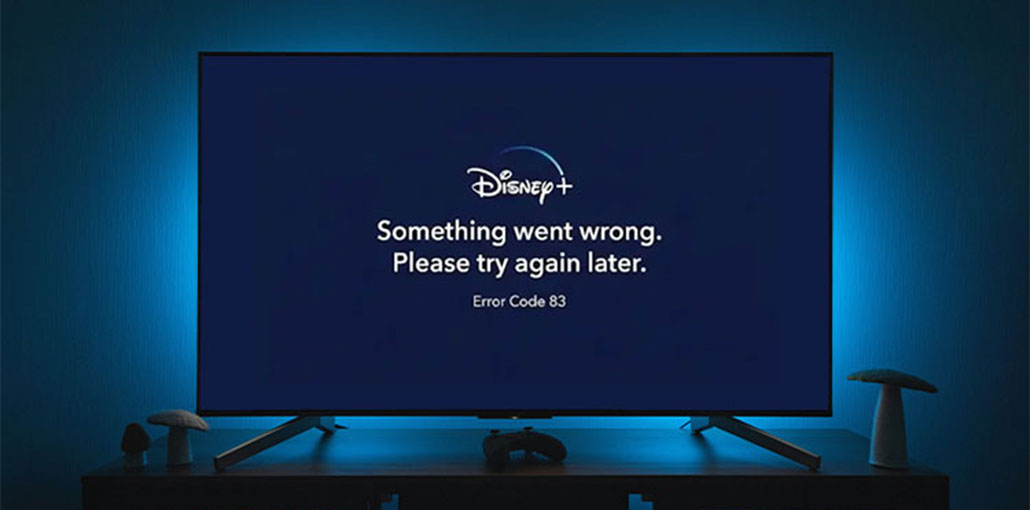
Disney+ is definitely a companion to help you beat boredom while you are at home. The problem is that the Disney+ service does not work and displays occasional error messages. The error code 83 is among the most frequent and infamous. It’s not even explicit about what the issue is, but it does block users from accessing Disney+ on any kind of device.
What’s the cause? What can you do about it? This article will explain the reasons and give 10 tips to fix the Disney Plus error code 83.
What Is Disney Plus Error Code 83?
Many users are complaining that they can’t stream videos on Disney+ owing to error code 83. What does Disney Plus error code 83 actually mean? Disney Plus support page says that error code 83 means “we had an unidentified error that prevented streaming on your device. It is usually a sign of an issue with device compatibility connection issue, a connection error, or an account issue.”
What Causes Disney Plus Error Code 83?
It does explain the cause, but it’s not that helpful. Users are still confused about how to fix the issue. What this explanation accomplishes is to reduce the issue to a problem with your device, your internet connection, or your account, and provide us with an idea of what to try.
Also read: Roblox Error Code 277: Causes, Fixes, and Troubleshooting Guide
How to Fix Disney Plus Error Code 83?
1. Check Your Device Compatibility
Sometimes, compatibility issues with your device could cause an error in the first place. In this instance, always ensure your Disney is compatible with the devices and platforms. Disney + never supports Linux. It’s a bad choice if you run the app on Linux devices.
2. Check Your Web Browser Compatibility
If you’re not running the most current version of Google Chrome, Internet Explorer, Firefox, Edge, or Safari If you do, then you’ll likely encounter this Disney Plus error code 83. Check that your web browser supports Disney+. It’s important to know that if you own a smart TV or set-top box and attempt to use the internet browser on that device, you might encounter an error code 83 message as well. You must find an appropriate Disney+ app for streaming media.
3. Check Your Internet Connection and Speed
If your Internet connection isn’t working or is not fast enough it won’t be able to stream videos through Disney Plus. Disney Plus error code 83 could be slow internet and connectivity issues. Based on Disney+ Internet speed guidelines. You must have a minimum of 5.0 Mbps for HD streaming and 25.0 Mbps to stream UHD content.
Test the speed of your connection to see whether it meets the minimum requirements of the recommended.
4. Dismiss Protected Content Playback Validation (PC Users)
If you are the first to sign up for a Disney+ account via web browser on a computer desktop or notebook, you could be confronted with the error message 83. After you log in with your Disney+ account, you could receive a notification asking you to confirm that your PC is capable of playing protected content. If you select “Allow, you may receive the error code 83. However, if you click “Dismiss” and try again, you will be able to watch Disney Plus contents smoothly.
5. Restart Your Device
If the suggestions above don’t work, then you should attempt the most tried and tested method in the world of technology: switch off your device, then turn it back on. For any unknown issues, it is always worth trying.
6. Update Disney+ to the Latest Version
If a new version of the Disney Plus app is released and the previous version is released, it could become unavailable and produce a myriad of errors like Disney Plus error code 83 39, 73 13, and so on. In this instance, you should go to the App Store on your device (smartphones, gaming consoles, tablets, streaming devices, or televisions with smart technology) to see if any update available. If so, then upgrade Disney+ to the latest version.
7. Reinstall Disney+ App
If you’ve tried all the suggestions but are still not solving this Disney+ error code 83, and no update is available, it could be a problem with the application. if app is suffering from an issue or data corruption that could result in a Disney error code 83. You can uninstall the app and then reinstall it to check the fixes.
8. Update Your Device Firmware or OS
We’ve all heard that an older version of the Disney+ app can cause annoying errors ranging from 83 to 84. Do you know that using an older version of the firmware and operating system may cause this problem? So, if you’ve tried the fixes routine but are still stuck, ensure that your device has the latest OS or firmware update available.
Also read: Twitch Error 2000: How to Fix Network Error on Twitch
9. Turn Off VPN or Proxy Services
If you are using a VPN or proxy service, ensure you turn off the connection before opening Disney Plus. Disney+ blocks many VPN connections due to regional and licensing regulations. Even paid VPNs can cause Disney Plus Error Code 83. After deactivating the VPN and closing the app completely before reopening it.
10. Try a Different Account
Accounts can also be a major issue with Disney Plus error 83. Try another account for Disney+ login. If it’s working with no error message 83, it could be a problem with the previous account. You can verify your billing information and the status of your subscription.
11. Contact Disney+ for Help
If none of the suggestions worked to resolve a Disney plus error code 83 issue, the problem is with Disney+ itself. Go to downdetector.com to check if Disney+ is down on the current scale, and also contact the Disney Plus help center if it is necessary.
How to Prevent Disney Plus Error Code 83 in the Future
- Keep the Disney Plus app updated
- Avoid VPNs while streaming
- Use supported devices only
- Maintain a stable internet connection
- Clear cache occasionally
Final Words
Error Code 83 Disney Plus is displayed when the app is unable to verify your device, connection, or account. It usually links to old apps, non-supported equipment, VPN use, or an insecure internet connection. The solutions are easy and work if you follow them carefully.
FAQs: Disney Plus Error Code 83
Why does Disney Plus keep showing Error Code 83?
This usually happens due to an unsupported device, slow internet, VPN usage, outdated app or browser, or temporary Disney Plus server issues.
Does Disney Plus Error Code 83 mean my account is banned?
No. Error Code 83 is not a ban. It’s a technical or compatibility issue, not an account suspension.
Does clearing cache fix Disney Plus Error Code 83?
In many cases, yes. Clearing the app cache removes corrupted data that may be blocking Disney Plus streaming.
Why do I get Error Code 83 only on Wi-Fi?
Your Wi-Fi network may be unstable or restricted. Switching to mobile data or another network can confirm the issue.



Leave a comment