

What exactly is Chrome Hardware Acceleration? What exactly is hardware acceleration? If you’re interested in learning more about Google Chrome hardware acceleration, you should read this article.
There is a chance that you are confused by the term”hardware acceleration” and aren’t sure why Chrome hardware acceleration is enabled. Don’t worry. After reading this article, you’ll have all the details about Chrome hardware acceleration.
What Is Hardware Acceleration?
In general, hardware acceleration is the process of executing certain processing (usually 3D graphics ) on hardware designed for specific tasks (the GPU) rather than in software that runs on the main CPU.
When you enable hardware acceleration, the CPU offloads certain tasks like loading and page rendering to your computer’s GPU. In particular, the goal will improve performance by shifting some tasks from the CPU to the GPU.
What Is Chrome Hardware Acceleration?
Google Chrome also has a hardware acceleration feature that enables the browser to use the device’s graphics hardware to speed up processes and increase Chrome’s performance on your system.
If Chrome hardware acceleration is enabled, most graphically intensive tasks in the web browser are offloaded to the GPU, so it will make the most of your hardware. This way, the overall performance will be enhanced.
To improve Chrome, you must always enable hardware acceleration.
Also read: How to Fix Chrome Freezing Issues on Android Phones
Why You Should Enable Chrome Hardware Acceleration
To improve Chrome performance, it is generally recommended to keep hardware acceleration enabled.
- Better performance in graphics-heavy websites
- Smoother scrolling and animations
- Reduced CPU usage
- Improved multitasking ability
- Enhanced video streaming experience
How Do I Know If Hardware Acceleration Is Enabled in Chrome?
Many of you might be asking how do I know whether to run hardware acceleration in Chrome? It’s an excellent question. It could be that you have Chrome hardware acceleration enabled; however, you don’t know it. How do you determine if Chrome hardware acceleration is enabled?
Open a new tab in Google Chrome, then type chrome://gpu in the address bar and press Enter. You will then see a myriad of results. Take a look at the features in the Graphics Feature status. You will see that the majority of features that fall under it include hardware-accelerated when hardware acceleration is enabled.
How to Enable Hardware Acceleration Chrome?
If you’re not sure how to enable hardware acceleration Chrome, you can apply the instructions below now.
Step 1. Open Google Chrome and click on”menu icon” (three dots) in the upper right corner.
Step 2. Select Options from the drop-down menu.
Step 3. Scroll down to find and then click the advanced button on the page.
Step 4. Scroll down to find the System section.
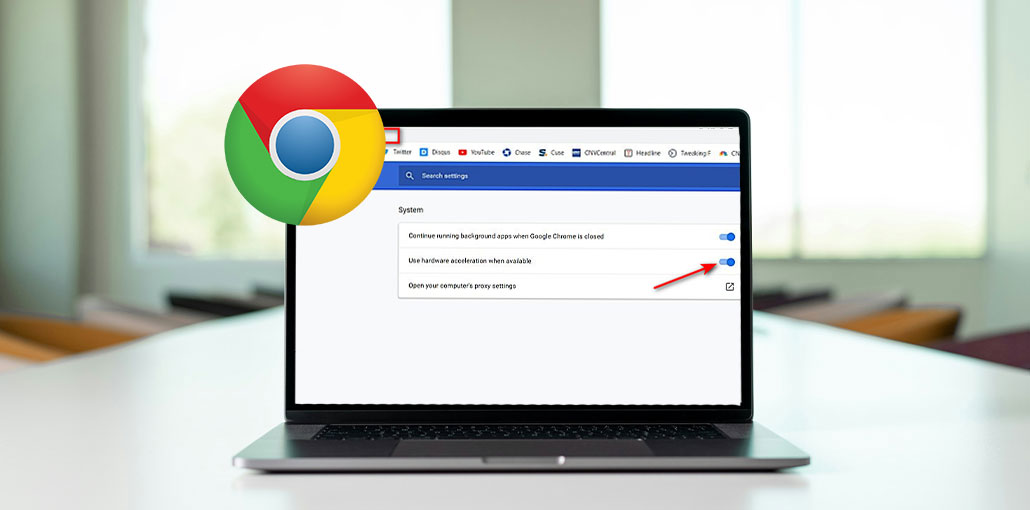
Step 5. Find the Use hardware acceleration if available setting. Toggle the Switch to off to turn it on.
Also read: How to Fix “Not Enough Memory to Open This Page” Error in Chrome
How to Disable Hardware Acceleration in Chrome?
Then, Chrome hardware acceleration should be enabled. If you are finding that this doesn’t improve performance, you can take the same steps to disable hardware acceleration in Chrome.
Step 1. Open Chrome Settings
Step 2. Go to System
Step 3. Find “Use hardware acceleration when available”
Step 4. Turn the toggle OFF
Wrap Up
After reading this article, it is important to know what Chrome hardware acceleration is and how to enable or disable it in Google Chrome. If you have an alternative opinion on Google Chrome hardware acceleration, you are welcome to share your thoughts with us by submitting a comment in the comment section below.
FAQs: Chrome Hardware Acceleration
Should I keep Chrome Hardware Acceleration enabled?
In most cases, yes. Keeping Chrome Hardware Acceleration enabled can improve browser speed, video playback, and overall performance. However, if you experience crashes, screen flickering, or display issues, disabling it may help.
Does Chrome Hardware Acceleration improve browser speed?
Yes. By offloading graphics-related tasks to the GPU, Chrome Hardware Acceleration can improve page rendering, video playback, animations, and overall browsing performance.
Does Chrome Hardware Acceleration use more GPU resources?
Yes. When enabled, Chrome uses more GPU resources because graphics-intensive tasks are processed by the GPU instead of the CPU. This is normal and often results in better performance and lower CPU usage.
Why does Chrome crash when Hardware Acceleration is enabled?
Chrome may crash due to outdated graphics drivers, incompatible GPU hardware, corrupted browser settings, or conflicts with browser extensions.







Leave a comment