

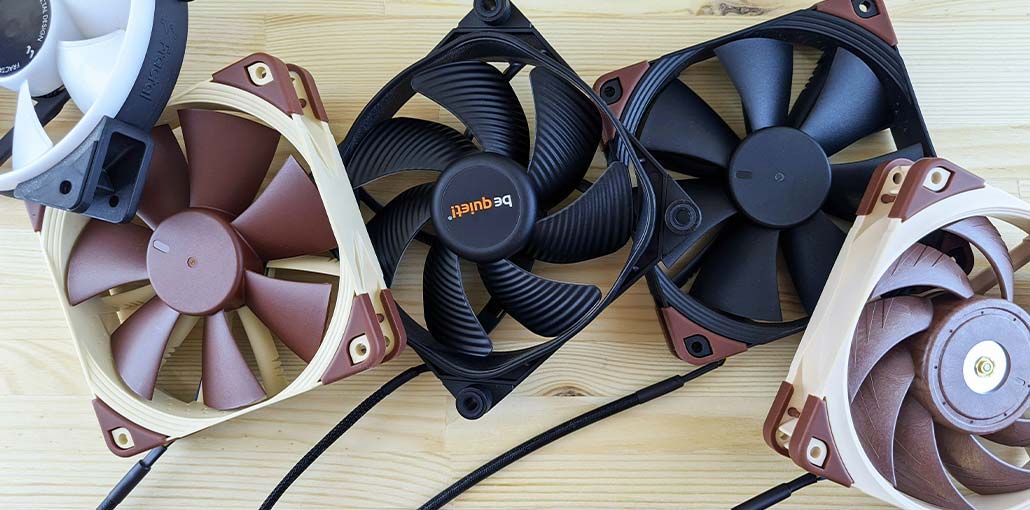
Finding the best CPU cooler for your PC can be harder than it looks. There are dozens of models to choose from, and the right option depends on more than just cooling performance. Your CPU, case size, motherboard, RAM height, noise preference, and budget all matter.
A large dual-tower cooler may be ideal for a powerful desktop, while a compact low-profile cooler makes much more sense in a small-form-factor PC.
To help narrow things down, here are some of the best CPU coolers for different PC builds.
Best CPU Coolers at a Glance
| CPU Cooler | Best For | Key Feature |
|---|---|---|
| Noctua NH-D15 | High-performance PCs | Large dual-tower design and quiet 140mm fans |
| Thermalright Peerless Assassin 120 SE | Value-focused builds | Dual-tower cooling at a competitive price |
| DeepCool AS500 Plus | Mid-range PCs | Dual 140mm fans and ARGB lighting |
| Cryorig C7 | Compact PCs | 47mm low-profile design |
| be quiet! Pure Rock 2 | Quiet mainstream PCs | Low-noise 120mm fan |
| DeepCool GAMMAXX GT BLK | Stock cooler upgrades | Four heat pipes and 120mm fan |
| Cooler Master MasterAir MA612 Stealth | Stylish builds | Dual fans and six heat pipes |
Note: Product availability and socket support can vary by revision and market. Always check the manufacturer’s current compatibility information before buying.
1. Noctua NH-D15 – Best Overall CPU Air Cooler
The Noctua NH-D15 remains a well-known high-performance air cooler for desktop PCs. It uses a large dual-tower heatsink with six heat pipes and two NF-A15 140mm fans. The fans can reach up to 1,500 RPM and have a maximum rated noise level of 24.6 dB(A) without the included low-noise adapter.
The cooler measures 165mm tall with its standard fans, so case compatibility is something you should check before purchasing. Noctua lists support for AM4, AM5, LGA1700, LGA1851, LGA1200, and several older Intel sockets.
Key Features
- Dual-tower heatsink
- Six 6mm heat pipes
- Two 140mm NF-A15 PWM fans
- Up to 1,500 RPM
- SecuFirm2 mounting system
- Support for AM4 and AM5
- Support for Intel LGA1700 and LGA1851
- Six-year manufacturer warranty
Pros
- Strong cooling performance
- Quiet fan operation
- Premium construction
- Excellent long-term reputation
- Broad socket compatibility
Cons
- Large heatsink
- Requires careful case and RAM clearance checking
- More expensive than many mainstream air coolers
If you have a spacious case and want a premium air cooler for a demanding desktop processor, the NH-D15 is still a compelling option.
Also read: 5 Best GPU Coolers for Your Graphics Card
2. Thermalright Peerless Assassin 120 SE – Best Value
The Thermalright Peerless Assassin 120 SE CPU cooler is designed around a dual-tower heatsink and two 120mm fans. The cooler has six 6mm heat pipes, measures 125 × 110 × 155mm, and its fans are rated for up to 1,550 RPM.
Thermalright officially lists support for AMD AM4 and AM5 as well as Intel LGA115X, LGA1200, LGA1700, and LGA1851. The manufacturer also warns users to check case clearance and account for tall memory modules.
Key Features
- Dual-tower heatsink
- Six 6mm heat pipes
- Two 120mm PWM fans
- Up to 1,550 RPM
- AM4 and AM5 support
- LGA115X, LGA1200, LGA1700 and LGA1851 support
- 155mm cooler height
Pros
- Strong price-to-performance potential
- Dual-fan design
- Broad socket support
- Good option for mainstream and performance-focused builds
Cons
- Still a large tower cooler
- RAM and case clearance need to be checked
The Peerless Assassin 120 SE is particularly attractive if you want substantial air-cooling hardware without automatically moving to a premium-priced cooler.
Tip: Thermalright also sells newer versions, including the Peerless Assassin 120 SE V2, so check which version you’re buying. The V2 uses different fans and speeds up to 1,850 RPM.
3. DeepCool AS500 Plus – Best Mid-Range CPU Cooler
The DeepCool AS500 Plus takes a slightly different approach. Instead of a large dual-tower arrangement, it uses a slimmer heatsink with five 6mm heat pipes and two 140mm fans.
According to DeepCool, the fans operate between 500 and 1,200 RPM, with up to 70.81 CFM of airflow. The cooler supports AMD AM4 and AM5 and several Intel sockets, including LGA1700. It also features addressable RGB lighting.
Key Features
- Five 6mm heat pipes
- Two 140mm fans
- 500–1,200 RPM fan speed
- Up to 70.81 CFM airflow
- Addressable RGB lighting
- AM4 and AM5 support
- LGA1700 support
- 164mm overall height
Pros
- Dual 140mm fans
- Good RAM clearance design
- ARGB lighting
- Quiet-focused design
- Suitable for many mainstream systems
Cons
- Large overall height
- Not the ideal choice for every high-power CPU
- Availability can vary by region
The AS500 Plus makes sense for builders who want a balance between cooling, noise, aesthetics, and compatibility.
4. Cryorig C7 – Best Low-Profile CPU Cooler
Small PC builds have very different cooling requirements. A conventional tower cooler may simply be too tall for a compact case.
The Cryorig C7 is designed specifically for this type of system. Cryorig lists the cooler at just 47mm tall, with a 92mm PWM fan capable of reaching 2,500 RPM. It also uses four 6mm heat pipes.
Cryorig originally rated the C7 for a 100W TDP and designed it to stay within the CPU keep-out area, helping it avoid interfering with RAM and PCIe graphics cards.
Key Features
- 47mm height
- Four 6mm heat pipes
- 92mm PWM fan
- Up to 2,500 RPM
- Low-profile design
- Designed for compact and SFF systems
Pros
- Extremely compact
- Excellent for space-constrained builds
- Low chance of interfering with tall components
- Suitable for many mini-ITX-style configurations
Cons
- Limited cooling capacity compared with large tower coolers
- Not intended for every high-power processor
- Socket support should be checked carefully because the original C7 is an older design
If you’re building a tiny PC, cooler dimensions can matter more than raw cooling performance. The C7’s 47mm height makes it much easier to fit into cases where conventional tower coolers won’t work.
5. be quiet! Pure Rock 2 – Best Quiet CPU Air Cooler
The be quiet! Pure Rock 2 focuses on simple, quiet cooling for mainstream systems. It uses four 6mm heat pipes and a 120mm Pure Wings 2 PWM fan.
be quiet! rates the cooler for 150W TDP cooling efficiency and lists maximum noise at 26.8 dB(A). The Pure Rock 2 is 155mm tall and uses an asymmetrical design intended to avoid blocking memory slots.
The current Pure Rock 2 Black specification lists support for AMD AM5 and AM4 and Intel LGA1700, LGA1200, LGA2066 and several older sockets.
Key Features
- Four 6mm heat pipes
- 120mm Pure Wings 2 PWM fan
- Up to 26.8 dB(A)
- 155mm height
- 150W manufacturer-rated TDP cooling efficiency
- AM4 and AM5 support
- LGA1700 support
- Asymmetrical design for memory clearance
Pros
- Quiet operation
- Compact compared with large dual-tower coolers
- Good mainstream option
- RAM-friendly design
- Simple installation
Cons
- Not designed for every high-power CPU
- Socket support can vary between versions
If keeping your PC quiet is a priority, the Pure Rock 2 is worth considering for an entry-level or mainstream system.
6. DeepCool GAMMAXX GT BLK – Good Stock Cooler Upgrade
If your PC is still using a basic stock cooler, moving to a dedicated tower cooler can be a worthwhile upgrade.
The DeepCool GAMMAXX GT BLK uses four heat pipes, an aluminum fin stack, and a 120mm fan. DeepCool lists a fan speed range of 500–1,500 RPM, up to 56.5 CFM airflow, and a maximum noise rating of 27 dB(A). It supports AMD AM4/AM5 and Intel LGA1700, LGA1200 and several older sockets.
Key Features
- Four heat pipes
- 120mm fan
- 500–1,500 RPM
- Up to 56.5 CFM airflow
- Up to 27 dB(A) noise
- AM4 and AM5 support
- LGA1700 support
- RGB lighting
Pros
- Straightforward upgrade from basic cooling
- Four heat pipes
- Relatively quiet
- Supports modern AMD and Intel sockets
- Attractive design
Cons
- Not aimed at extremely high-power processors
- Larger than low-profile coolers
For a mainstream PC, the GAMMAXX GT BLK can be a practical step up from basic CPU cooling.
7. Cooler Master MasterAir MA612 Stealth – Best for Stylish Builds
The Cooler Master MasterAir MA612 Stealth combines a black exterior with a six-heat-pipe heatsink and two 120mm SickleFlow fans.
Cooler Master’s specifications list a 158mm overall height, six heat pipes, two 120mm fans, and fan speeds between 650 and 1,800 RPM. The fans are rated for up to 62 CFM airflow and up to 27 dB(A) noise.
The ARGB version adds addressable RGB lighting while retaining the dual-fan design.
Key Features
- Six heat pipes
- Nickel-plated copper base
- Two 120mm fans
- Up to 1,800 RPM
- Push-pull fan configuration
- 158mm height
- ARGB version available
- Asymmetrical heat-pipe design
Pros
- Strong cooling hardware
- Attractive black design
- Dual-fan configuration
- ARGB version available
- Designed with RAM clearance in mind
Cons
- 158mm height requires case clearance
- Compatibility can vary by revision
- Some older units may require an appropriate mounting bracket
The MA612 Stealth is a good fit for builders who want their CPU cooler to look as good as the rest of the system.
Also read: Why Am I Getting a CPU Fan Error? Causes and Easy Fixes
How to Choose the Right CPU Air Cooler
Choosing a CPU cooler isn’t just about buying the biggest heatsink you can find. Here are the main things to check.
1. Check CPU Socket Compatibility
Your cooler must support the socket on your motherboard.
Common modern desktop sockets include AMD AM5 and Intel LGA1700/LGA1851, but compatibility depends on the exact cooler and revision.
Always check the manufacturer’s current compatibility list before ordering.
2. Consider Your CPU’s Power Requirements
Don’t rely solely on a single TDP number when choosing a cooler.
Manufacturers sometimes provide TDP ratings, but actual CPU temperatures depend on factors such as processor power consumption, workload, motherboard power settings, ambient temperature, thermal paste, and case airflow.
A cooler designed for a mainstream processor may not be appropriate for a high-power CPU running sustained workloads.
3. Check Your PC Case
Large tower coolers can be surprisingly tall.
Before buying, compare the cooler’s total height with the maximum CPU cooler height supported by your PC case.
For example, the NH-D15 is around 165mm tall with its standard fans, the AS500 Plus is 164mm tall, and the MA612 Stealth is 158mm tall.
4. Don’t Forget RAM Clearance
The heatsink or front fan can overlap the RAM slots on some motherboards.
This matters even more if you’re using tall RGB memory modules.
Check the manufacturer’s clearance information before buying a large dual-tower cooler.
5. Think About Noise
If you use your PC for gaming, editing, recording, or other noise-sensitive work, fan noise matters.
Larger fans can move substantial amounts of air at relatively low speeds, but the overall noise level depends on the fan design, heatsink, fan curve, case airflow, and CPU workload.
6. Look at the Whole PC Cooling System
A CPU cooler doesn’t work in isolation.
Good case airflow can help the CPU cooler get rid of heat more effectively. A typical airflow setup uses front or bottom intake fans and rear or top exhaust fans, although the ideal configuration depends on your particular case.
Air Cooler vs. Liquid Cooler: Which Is Better?
Both air CPU cooler and liquid CPU coolers can work well, but they suit different builds.
Air Coolers
Advantages:
- Simple design
- No pump
- No radiator
- Generally easy to maintain
- Many affordable options
- Excellent performance from larger models
Liquid Coolers
Advantages:
- Radiator-based cooling can offer high cooling capacity
- More flexibility in some case layouts
- Available with extensive RGB and display features
- Can be useful for certain high-power processors
For many mainstream gaming and productivity PCs, a good air cooler is more than sufficient. The choice ultimately depends on your CPU, case, budget, noise requirements, and personal preference.
Which CPU Air Cooler Should You Buy?
There isn’t one CPU cooler that is perfect for every PC.
The Noctua NH-D15 is a large, premium option aimed at users who want substantial air-cooling capacity. The Thermalright Peerless Assassin 120 SE takes a similar dual-tower approach while targeting value-focused builders.
For a mid-range system, the DeepCool AS500 Plus offers dual 140mm fans and ARGB lighting. If you’re working with a very compact case, the Cryorig C7 is a completely different type of cooler because of its 47mm height.
Meanwhile, the be quiet! Pure Rock 2 focuses on quiet mainstream cooling, while the GAMMAXX GT BLK and MasterAir MA612 Stealth offer alternatives for users looking for a straightforward upgrade or a more distinctive-looking build.
Conclusion
At the end, picking the right CPU cooler comes down to what your PC actually needs. You don’t always have to spend a lot to get great cooling. Just check that the cooler fits your case, works with your CPU, and suits your budget. With the right choice, your PC can stay cool, quiet, and running smoothly.
FAQs About Best CPU Coolers
Is an air CPU cooler better than a liquid cooler?
Both have their advantages. Air coolers are generally simpler, easier to maintain, and often more affordable. Liquid coolers can provide strong cooling performance but require more components and installation considerations.
Is a dual-tower CPU cooler better than a single-tower cooler?
Dual-tower coolers generally provide more heatsink surface area and can offer stronger cooling performance. However, they are usually larger, so you need to check case clearance and RAM compatibility before buying one.
Which CPU cooler is best for gaming?
For gaming, options like the Noctua NH-D15, Thermalright Peerless Assassin 120 SE, and DeepCool AS500 Plus offer strong cooling performance. The right choice depends on your CPU, case size, budget, and compatibility requirements.
Will any CPU cooler fit my PC?
No. CPU coolers come in different sizes and support different CPU sockets. Before buying one, check both your motherboard's socket compatibility and your PC case's maximum CPU cooler height.








Leave a comment