

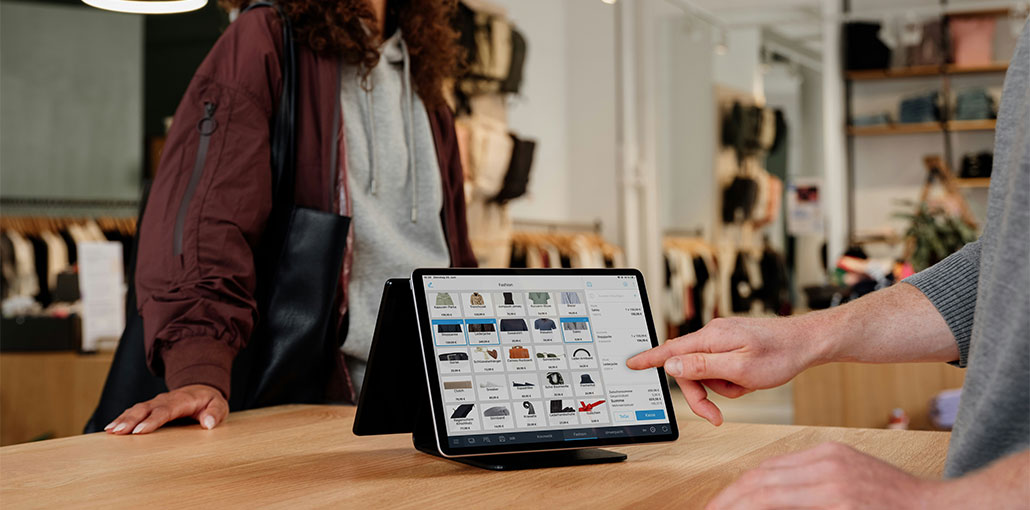
An iPad POS system can help businesses simplify transactions, manage inventory, and support customers. For any company, large or small—whether it’s a restaurant, retail shop, cafe, or any other operation—an iPad-based solution is adaptable, practical, and easy to use. The guide covers 10 popular iPad POS system, their features, pricing models, and compatibility with businesses.
What is an iPad POS system?
An iPad POS system is a point-of-sale solution that uses an Apple iPad to process transactions and support day-to-day business operations. It works with POS software and can connect to compatible hardware such as card readers, receipt printers, barcode scanners, and cash drawers.
These solutions are more mobile and flexible than traditional cash registers, which are stationary. These are more mobile and flexible than traditional cash registers, which are fixed. Payments can be processed, stock checked, staff managed and sales reports viewed all from one device.
A POS for iPad can be used for tableside ordering, menu management and payment processing in restaurants. It can control products, track inventory, and offer fast checkout experiences.
By installing the right applications and accessories to connect with an iPad, businesses can easily convert it into a point-of-sale system. This provides a checkout system without needing cumbersome conventional hardware.
Also read: What is POS Experience: 10 Smart Ways to Improve POS Experience
Benefits of Using an iPad POS System
An iPad POS system offers several benefits for companies that want to enhance their operations and customer experiences.
- Improve customer service: Faster checkout and convenient payment options help employees serve customers efficiently.
- Inventory management: Monitor product availability, stock in/out, and inventory levels.
- Employee management: Control staff access, work hours, and employee performance.
- Business mobility: Process payments from counters, restaurant tables, and other appropriate areas.
- Easy training: User-friendly interfaces make employee training for daily operations easier.
- Sales reporting: View transaction history and performance reports to make informed decisions.
- Reduces paperwork: Electronic records and receipts can help minimize paper usage.
With these benefits, an iPad POS system can be useful for businesses that are seeking flexible payment and management solutions.
Top 10 Best iPad POS Systems
Here are the best iPad POS systems for restaurants, retailers, and growing businesses with different features. Before choosing one, check the latest pricing, hardware compatibility, and availability in your region.
1. Toast POS
Best for small, medium, and large restaurants.
Toast is a restaurant-focused POS system that’s made to make ordering, payment, and restaurant management easier. It offers menu management tools, online ordering, employee tools, and customer engagement.
While Toast runs primarily on Android hardware, it’s still worth considering when you compare restaurant point-of-sale systems—especially if you don’t want to be limited to iPad-based options.
Pricing: Toast offers subscription packages and starter packages. Hardware cost and payment processing vary according to the arrangement.
Key Features:
- Online ordering and delivery systems.
- Table-side ordering and payment system.
- Digital menu management.
- Third-party application integrations.
- Employee and restaurant management.
- Marketing and customer engagement tools.
Verdict: Toast is good for restaurant operations. But if you’re looking for an iPad POS system, check the device compatibility before buying.
2. Cake POS
Best for Restaurants and hospitality businesses.
Cake POS is a restaurant management tool that makes it easier to handle daily operations. It offers order management, payment processing, reporting, and customer engagement.
Restaurant owners can use it to coordinate front-of-house operations and improve communication with staff.
Pricing: Cake offers custom pricing options based on the package chosen and business needs. Please call the provider to get an accurate quote.
Key Features:
- Reporting and restaurant management.
- Online ordering capabilities.
- Loyalty and rewards management.
- Third-party integrations.
- Payment processing.
- Order management tools.
Verdict: Cake POS is a good option for restaurants that need a comprehensive management platform. Before subscribing, businesses should check that the hardware is available and iPads are compatible.
3. Lightspeed POS
Best for Small, medium and large retail/restaurant companies.
Lightspeed offers an iPad POS system for the retail and hospitality industry. It offers inventory management, customer loyalty, employee tracking, and sales reporting.
Its multi-location features enable retailers to manage products and track business performance.
Pricing: Lightspeed provides a variety of subscription plans based on the product, features, and business needs.
Key Features:
- Advanced inventory management.
- Multi-location business support.
- Customer loyalty tools.
- Retail analytics and retail reporting.
- Integrated payment processing.
- Employee management.
- Exportable business reports.
Verdict: Lightspeed is a strong option for retailers who need advanced inventory management and detailed reporting. Its wide range of app integrations also makes it a smart choice for businesses considering an iPad-based POS system.
4. Square POS
Best for Startups, small businesses, retailers and restaurants.
Square POS is one of the most favored payment and business management solutions. It offers restaurant and retail checkout tools as well as app-based business tools.
Its compatible hardware, such as Square Stand, enables businesses to integrate an iPad into their checkout process. The platform is known for its ease of use and basic functions.
Pricing: Square also has a free iPad POS system in select markets. Subscription fees and transaction fees will vary depending on the services and payment options.
Key Features:
- Fast payment processing.
- Electronic and personalized invoices.
- Reporting & Analytics for sales.
- Anti-fraud and security measures.
- Compatible payment accessories.
- Customer management.
- Inventory tracking.
Verdict: Square is a sensible option for startups and small businesses. Its hardware flexibility makes it easier to convert your iPad into a POS without investing in a traditional checkout terminal.
Also read: How to Choose the Best Payment Processor for Your Business
5. ShopKeep
Best for Small retail outlets, cafes, and restaurants.
ShopKeep was a cloud-based POS system. It included payment processing, inventory, shipping, employee operations, and sales reporting features.
The platform was designed to help business owners manage day-to-day transactions and track business performance from one platform.
Key Features:
- An inventory and product management system.
- Employee management.
- Sales reporting.
- Customer information management.
- Payment processing.
- Discounts, returns, and refunds.
- Back-office management.
Verdict: ShopKeep was a popular iPad POS system for small businesses that wanted simple checkout and inventory tools. However, Lightspeed acquired ShopKeep, and it’s no longer available to new customers. Businesses should explore other Lightspeed alternatives that better match their needs.
6. Revel Systems
Best for small & medium-sized restaurants and retailers.
Revel Systems offers a point-of-sale system for restaurants and retail stores. It integrates payment processing with inventory, employee, customer, and business management solutions.
The features help companies manage daily operations while tracking transactions and performance.
Pricing: Revel pricing is dependent on terminals, hardware, installation, and services selected. Companies should ask for an up-to-date quote.
Key Features:
- Cash and table skills.
- Deliveries/On-line Orders.
- Customer relationship management.
- Efficiently run kitchen and inventory.
- Employee management.
- Reporting dashboard.
- Offline functionality.
Verdict: Revel Systems offers a wealth of features for businesses that need more than just a simple payment processor. This management tool is a good choice for restaurant and retail businesses.
7. Vend (Lightspeed Retail)
Best for Retail companies small to medium in size.
Vend is a cloud-based POS system for retailers, and it manages sales, products, stock, and customer details. It allows businesses to sell products across different business locations.
Vend became part of Lightspeed Retail following its acquisition. Therefore, retailers researching this platform should evaluate the latest Lightspeed Retail offering.
Key Features:
- Product and inventory management.
- Customer relationship management.
- Sales and inventory reports.
- Gift card management.
- Payment processing.
- Multi-store retail management.
- Product performance tracking.
Verdict: Vend was popular among retailers that were looking for inventory and sales management. Lightspeed Retail is best for businesses seeking the same capabilities.
8. eHopper POS
Best for small businesses or independent retailers.
eHopper is a small and medium-sized enterprise (SME) friendly POS system. It provides tools to process payments, manage inventory, manage employees, and manage customer information.
It’s designed for ease of use in everyday transactions without needing a complex enterprise-based platform.
Pricing: eHopper has a variety of subscription plans.
Key Features:
- Inventory and employee management.
- Customer information tracking.
- Sales and transaction reports.
- Payment via cash & card.
- Split payment functionality.
- Order and tip management.
- Employee working-hour tracking.
Verdict: eHopper is certainly worth looking at for small businesses that want the benefits of POS features. Before choosing a subscription, make sure the software is compatible with your system and payment integration.
9. TouchBistro
Best for Small and medium restaurants.
Developed for Apple’s iPad ecosystem, TouchBistro is a restaurant management system. It lets restaurant owners control orders, tables, payments, and customer interactions.
It is relevant to hospitality companies that are choosing between different iPad POS systems because of its restaurant functionality.
Pricing: TouchBistro has subscription pricing. The total cost may vary due to additional modules and services.
Key Features:
- Table-side ordering and payment.
- Table status tracking.
- Online ordering & reservation services.
- Menu customization.
- Restaurant reporting.
- Customer engagement tools.
- Restaurant management capabilities.
Verdict: If your business is a restaurant seeking an iPad pos sysemt, TouchBistro is a strong choice. Efficiently improving service with its restaurant management and payment processing features.
10. Shopify POS
Best for small and medium-sized retailers and omnichannel businesses.
Shopify POS connects the eCommerce platform and physical store, enabling the seamless integration of online selling and in-store operations. Retailers can manage products, stock, customers, and transactions from various sales channels.
The iOS app allows businesses to use the same Apple devices for checkout and store management.
Pricing: Shopify POS features depend on the selected Shopify subscription. Additional POS functionality and hardware may involve extra costs.
Key Features:
- Customer profile and purchasing history.
- Inventory & Stock Management.
- Purchase order management.
- Sales reporting and analytics.
- Staff permissions.
- Syncing Online and In-Store sales.
- Centralized product management.
Verdict: Shopify POS is the best iPad POS system for retailers who need to run their online and in-store businesses together. It’s a centralized platform that simplifies inventory management and provides a consistent shopping experience across all channels.
Also read: 7 Best POS Cash Registers for Small Businesses in 2026
How to Choose the Best iPad POS Software
Choosing the right iPad POS system depends on the specific needs, budget, and business model. Before you decide, take into account the following:
1. Business Requirements
First, identify your business requirements and restaurants may need table management, kitchen integrations, and online ordering. Retailers might focus on inventory control, barcode identification and customer management.
2. Prices and transaction charges
Check monthly subscription fees, payment processing fees, hardware costs, and installation fees. Small businesses may need an advanced plan, but a startup might only need a free plan.
3. Hardware Compatibility
Make sure the software is compatible with your iPad and any additional accessories you require. These include receipt printers, card readers, cash drawers, barcode scanners and more.
4. Ease of Use
Choose software with a user-friendly interface that is easy to navigate. Employees should be able to learn it without technical training.
5. Third-Party Integrations
Ensure that the platform integrates with accounting, marketing, e-commerce, delivery and customer management systems. Integrations can diminish manual effort and upgrade business productivity.
6. Customer Support
Reliable technical support is essential for businesses processing transactions throughout the day. Check support availability, training resources, troubleshooting assistance, and service terms.
Conclusion
In this article, we’ve explored the best iPad POS systems. Revel Systems, Vend and Lightspeed are the best for SMBs. The three best iPad POS systems for small businesses are ShopKeep, eHopper and Square.
eHopper provides an essential free plan. In comparison to Vend, Revel Systems offers an affordable option as well. When compared to other services, eHopper’s pricing plans are more affordable.
FAQs: iPad POS System
Can I use an iPad as a POS system?
Yes, you can turn an iPad into a POS system by installing compatible POS software and connecting accessories such as card readers, receipt printers, and cash drawers.
Which iPad POS system is best for restaurants?
TouchBistro, Square POS, and Lightspeed Restaurant are popular choices for restaurants. They offer features such as table management, menu customization, order processing, and payment handling.
Do iPad POS systems work without an internet connection?
Some iPad POS systems offer offline functionality, allowing businesses to continue certain operations without an internet connection. However, offline payment capabilities and available features vary by provider.
Can an iPad POS system connect to accounting software?
Yes, several iPad POS platforms integrate with accounting applications such as QuickBooks and Xero. These integrations help synchronize sales data and simplify financial recordkeeping.






Leave a comment