

The World Health Organization highlights that one in six people worldwide has a significant disability, that is, 16% of the world’s population. Add to this the fact that mobile devices now account for over 62% of global internet traffic. So, billions of users go online from their phones, and a significant part of them simply can’t access the information they need if a website or app is inaccessible. Any business whose digital products aren’t accessible is just shutting the door on a massive part of its audience — often unintentionally, but with real, measurable losses.
Despite regulators in the US and Europe taking accessibility seriously and establishing legal penalties for non-compliance with the ADA and EAA, respectively, including hefty fines, lawsuits, and reputational damage, statistics tell a worrying story. In most cases, accessibility is checked only at the testing stage — when major design and development decisions have already been made. A DevOps Digest study found that while 79% of respondents incorporate accessibility early into their design processes, 26% report limited resources for inclusive design. As a result, accessibility requirements for websites are only partially implemented, and technical debt in design is growing.
Who is responsible for accessibility?
Many people think that website accessibility is the responsibility of just one or a few developers who check buttons, forms, and colors. In reality, the past few years have shown that accessibility is a team effort that affects all levels of a company — from hands-on specialists to leadership. If we stop at just the “first floor”, a product could remain inaccessible for millions of people with disabilities. Addressing this issue requires experts on every “floor” or level to be involved.
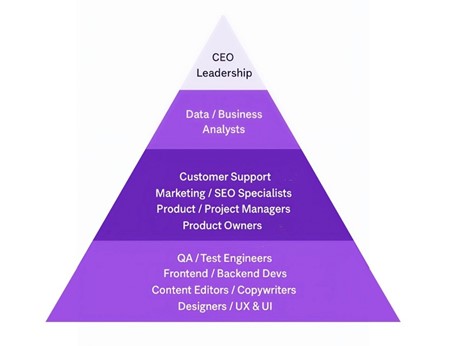
Level 1. UX/UI designers, Content editors/Copywriters, Developers, QA/Test engineers
On the “first floor,” there are specialists from UX/UI designers and copywriters to developers and testers.
UX/UI designer
They make interfaces user-friendly and accessible for all users, with or without disabilities. This specialist picks the right button sizes, text colors, and contrasts, and adds hints and alternative ways to interact. For older users, they make interfaces intuitive, with simple navigation and a guide.
Also read: 7 Ways for Using Illustrations to Amplify Games UI/UX Design
Content editor/Copywriter
Content editors and copywriters ensure the text and website structure are clear to everyone. They use the right headings and add empty alt tags to decorative elements so they don’t get in the way. These specialists also make links and buttons clearer, for example, instead of “Learn more”, they make a “Learn more about pricing” button. They ensure that texts are short, simple, and free of complex jargon, videos have captions, podcasts have transcripts, and pop-up notifications include text or audio.
Developer
A frontend developer makes the interface accessible to everyone. They ensure that headings are logical and readable for screen readers, that buttons and links have proper labels, and that users can navigate the website with a keyboard. They ensure that forms display errors right away, and that videos and audio have subtitles or alternative access to the content.
The backend is the foundation without which the “nice frontend” is ineffective for people with disabilities. A backend developer validates data to ensure forms work properly, errors are displayed to all users, and content loads correctly and displays as it should.
QA/Test engineer
Quality assurance specialists make sure a website or application actually works for every user. They check that headings, buttons, and forms make sense and are easy to use. They don’t just test videos or images but go through the site with screen readers, voice controls, and keyboard navigation too. If something changes in the code or design, they double-check accessibility to make sure nothing breaks.
Level 2. Product owners, Project/Product managers, Marketing/SEO specialists, Customer support/Success
On the “second floor” are those who manage the product and actively interact with users.
Product owner
This specialist sees the product as a whole. They decide which features and interface elements should be made accessible first, set priorities, assign goals to the team, and ensure accessibility requirements for websites are part of every task.
Project/Product manager
Project and product managers ensure the team’s workflow is clear and organized. They keep an eye on accessibility tasks so that they are assigned to sprints, checking that design, development, and testing are synchronized. A project manager can spot bottlenecks and provide resources or time so accessibility requirements aren’t left behind.
Marketing/SEO specialist
Marketing and SEO specialists make content accessible, create alt texts, clear links, and structure the content for quick navigation. Their work may overlap with that of content editors and copywriters, but the difference is that the latter ensure content is clear and accurate for users, while the former focus on promoting the product in a business and SEO context.
Customer support
Customer support hears the problems real users face, including those with disabilities. These specialists can provide the team with valuable feedback on where the interface is inconvenient, what features are unclear, or what is unavailable. This data helps improve the product and make it more inclusive.
Level 3. Data/Business analysts
Analysts see the bottlenecks — where users get lost, where the interface is tricky to use, and where everything works smoothly. They track which forms people with disabilities cannot complete and where navigation is hard to follow. Data and business analysts check how many steps are required to complete a task and if users with disabilities get confused. Also, they study user feedback, complaints, and suggestions.
Based on all this data, analysts help determine what needs to be corrected and improved first. For example, if the team added alt text for images and improved keyboard navigation, the analyst can show whether the number of successful interactions has increased and the number of errors has gone down.
Level 4. CEO/Leadership
When leaders say, “This matters to the company”, and treat accessibility not as a box to tick but as part of the brand’s culture and strategy, specialists on any “floor” feel it. Executives set the tone, they allocate time and budget, support training and audits, and accessibility implementation becomes a real, ongoing process. Without their support, everything quickly devolves into enthusiastic attempts to “get it right” until deadlines or new features are pushed.
Also read: How to Start Monetization A Website and Mobile App
Spending on accessibility: an investment or money down the drain?
Complying with new laws and implementing new processes can cost companies a pretty penny. But don’t think that the only benefit of accessibility is that it’s a “good deed” and a way to care for people, like charity. Implementing accessibility actually pays off for business.
The first thing that comes to mind is audience growth. Remember the statistics at the beginning of this article? Inclusive apps and websites draw in more customers. And we’re not just talking about people who’ve lived with physical and cognitive disabilities since birth or who got them because of injury or surgery. In recent years, the number of employed, financially stable people aged 50+ in Europe has increased and continues to grow. They embrace modern technologies and willingly use online services.
Also, accessibility protects against reputational risks. In October 2025, fashion giant Fashion Nova agreed to pay over 5 million dollars in a class-action lawsuit, which stated that their website was inaccessible to visually impaired users who used screen readers. The company decided to pay the fines to avoid further litigation.
Another benefit is brand trust. When a company cares about accessibility, people notice, especially those who truly care. Users with disabilities often become the most loyal customers if they feel the company has thought about them. Others see that the company takes a “for everyone” approach, not a “for the majority” approach — and this builds respect.
How does Attico help your business get accessibility right?
Implementing accessibility isn’t just about following the law; it’s a culture of inclusivity. You can check yourself how well your website meets legislative requirements, and our article on the best accessibility tools can help. But even the most reliable, innovative, and easy-to-use tools can’t replace a human, as every real-world situation — such as slow internet, tired users, or access only on mobile devices — needs careful attention.
The Attico team offers a free homepage accessibility check against 50 WCAG 2.1 AA criteria and guarantees helpful, clear suggestions, free of confusing jargon and unnecessary theory, so your team knows exactly what needs to be improved.









Leave a comment