

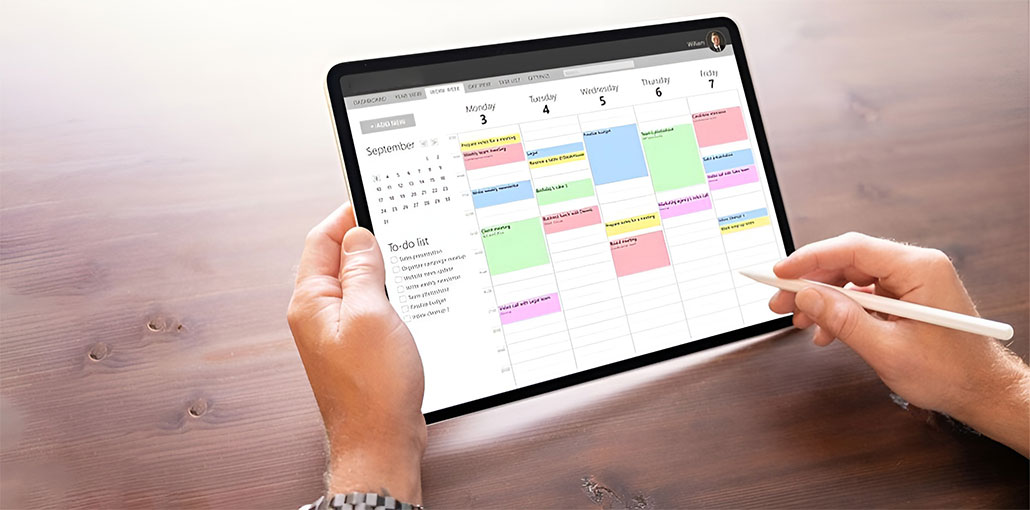
Digital planners are most effective when they come in the form of productivity or project management apps. These apps give you the ability to design your schedule in the way you like, using features like custom labeling, colored calendars, and task dependencies to help you stay on top of your game when managing personal goals or managing your own business.
More than one-fifth of small-scale business owners work more than 50 hours per week, while just 28 percent of solopreneurs do, according to Adobe’s Work-Life Balance report. With such a high workload, best digital planners become indispensable instruments to stay on top of your tasks and adjust priorities without burning out. As an individual who relies on digital planning every day, I have a list of the best digital planners to help you stay organized and productive.
7 Best Digital Planners
1. Google Workspace
Google Workspace’s Calendar is likely to be the best digital planner for people who already depend on Google to manage their personal or professional productivity. Because it’s part of each Workspace Account, Google Calendar connects directly to Gmail and Google Meet, making it easy to add events or appointments to your schedule in a single click. It is also compatible with both Android and iOS platforms, and helps keep your calendar in sync across all your devices.
One of the greatest advantages of Google Calendar is its flexibility and variety of customization options, and support for collaborative calendars. You can show a secondary time zone that you can use in teams around the world, set your hours of operation and work location, and make holidays visible so that people know when you’re available to attend meetings. I find it beneficial to switch the view on Google Tasks and adjust the brightness of previous events to help me stay concentrated.
Pros
- Automatically schedules meetings and events
- Seamlessly syncs with Google Workspace apps
- Allows sharing across multiple calendars
Cons
- Task management features are very basic
- Limited customization options
- Can look cluttered when many events are added
Also read: Top 10 Digital Event Planning Tools in 2024
2. monday.com
Monday Work Management is a fantastic choice when you’re looking for a digital planner that offers simplicity with visual organisation. The thing I like the most is the capability to customize it using templates, allowing you to make a plan that fits your needs without stressing about space limitations. Because it is an interactive board layout, it’s easy to move tasks around to new dates or add additional information to the appointments.
Monday offers a variety of ready-made templates, including the weekly list of things to do and a bullet journal or a daily task-tracker. You can personalize each by altering the layout and field names and using your favorite color scheme. To simplify your daily routine, you can also schedule tasks automatically occur when you need them.
Pros
- Highly customizable calendar and task views
- Ready-to-use calendar templates for easy customization
- Syncs smoothly with Microsoft Teams and Google Calendar
Cons
- Paid plans require a minimum team size
- Not ideal or cost-effective for solo users
- Initial setup can take time
3. ClickUp
ClickUp is designed for advanced project management, but it also works as a digital planner for teams that require an organized and precise system. It can be used as the best digital planner to categorize your team’s work in categories and assign priorities according to importance and urgency.
What makes ClickUp stand out to me is the degree of control it grants users over the task-planning process. It allows you to add custom statuses, connect tasks with dependencies, or break up projects into smaller pieces while keeping track of the progress. If the entire ClickUp setup seems overwhelming, start with a daily planner template like Monday’s. These are great for new users or anyone else looking for an easy way to start.
Pros
- Powerful and extensive task management tools
- Automatically blocks focus time on your calendar
- Auto-reschedules tasks based on priority
Cons
- AI note-taking requires an extra fee
- Designed mainly for teams, not individual users
- Steep learning curve due to many features
4. Todoist
If you’ve ever read reviews or forums such as Reddit for recommendations for free digital planners, you’ll find that Todoist is among the most popular tools among users. I would also suggest it, particularly if you’re looking for an easy method to organize your day without getting overloaded by a myriad of additional options.
As someone who is easily stressed simply by writing tasks with no general structure, I suggest that Todoist’s simple and easy design helps bring clarity. It seems like a simple to-do list. But, Todoist takes it a step further, offering useful tools such as recurring due dates, daily snapshots, and even a routine tracker that helps you stay motivated to reach your goals.
Pros
- Clean, beginner-friendly design
- Free plan is suitable for individual users
- Add tasks using natural voice input in 18 supported languages
Cons
- Not suited for large or complex team planning
- Cannot set start and end dates for tasks
- App may occasionally become unresponsive on iOS and Android
5. Notion
Notion is most likely to be regarded for its note-taking software. However, its versatility makes it a great option for creating an electronic planner. If you’d like a design that matches your particular plan, you can build one from scratch by converting a database into a table view and altering it using checkboxes, a calendar embedded, and widgets for your daily schedule.
If you’re not keen on starting with the best digital planner, Notion’s template library provides more than 850 weekly and monthly planner templates created by other Notion users. They range from task management and habit trackers to social media schedulers, and more. Each can be modified to suit your specific needs by changing the titles, icons, and text formatting, database properties, or content blocks.
Pros
- Large collection of customizable planners
- Flexible workspace layouts to fit different workflows
- Built-in calendar with easy time zone switching
Cons
- Limited offline access
- Can slow down with large amounts of data
- Steep learning curve for full customization
Also read: Top 10 Task Management Software
6. Wrike
Wrike uses AI to support enterprise project management, making it an ideal choice for leaders who manage multiple projects and employee schedules. Its built-in assistant system, Wrike Copilot, functions as an assistant to plan, providing immediate information on the status of your project and task assignments. It also helps you alleviate scheduling conflicts and decrease the amount of overlap between assignments by allowing you to ask questions in plain English regarding your work. You can also make use of voice commands to add tasks, mark items as completed, or delegate actions.
AI tools integrate the planner for your month to create subtasks and generate your project descriptions whenever you require help. The best digital planner can also arrange your planner by using folders. This allows you to organize tasks according to project or department for a clear view of everything on your agenda.
Pros
- View tasks by month, quarter, or year
- Share calendar links with external users
- Clean, well-structured interface
Cons
- Best suited for team use only
- Calendar view is available only on paid plans
- AI features not included in the free plan
7. Smartsheet
Like other best digital planners, Smartsheet is an excellent choice for project managers and enterprise teams that require the best digital planner with built-in flexibility. The strength of Smartsheet lies in its layout, which resembles a spreadsheet, which allows you to use formulas and functions to calculate data, track dates, and organize data in a logical order.
What makes Smartsheet distinguish itself as a planner is its capacity to link data to the execution of tasks. It is possible to plan projects using formulas for time lines, budgets, and resources, and then link the calculations directly to schedules and task lists. This is a great benefit for teams that rely on the accuracy of data-driven insight for their daily planning.
Pros
- Extensive user guides and resources
- Syncs seamlessly with Microsoft Planner
- Multiple calendar view options
Cons
- Complex configuration leads to a steep learning curve
- Not suitable for personal use
- Only paid plan available
Quick Comparison of the 7 Best Digital Planners
Key Features to Look for in the Best Digital Planners
The best digital planner requires more than design and layout. The best digital planner apps make planning simpler and more accessible to diverse circumstances.
- Cross-device sync reliability: The best digital planner must seamlessly sync across desktops, mobile, and tablets. It is also helpful to determine whether the app is reliable with the Android and Apple ecosystems. Choosing an app that is compatible with your device can help allow for more consistent synchronization. This means that your schedule will stay current regardless of the device you are using.
- Template support: Search for organizers with ready-made templates, like habit logs or project trackers. Templates will save time and allow you to get organized without starting from scratch.
- Accessibility options: features like font scale, screen reader compatibility, online access, and font scaling make planners suitable for all users. These options can help you keep your productivity up even when you’re disconnected from the web.
- Task automation: It is possible to schedule recurring tasks or automate reminders, which can reduce the amount of repetitive work. This helps you focus on the important things instead of having to enter tasks.
- Collaboration software: If you’re using an enterprise planner, integrated sharing and tools for team collaboration are crucial. They allow you to assign tasks to everyone on the same page.
- Flexibility in customization: These Best digital planners will allow you to adjust perspectives (Kanban and Gantt chart) and colors and fields to fit your workflow. The planner can be customized to adapt to your needs and not the other way around.
Final word — Select the best digital planners
The best digital planners are much more than simply calendars. They stay organized and boost productivity across their personal and professional life. The best digital planner should seamlessly sync across devices, offer customizable templates, and offer accessibility options to allow you track your time and set goals.
FAQs: Best Digital Planners
What is a digital planner?
A digital planner is an app or software that helps you organize your schedule, tasks, and projects on devices like phones, tablets, or computers. It often includes calendars, task lists, and productivity tools.
Which is the best digital planner for personal use?
Tools like Todoist, Google Workspace Calendar, and Notion are ideal for individuals because of their ease of use, free plans, and task management features.
Can digital planners help boost productivity?
Absolutely. Features like task prioritization, automated reminders, focus-time blocking, and collaboration tools help you stay organized and increase efficiency.
Which digital planner is best for teams?
ClickUp, monday.com, Wrike, and Smartsheet are great for team use, offering task assignments, collaboration tools, project tracking, and workflow automation.







Leave a comment