

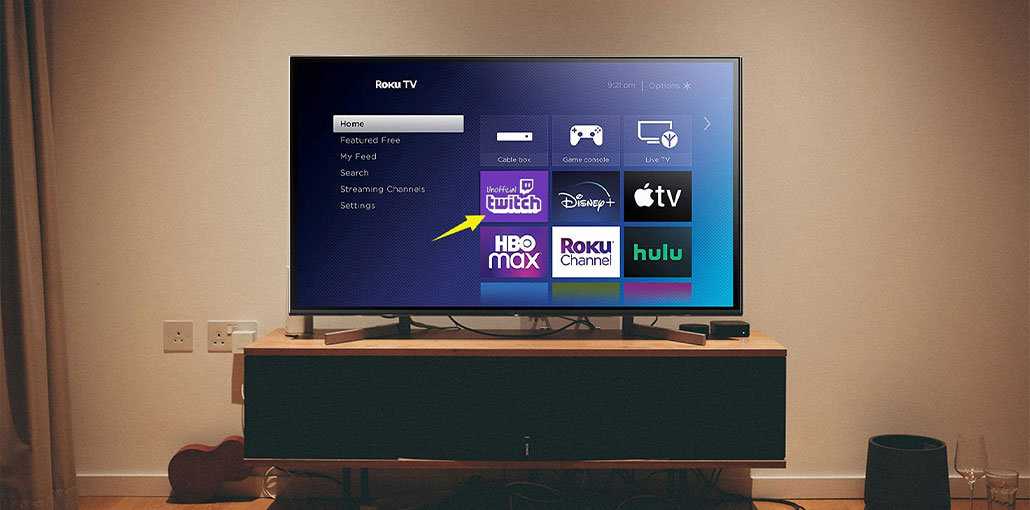
Twitch isn’t available on Roku devices as an official app because of its removal in 2017. But you can use Twitch on Roku via simple methods, such as Twoku or casting using mobile devices
Absolutely, Twitch is one of the largest gaming platforms and acts as a perfect platform to watch other gamers’ live streams while they play. Twitch has also facilitated growth into other types of broadcasts, including news, music, sports, and so on.
Twitch is among those platforms that are accessible virtually anywhere and has applications available for Windows, macOS, Android, iOS, Fire TV, PlayStation, Xbox, and Apple TV. The only notable difference is Roku. It’s a good thing that you can fix Twitch’s absence from Roku. Let’s look at how to watch Twitch on Roku TV.
How to Add Twitch to Roku
Step 1: Sign in to Your Roku Account
First step: Go to https://my.roku.com on your web browser. Enter your login credentials on the Roku website.
When you log in, you’ll be taken to the “My Account” page. You will see a menu option to “Add channel with a code.” It is located in the middle of the page under”Manage Account” heading “Manage Account” heading.
Also read: Top 10 Twitch Ad Blocker Apps and Extensions in 2025
Step 2: Add the Twoku Channel
Simply click on “Add channel with a code” to take you to an add channel page. This is where you can type any number of codes for any software that isn’t officially supported by Roku. For instance, if you want to add Twitch, enter “Twoku” (not case sensitive) and then click “Add Channel.”
If you try to join the channel, a message will be displayed, signalling that you’re trying to add a channel that is not verified. This is normal and helps eliminate any liability for Roku from adding the channel.
Click “OK” to accept the terms and conditions.
In the following screen, you can see the Twoku icon appear and a message that the channel is completely free and doesn’t have ratings for its content. You can click “Yes, add channel” at this point.
Step 3: Open and Refresh Your Roku
After the channel has been created, the only thing you need to accomplish is to sign in and start watching Twitch. You’ll be able to browse categories and channels to stream on, but chat features will be disabled.
If Twoku does not appear immediately on your homepage, be sure you refresh your page by clicking “Settings -> System -> System Update,” which will refresh your homepage and also add the Twoku channel.
Step 4: Sign in to Twitch
If you need to sign in, go to the Twoku site using your tablet or smartphone and enter the code displayed at the Roku TV screen when you attempt to connect to the Twoku application. After you have gone through the various permission screens, click Authorize, and then you’ll log in if your login does not work initially on the TV.
How to Watch Twitch on Roku
If the thought of adding an unknown third-party app on the Roku TV gives you pause, be sure that it’s not the only choice. Although Roku is an operating system designed for TVs, additional streaming services such as Google Chromecast and AirPlay continue to work after they have been connected via HDMI or when the AirPlay feature is activated.
Watch Twitch on Roku on macOS
Turn on your Roku TV.
- If using AirPlay, go to:
Settings → Apple AirPlay and HomeKit
and enable AirPlay. - On your Mac, click the Control Center icon.
- Select Screen Mirroring.
- Choose your Roku TV.
- Open Twitch in your browser or app to start streaming.
Also read: Top 5 Games to Stream on Twitch Right Now
Watch Twitch on Roku On Windows
Windows users can mirror their screen easily:
- Press Win + A to open the Action Center.
- Select Project → Duplicate.
- Click Connect to a wireless display.
- Choose your Roku device.
- Once connected, open Twitch and start watching.
Watch Twitch on Roku on Mobile Devices (Android & iOS)
- Open the Twitch app on your smartphone or tablet.
- Tap the Cast icon (Android) or AirPlay button (iPhone).
- Select your Roku device.
- Start playing any stream.
Certain Android gadgets (smartphones and tablets) use”Smart View” feature “Smart View” feature to cast the content to the Roku TV or other device. This feature is similar to the Apple Control Center by flicking down to the top of your screen show the menu options. You can stream Twitch by using other third-party streaming apps.
Conclusion
There are several ways to stream Twitch on Roku, even though the channel was removed from the official Twitch channel in the Roku Channel Store.
These include using an unofficial channel, mirroring screens on compatible devices, and using a Roku web browser.
FAQs: Twitch on Roku
Is there an official Twitch app for Roku?
No, as of 2026, Roku does not offer an official Twitch app. However, you can still watch Twitch using screen mirroring or the unofficial Twoku channel.
Is Twitch available on Roku?
Twitch was removed due to business and platform decisions between Amazon (Twitch owner) and Roku. As a result, Roku users cannot access Twitch natively.
Are there alternatives to watch Twitch on Roku?
Yes, besides Twoku and screen mirroring, you can use external devices like Chromecast, Apple TV, or Fire TV connected to your Roku TV via HDMI to stream Twitch.
Do I need a fast Wi-Fi connection to watch Twitch on Roku?
Yes, a stable 5 GHz Wi-Fi connection is recommended for smooth streaming, especially when mirroring from a phone or computer.







Leave a comment