

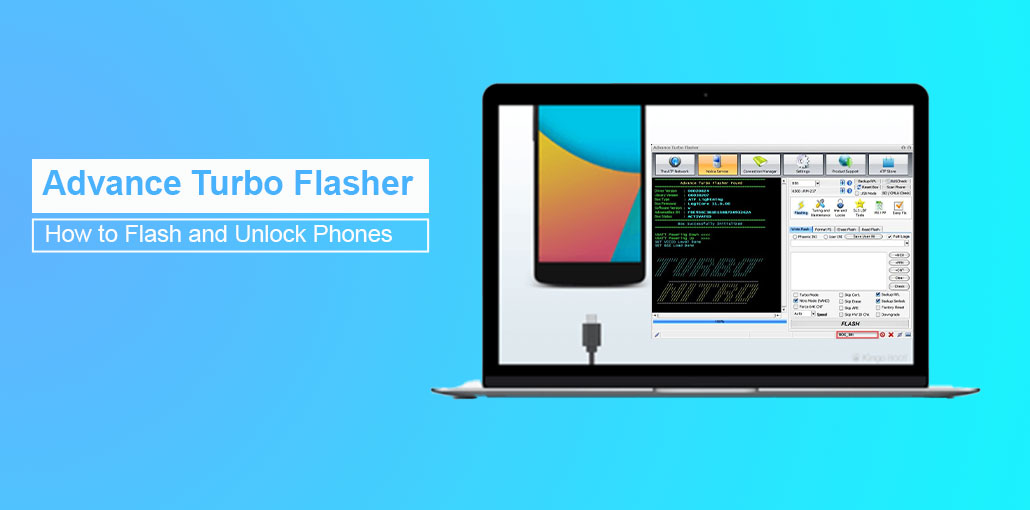
Advance Turbo Flasher (ATF) is a professional tool used for flashing or unlocking mobile devices. It has clear strengths, weaknesses, and devices that support it. This guide will discuss its strengths, its drawbacks, and the supported devices. Here are reliable methods for Android unlocking and recovery, eliminating the requirement for technical knowledge.
Overview of Advance Turbo Flasher
Advance Turbo Flasher (ATF) is a high-tech gadget for professionals to unlock, flash, and repair Android system issues. Its main characteristics include its stability and speedy performance. It can be used to cover brands like Nokia, Samsung, and LG devices. ATF flash tool is a perfect tool to bring back a dead phone, fix software issues, or repair the IMEI and other problems. , which is adaptable to different brands and receives regular updates, ATF is the ideal solution for any mobile professional.
Main Functions of Advance Turbo Flasher
- Firmware flashing and SIM unlocking ATF: Using Advance Turbo Flasher technicians can install the stock firmware, unblock SIM locks, and restore stability to the system, giving a one-stop solution to software problems.
- Restoring bricked devices: It could bring back phones that are considered “dead,” or that do not respond to software reinstallation or correction, and thus save the devices that are likely to be unusable otherwise.
- Harmonious firmware updates: Users can upgrade firmware to the latest version by using the update-included function, which allows the device to run the best it can and be compatible with other apps and networks.
- Assistance for modified or tailored variants: ATF supports both official and custom firmwares, allowing advanced users the option to customize their devices.
Also read: Best way to unlock PST file – PST Password Recovery
Pros and Cons of Advance Turbo Flasher
Pros:
- Offers comprehensive solutions for flashing, unlocking, and device servicing
- Supports a wide range of brands, including Nokia, Samsung, HTC, and others
- Regularly updated to improve performance and add device support
Cons:
- Requires a paid license to unlock full features
- Limited support for newer models; primarily focused on older Nokia and select devices
- Not beginner-friendly and requires technical expertise
Supported Brands and Devices
Advance Turbo Flasher supports a wide range of legacy and older mobile devices, including:
- Nokia (BB5, DCT3, DCT4 – primary focus)
- Samsung (limited models)
- HTC (select devices)
- LG
- Sony Ericsson
Due to limited support for newer Android models, ATF is best suited for servicing older phones rather than modern smartphones.
Is Advance Turbo Flasher Free?
Advance Turbo Flasher is a paid application, and to utilize all its features, you must possess a valid copy. The price is dependent on the seller and the bundle, and the typical price range is from 60 to $150.
Is Advance Turbo Flasher Safe to Use?
In the end, AFT is a safe tool for users if it is downloaded on the system from a trustworthy site and used correctly. It is renowned for its security in the mobile repair industry, stability, frequent updates, and the security features that are already included by default. However, there could be a mistake of using the incorrect software or downloading the program from a non-official website could result in some issues with the device or security threats.
How to Use Advance Turbo Flasher to Unlock Android?
Before starting the unlock screen using Advanced Turbo Flasher, make sure that all preparations are complete, since ATF requires the correct drivers and configuration to function properly. Following the steps below, you will be able to safely unlock your Android device and avoid typical errors throughout the process:
Step 1. Install and download the most recent ATF version. ATF on your personal computer, making sure you have enough space to store firmware files.
Step 2. Install the needed USB drivers to ensure that ATF can detect and connect with your phone.
Step 3. Start ATF and choose the appropriate operating system for the device you are using (e.g., the BB5, MeeGo, MediaTek, or NXPlatform).
Step 4. Go to the Flashing tab, download the matches firmware, and then click on FLASH to install or repair the program.
Step 5. To unlock or screen lock reset, go to the Service tab, select Reset (User Code), and then connect your device in testing mode.
Step 6. Restart your device to verify that the firmware update or the unlock was successfully installed.
Also read: 7 Best iPhone Unlockers to Unlock Your Device Quickly and Safely
Common Problems and Solutions
| Problem | Solution |
|---|---|
| ATF not detecting phone | Check USB drivers, cable, or device mode |
| Flashing error | Ensure firmware matches your device |
| Bricked phone recovery failed | Use dead USB recovery mode and verified firmware |
3 Alternatives to Unlock Screen on Android Easily
1. 4uKey for Android
Unlocking Android devices can often be complicated and time-consuming, but it doesn’t need to be. If you’re searching for a simple, reliable, user-friendly, and secure solution, 4uKey for Android is the ideal solution for you.
Created with both novices and experts in mind, this program can help to unlock Android phones swiftly and effectively without requiring any technical knowledge. 4uKey on Android provides a straightforward solution that anyone can use.
Pros:
- Very easy to use with a simple interface
- Removes PIN, pattern, password, and fingerprint locks
- No technical knowledge required
- Fast unlocking process
Cons:
- Some methods may erase device data
- Advanced features require a paid license
- Limited functionality beyond screen unlocking
2. EaseUS MobiUnlock
In contrast to ATF, which is predominantly an expert flashing and unlocking device that requires special technology, EaseUS MobiUnlock offers a user-friendly and easy-to-use software ideal for users of all ages who want to unlock Android devices without technical expertise.
EaseUS MobiUnlock supports many Android brands and models like Samsung, Nokia, Motorola, LG, Xiaomi, Huawei, and more. Additionally, it is compatible with both new and old Android versions. It is compatible with the most recent Android OS, such as Android 15/16.
Pros:
- Clean and beginner-friendly interface
- Supports many Android brands and models
- Works with both older and newer Android versions
- Reliable and well-known software provider
Cons:
- Free version has limited features
- May not unlock all security types on every device
- Requires a PC to operate
3. DroidKit
As an expert Android unlock tool, DroidKit from iMobie is an all-in-one solution to unlock screen-locked devices, recover lost data, and solve system issues without the need for technical skills. This tool provides users with a simple, step-by -step process to unlock the screen in several minutes, grab the device, and then restore normal operation. With support for more than 20000 Android devices and all major types of locks, DroidKit is a good option for providing a secure and straightforward unlocking solution for all those who want.
Pros:
- Supports over 20,000 Android devices
- Step-by-step guided process, ideal for beginners
- Can fix system issues and recover data
- No technical expertise required
Cons:
- Premium features require a paid subscription
- Unlocking may result in data loss on some devices
- Larger software size compared to simple unlock tools
Conclusion
Advance Turbo Flasher (ATF flash tool) is a professional and powerful tool used to flash unlock, repair, and flash the vast array of mobile devices, including Nokia phones. It requires technical expertise and the purchase of hardware, and care to prevent the device from being damaged.
FAQs About Advance Turbo Flasher
Can ATF remove SIM locks from phones?
Yes. ATF can calculate unlock codes and remove SIM locks on many supported models safely.
How do I install Advance Turbo Flasher on my PC?
Download the official software, install required USB drivers, connect the ATF box, and follow on-screen instructions to set up the tool.
Is it safe to use unofficial or cracked versions of ATF?
No. Using cracked versions can damage your device, introduce malware, or create legal issues. Always use official licensed versions.
What are the common errors in ATF and how to fix them?
Common errors include connection failure, firmware mismatch, and dead-USB errors. Solutions often involve checking drivers, cables, or using the correct firmware file.





Leave a comment