

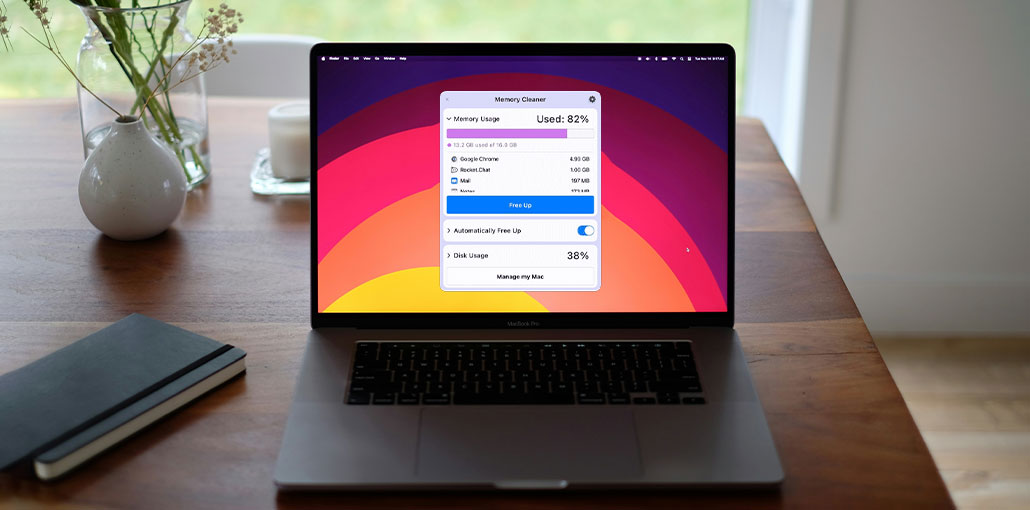
If you’re searching for the best MacBook memory cleaner in 2026, you’ve come to the right place. There’s nothing more frustrating than a slow or unresponsive Mac. RAM cleaning tools will definitely help, but the main benefit is knowing when your Mac needs assistance and which tool is best for your preferences. I’ve tested some of the best MacBook memory cleaners, and what I found is read in this blog.
Do you really require a Mac Memory Cleaner?
When your Mac’s RAM is under pressure, even basic tasks can start to feel slow and unresponsive. You may notice:
- Tabs are taking longer to load or respond
- Apps are slowing down when switching between them
- Delays after clicking “Save” or performing simple actions
This condition is known as memory pressure—not just high RAM usage, but how hard your system is working to manage available memory efficiently.
- Green means fine.
- Yellow indicates that the system is compressing and swapping to an SSD.
- Red color means you can feel it all over.
MacBook Memory Cleaner Comparison: Best Tools Ranked
| Tool Name | Best For | Key Features | Ease of Use | Free Version |
|---|---|---|---|---|
| CleanMyMac X | All-in-one optimization | RAM cleanup, junk removal, performance monitoring | ⭐⭐⭐⭐⭐ | ❌ |
| MacKeeper | Security + performance | Memory cleaning, antivirus, system tools | ⭐⭐⭐⭐☆ | ❌ |
| Macube Cleaner | Lightweight cleaning | Junk file removal, RAM optimization | ⭐⭐⭐⭐☆ | ❌ |
| Nektony Memory Cleaner | Quick RAM cleanup | One-click memory release | ⭐⭐⭐⭐⭐ | ✅ |
| BuhoCleaner | Modern UI + cleaning | RAM and storage optimization | ⭐⭐⭐⭐☆ | ❌ |
| Memory Clean 3 | Menu bar RAM tool | One-click RAM cleaning | ⭐⭐⭐⭐⭐ | ✅ |
| iStat Menus | System monitoring | Real-time RAM, CPU, and performance tracking | ⭐⭐⭐⭐☆ | ❌ |
| AppYogi Memory Cleaner | Alerts + optimization | RAM usage alerts, quick cleanup | ⭐⭐⭐⭐☆ | ✅ |
| CCleaner for Mac | System cleanup | Cache cleaning, performance tools | ⭐⭐⭐⭐☆ | ✅ |
| Memory Magic | Background optimization | Memory tracking, quick cleanup | ⭐⭐⭐⭐☆ | ✅ |
10 Best MacBook Memory Cleaners
Here are the top MacBook Memory Cleaner apps that actually stuck around on my device after I finished testing. I was interested in two things: whether they help relieve a spike in a short time, and see the cause to fix it immediately.
1. CleanMyMac
The real-time menu bar is what I love about this. You can use the free Up RAM task for quick relief, and it includes an extensive list of heavy users that can be shut down from the menu. If you combine that with the other MacBook memory cleaner in the suite, particularly when you suspect that an issue with your system is caused by cache bloat, or other login items you did not know about, the tool is far beyond a standard RAM cleaner.
Pros
- One-click RAM cleanup and optimization
- Real-time memory monitoring
- Removes junk, cache, and hidden system clutter
- User-friendly interface
- All-in-one performance suite
Cons
- Paid subscription required
- Can be heavy for older Macs
- Not strictly a “RAM-only” tool
Also read: Top 5 Snipping Tool for MacBook in 2025
2. MacKeeper
Has your MacBook’s performance truly gotten to the point of being unbearable? It’s no longer necessary to suffer with unanswered speed or system-related lags; The MacKeeper’s Memory Cleaner tool is to assist you. It’s MacBook memory cleaning software that does all the hard work for you. Your Mac will be optimized within a matter of seconds, thanks to this self-proclaimed best MacBook memory cleaner.
Pros
- Quick memory optimization tool
- Includes security and antivirus features
- Easy to use interface
- Useful for overall Mac maintenance
Cons
- Aggressive marketing reputation
- Subscription-based
- Some features overlap with macOS tools
3. Macube
Macube is another well-known program trusted by many Apple users, which makes it a reliable and useful tool. Like other memory cleaners, Macube can free up memory, clean up junk files, and optimize RAM quickly, making it fast and reliable.
Pros
- Fast memory cleanup
- Simple and clean interface
- Combines RAM + junk file cleaning
- Lightweight performance
Cons
- Limited advanced features
- Smaller user base compared to competitors
4. Nektony memory cleaner
Nektony Memory Cleaner can be described as a different program, but is it really the most effective RAM cleaner for MacBook users? It comes with the Optimize RAM tool that makes finding and using it a breeze for novice users.
Pros
- One-click memory release
- Lightweight and fast performance
- Easy for beginners to use
- Good for quick RAM recovery
Cons
- Limited to basic memory cleaning only
- No advanced system optimization tools
- Does not fix the root causes of high memory usage
5. BuhoCleaner
This fifth MacBook memory cleaner we’ll discuss is named BuhoCleaner. It’s an easy-to-use application with a shortcut key to clear memory and free up space quickly on your MacBook. Although it has a full interface and pop-up menu, it makes your memory more efficient and easier to examine, or increases your computer’s performance.
Pros
- Fast RAM cleaning feature
- Clean and modern interface
- Extra tools for storage optimization
- Good performance improvement
Cons
- Paid features required for full use
- Not as advanced
6. Memory Clean 3
Memory Clean is a menu bar item that shows how much memory is being consumed by the Mac’s resources and inactive apps. There are two cleaning options available for the system: Extreme Clean and Clean. You can also configure Memory Clean to free up RAM regularly.
Pros
- Very lightweight and fast
- One-click RAM cleaning
- Works quietly in the background
- Free version available
Cons
- Only performs basic memory clearing
- No system cleaning or optimization features
- Does not address app-level memory leaks
7. iStat Menus
This is not an official MacBook memory cleaner; it’s more of an extensive display. iStat Menus comes with GPU, CPU sensors, RAM, and fan monitoring. Also, if you prefer to see visually your pressure point, switch applications quickly, and decide that this is the right app for you. Use it to identify the pattern that is causing surges.
Pros
- Detailed real-time memory monitoring
- Helps identify heavy apps and processes
- Highly customizable interface
- Excellent for performance diagnostics
Cons
- Not a memory cleaner (monitoring only)
- Paid software
- Requires user knowledge to interpret data
8. AppYOGI Memory Cleaner App
AppYOGI analyzes your RAM usage and sends you notifications to determine whether there is enough space in your memory, you’re running out of space, or apps are running in the background. So you can take action.
This RAM cleaner software has advanced features that help your PC perform at its best. It’s as simple as one click, and you can improve your RAM performance. The “Intense Optimize” feature is a sophisticated feature that provides an extremely efficient optimization process. It requires a bit more time, but also frees more space.
Pros
- Simple RAM optimization tool
- Notifies when memory usage is high
- One-click cleanup option
- Beginner-friendly
Cons
- Limited advanced features
- Not a full system optimization suite
- Interface is basic compared to competitors
9. CCleaner
It’s a RAM cleaner for Mac that comes as an option in the menu bar. It aims to clean your Mac along with other useful tools that assist in monitoring system performance, like processing load and storage capacity.
Pros
- Trusted cleaning brand
- Removes cache and unnecessary files
- Simple interface
- Helps improve overall system speed
Cons
- Limited Mac-specific optimization features
- Less powerful than dedicated Mac tools
- Focus is more on cleaning than memory management
10. Memory Magic
Memory Magic is a free MacBook memory cleaner to run quietly in the background, helping improve memory efficiency and freeing up RAM for applications that need it most. When you click on the menu bar option, you’ll see the amount of RAM still available and, if needed, manually force it to recover memory. History graphs how often you’re close to exhausting your memory space.
Pros
- Runs quietly in the background
- Quick memory recovery option
- Basic memory usage tracking
- Lightweight and simple
Cons
- Very basic functionality
- No advanced optimization tools
- Limited updates and features
Also read: 5 Best Antivirus for Mac in 2025
Key Features to Look for in a MacBook Memory Cleaner
There are many features that we recommend you look out for when deciding which MacBook memory cleaner to install.
- One-click RAM cleanup
- Real-time memory monitoring
- Background process management
- Junk/cache cleaning tools
- Simple and lightweight interface
- Security features (optional but helpful)
How to Clear RAM on macOS without Software
If you’re wondering if there’s an alternative to using a MacBook memory cleaner, the answer is, not entirely. However, there are some solutions you can try to clean RAM on MacBook:
- Restart your Mac regularly — A simple weekly restart helps clear temporary memory usage and keep the system running smoothly, and speed up MacBook.
- Close unused browser tabs and apps — Background tabs and inactive applications often consume a large amount of RAM.
- Keep macOS updated — New macOS versions include performance improvements and better memory management.
- Disable unnecessary login items — Go to System Settings > Login Items & Extensions and remove apps that launch at startup unnecessarily.
- Choose an efficient browser — Safari is generally more optimized for macOS and uses less energy than Chrome, although performance may vary depending on usage.
- Use Terminal command: sudo purge (advanced users only) — This can help free inactive memory, but it should not be used frequently and may temporarily slow the system.
- Free memory before heavy workloads — Close background apps before running demanding software like video editors, Adobe Creative Cloud, or virtual machines.
Wrap Up
That’s it. We’ve covered everything you need to know about the top MacBook memory cleaners, both free and paid, and some useful suggestions for manual use. Be aware that little changes are the most significant factor in determining your memory’s performance. lighter browsing sessions, fewer login options, and a short maintenance check after major updates can help to keep optimal memory.
FAQs: MacBook Memory Cleaner
What is a MacBook Memory Cleaner?
A MacBook Memory Cleaner is a tool designed to free up RAM, clear inactive memory, and optimize system performance. It helps reduce lag and improves responsiveness, especially when running multiple apps.
Are MacBook memory cleaner apps safe to use?
Most popular tools like CleanMyMac X and Memory Clean 3 are safe if downloaded from official sources. Avoid unknown apps, as some may include unnecessary or misleading features.
Is there a free Mac memory cleaner?
Yes, tools like Memory Clean 3, Nektony Memory Cleaner, and Memory Magic offer free versions with basic RAM cleaning features.
How do I clear RAM on Mac quickly?
The fastest way to clear RAM is to restart your Mac. You can also close unused apps or use tools like Activity Monitor to quit memory-heavy processes.








Leave a comment