

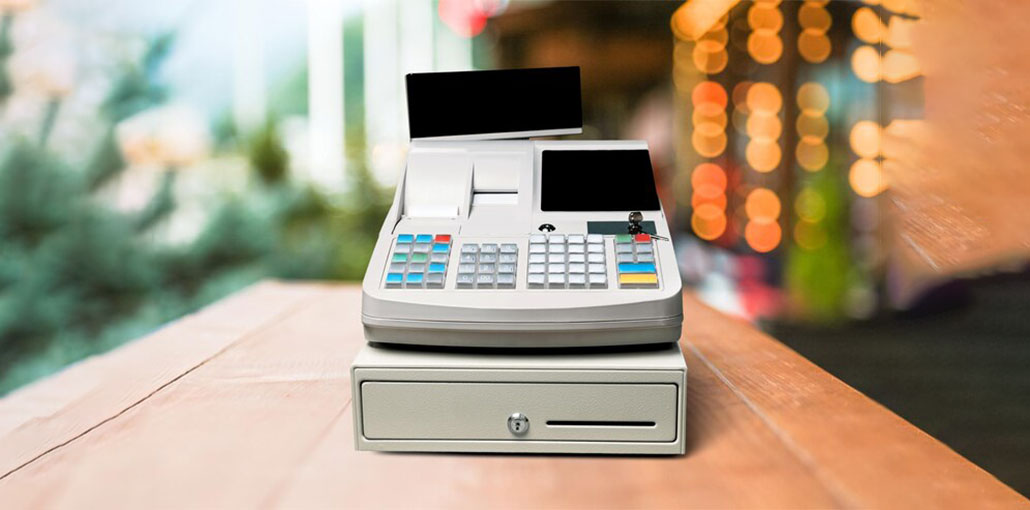
A point of sale (POS) system, also known as an electronic cash register, is an essential tool for companies across different sectors. Both the commercial and restaurant sectors rely on cash register POS systems to run more efficient companies. Modern cash registers feature like inventory management, accounting, and financial reports. POS cash registers come with different levels of complexity to meet the requirements of various types of businesses.
When selecting the best POS cash register system for your business, it’s a good idea to find the distinction between a traditional cash register and a POS system.
Traditional Cash Register vs POS System
Traditional cash register: A traditional cash register was a must-have for those who sold items to customers. POS cash registers in restaurants and retail permit you to keep cash in drawers, ring up sales, store receipts, and calculate tax. Certain cash registers included the capability to add hardware, like barcode scanners and a credit card reader, at an additional cost. Traditional Cash registers are inexpensive, starting at around $100.
Cash register POS system: A Cash register POS system offers all traditional cash register features, but it offers advanced options to improve business management. There are two types of POS systems: traditional POS and the most recent technology-based mobile point of sale (mPOS).
The traditional POS system has been used in the restaurant and retail industry for years. They usually have an on-premise server for storing data. Standard POS systems also include hardware, like touchscreen devices and a desktop. You can add additional equipment, like credit card readers. You can pay a minimum of $1,500 per terminal running the traditional POS systems.
mPOS systems run on iPad, Android, and PC. Most mPOS systems reside in the cloud, meaning retailers and restaurateurs don’t have to store servers on their premises. The main benefit of using an MPOS system is that you can access business-related data anywhere there’s an internet connection. Some mPOS systems allow users to work offline if there’s no internet access.
The cost of mPOS systems is typically a monthly subscription fee because of the software-as-a-service model. However, you’ll be required to purchase any hardware that is used with the software, such as barcode scanners and cash drawers.
Also read: What is POS Experience: 10 Smart Ways to Improve POS Experience
7 Best POS Cash Registers
As mentioned above, the best POS cash registers designed for small businesses offer numerous advantages; they should also be simple to use and cost-effective. If you’re looking for a POS cash register for sale and a traditional system, it’s likely to be a good fit. If, however, you’re not averse to paying an annual subscription fee, a modern electronic cash register POS system allow to make payments regularly,
1. Square
Square’s POS system allows businesses of all sizes to use credit cards from anywhere. They also provide a card reader and can convert your tablet to an Android or iPad kiosk. Square offers the ability to accept checks, cash, and other types of payments. Other features of Square include:
- Digital receipt management.
- Inventory management.
- Automatic upgrades.
- Appointment setting
Square also works with a variety of software, like Deputy and Xero. Square’s pricing model starts with a fee of 2.5%, plus 10 to 15 cents for each transaction. Additionally, custom pricing plans handle more than $250,000 worth of transactions per year.
Pros
- Free basic POS software
- Easy setup and beginner-friendly
- Works on iOS and Android
- No long-term contracts
- Strong inventory and sales tracking
- Wide third-party integrations
Cons
- Transaction fees can be high for large volumes
- Limited advanced reporting on free plan
- Custom features require paid add-ons
- Not ideal for complex restaurant workflows
2. Toast
Toast can be a POS system for restaurants that can be customized to meet your requirements. Toast offers touchscreen cash registers for restaurants to make payment effortless. This POS system can be used in different cafes and restaurants of any size. Toast offers several functions to aid in the efficient running of a restaurant, including:
- Online ordering system.
- Loyalty programs.
- Built-in customer relationship management.
Toast’s monthly price starts at $79 per month. There is a one-time installation cost starting at $499.
Pros
- Designed specifically for restaurants
- Excellent table, menu, and kitchen management
- Built-in online ordering and loyalty programs
- Fast and reliable hardware
- Scales well for multi-location restaurants
Cons
- Higher upfront installation cost
- Monthly pricing can be expensive
- Locked into Toast’s payment processing
- Not suitable for retail businesses
3. Vend
If you’re looking for a retail cash register and POS system, Vend is the best option. Vend is a popular software among retailers because of its reporting and inventory management capabilities. Vend’s POS cash register in retail offers customer loyalty programs on iPad, Mac, or PC. Retail companies of any size can utilize Vend to run their business. The features include:
- Customer database.
- Real-time reporting.
- Available offline.
Vend is compatible with different types of software, including Deputy and Stitch Labs. There are different prices for Vend’s software for cash registers in retail. The “lite” version for small-sized retailers costs $99 per month. The ‘plus’ package is for multi-store stores that pay $129 per month.
Pros
- Powerful inventory management
- Excellent retail reporting tools
- Works offline
- Supports multi-store management
- Strong customer loyalty features
Cons
- Higher monthly subscription cost
- Limited restaurant functionality
- Requires a third-party payment processor
- Advanced features are only in higher plans
4. QuickBooks POS
QuickBooks POS cash register offers retailers a solution to handle various types of payment methods. You can purchase different hardware to use with QuickBooks Point of Sale. Pole displays, cash drawers, and wireless barcode scanners can be purchased to go with QuickBooks POS. QuickBooks POS features include:
- Inventory management.
- Customer relationship management.
- Customer reward and loyalty tracking.
QuickBooks POS integrates with QuickBooks accounting software to provide seamless accounting for businesses. QuickBooks POS system is for sale at a starting price of $720 for its basic version. The professional version of the POS system is available at a reduced cost of just $1,020. Multi-store options cost $1,140 once a discount has been applied. Once you’ve bought the equipment, there are monthly plans that depend on your business and start at $5.
Pros
- Seamless integration with QuickBooks Accounting
- One-time software purchase option
- Strong inventory and customer management
- Supports various hardware options
- Ideal for accounting-focused retailers
Cons
- Desktop-based (not cloud-native)
- Limited remote access
- Less intuitive UI
- Software updates require manual handling
Also read: 7 Best Free POS Systems for Startups and Small Businesses
5. ShopKeep
ShopKeep is another POS system that can be used to replace traditional cash registers in retail stores. The cloud-based software enables merchants to accept multiple payment methods, including credit and debit cards, and mobile payments. ShopKeep’s iPad cash register offers the capabilities of a cash-register an iPad. The ShopKeep pocket App is compatible with your iPad register and provides real-time performance information. ShopKeep’s POS is flexible enough to be utilized in various industries, such as restaurants, bars, and franchises, thanks to the following attributes:
- Customer marketing.
- Inventory management.
- Reporting and analytics.
ShopKeep is integrated with QuickBooks and BigCommerce to enable retailers to sell products online. There is no contract requirement to sign up with ShopKeep. You’ll need to provide your company details. The prices start at $69 per month. It is also possible to purchase a POS apparatus to go along with ShopKeep. ShopKeep application for an all-inclusive POS cash register. The monthly cost is 24-hour support via live chat, telephone, or email.
Pros
- Cloud-based and easy to use
- Real-time sales analytics
- Works for retail and hospitality
- Strong inventory and customer marketing tools
- No long-term contracts
Cons
- Limited customization options
- Reporting is basic compared to competitors
- Requires iPad hardware
- Payment processing fees may vary
6. TouchBistro
TouchBistro is the POS solution that operates on an iPad and also includes an integratedPOS cash register for restaurants. TouchBistro is a viable option for any type of establishment serving food and drinks, such as bars, food trucks, and fine dining restaurants and cafes. Because TouchBistro is specifically designed for the restaurant industry, it comes with options like:
- Reservations for tables.
- Delivery Management.
- Table management and floor plan.
TouchBistro allows restaurants choose the best payment processor for their needs. Therefore, you can select among Square, PayPal, or other payment processors that will best suit the requirements of your restaurant. TouchBistro integrates with QuickBooks and other third-party applications, like BarVision, which offers an inventory management system for your restaurant’s bar. Prices for TouchBistro start at $69 for a month for one license, up to $399 per month for unlimited licensing. All payment plans offered by TouchBistro are annually billed.
Pros
- Restaurant-focused features
- Works offline
- Customizable floor plans and table management
- Flexible payment processor choices
- Strong integrations with restaurant tools
Cons
- Annual billing only
- Hardware costs not included
- Limited retail features
- Add-ons increase total cost
7. Upserve
Upserve POS system helps restaurateurs manage their restaurants from any location and in real-time. Upserve is based on iPad POS software, and it is compatible with the majority of iPad models. Cloud-based software allows automatic updates. Upserve POS is comparable to other restaurants’ POS or cash register systems as it integrates with other software, including employee scheduling and accounting programs. The “pro” version provides restaurants with a loyalty program that is integrated into online orders.
Upserve offers features that allow you to manage transactions, track inventory, and efficiently manage tables. Among the features that are available on Upserve’s restaurant-based POS system:
- Table order.
- Kitchen display system.
- Menu and inventory management.
- Live report of sales.
Pricing offered by Upserve includes software that starts as low as $69 a month, per terminal. The cost of hardware is based on the user’s needs; however, Upserve offers no hardware cost.
Pros
- Advanced analytics and sales insights
- Real-time reporting from anywhere
- Strong menu and inventory tracking
- Built-in loyalty and online ordering
- User-friendly interface
Cons
- Monthly costs can add up
- Best features locked behind higher plans
- Requires iPad
- Limited customization for non-restaurants
Also read: 6 Crucial Steps for Building a Healthy eCommerce Cash Flow
What Features to look for in a POS cash Register
If you’re looking to expand beyond a modest operation, then a POS system is usually an investment rather than a traditional electronic cash register (ECR). Even the simplest or free POS cash register plan comes with features that are only available in high-end ECRs. practical tips you can apply in everyday life. Among the things I recommend you look for in a POS cash register:
- Inventory management: Every business tracks inventory, and this becomes more crucial if you have multiple stores or sell online. Cloud-based POS software updates inventory in real-time, and you’ll always have a clear picture of what’s in stock. Some ECRs can do this on an elementary scale for a more thorough inventory monitoring, and POS systems are the best option.
- Tax calculation and reporting: In addition to ringing sales, you must also be able to calculate taxes correctly and produce reports on efficiency and conformity. Certain ECRs can manage tax rates, but only advanced (like that of the SAM4S’s ER-925) provide precise reports. The robust reporting feature is standard on POS systems.
- Sales or service mobility: A fixed cash wrap can be used in certain shops; many businesses can benefit from mobile checkout. With the help of POS devices, you can take payments on a mobile or tablet at any time in your shop. This can speed up the process and improve the customer experience.
- Hardware options and support: POS Systems offer more options with this option. In addition to basic scanners and readers, you have the option of choosing from a variety of complete kits for hardware, portable devices, or tap-to-pay readers that can be attached to mobile phones. Toast and other providers, such as Toast, have even designed their hardware to meet the needs of certain industries, restaurants, which are where spills, heat, and heavy use occur.
- Support is an additional benefit: Many POS service providers provide 24/7 customer support as a part of their subscription. Support for ECRs is limited. Many models are no longer available, and replacement parts or service may be difficult to find.
Conclusion
The most suitable POS cash register for your restaurant, shop, or any other small-scale business will depend on your needs and budget. There are comparison websites, such as Capterra and G2, to look over the options you have shortlisted. The majority of POS cash register systems run via the iPad kiosk for ease of use and to enable automatic updates. If you’re searching for an iPad kiosk to use with your POS cash register system, Square and Deputy might be a perfect fit for your needs.
Integration considerations when choosing a POS cash register system for your business. The most modern software enables you to seamlessly link various tools within your business to ensure complete security.
FAQs: POS Cash Register
What is a POS cash register?
A POS cash register is a digital system that processes sales, accepts payments, manages inventory, and generates reports from one platform.
How does a POS cash register work?
A POS cash register records transactions, calculates taxes, processes payments, and updates inventory automatically after each sale.
Is a POS system better than a traditional cash register?
Yes, a POS system offers advanced features like inventory tracking, analytics, and cloud access that traditional cash registers do not provide.
Which POS system is best for restaurants?
Toast, TouchBistro, and Upserve are among the best POS systems for restaurants due to their menu, table, and kitchen management features.
What payments can a POS cash register accept?
Most POS systems accept cash, credit cards, debit cards, mobile wallets, and contactless payments.





Leave a comment