
How to download YouTube Clips on your device to upload them to your social media sites and other projects? If it’s a humorous moment, an instructional video, or even a memorable scene, downloading videos can be extremely helpful. Even though YouTube is not a legal platform that allows users to download videos, several good tools can make it easy. In this article, we’ll provide 5 top YouTube clip downloaders to download clips fast and easily. Let’s get started!
How We Tested These YouTube Clip Downloaders
To evaluate the best YouTube clip downloaders, we reviewed each tool based on the features that matter most to users who want to save specific parts of YouTube videos quickly and efficiently.
During our evaluation, we considered:
- Ease of clipping and trimming YouTube videos
- Supported output formats such as MP4, MP3, and GIF
- Download and export flexibility
- User interface and overall ease of use
- Availability of free features
- Additional tools such as screenshot capture, audio extraction, and video editing
Quick Comparison: Best YouTube Clip Downloaders
| Tool | Clip Trimming | MP3 Export | GIF Export | Watermark-Free | Best For |
|---|---|---|---|---|---|
| YT Cutter | Yes | Yes | Yes | Yes | Quick clipping |
| SliceTube | Yes | No | No | Yes | Fast extraction |
| Kapwing | Yes | Yes | Limited | Paid plans | Editing & clipping |
| Streamable | Limited | No | No | Yes | Sharing clips |
| SurFast | Yes | Yes | Yes | Yes | High-quality downloads |
5 Best YouTube Clip Downloaders
1. YT Cutter
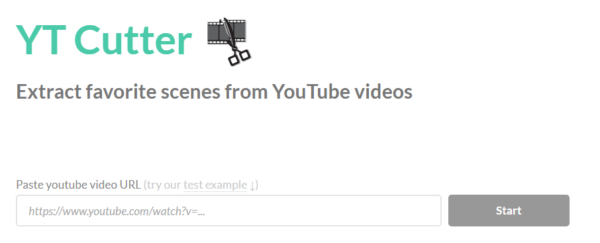
YT Cutter is an online YouTube Clip Downloader that lets you trim or download YouTube clips without software. Apart from downloading a part of the YouTube video clip, the program also offers additional features to:
- Download YouTube videos as GIFs
- Convert YouTube clips into MP3
- Take pictures of YouTube videos.
Therefore, whether you want to convert a YouTube clip into MP3 or extract audio from a video, it can prove useful.
Key Features
- Trim and download specific parts of YouTube videos
- Convert YouTube clips to MP3 audio files
- Create GIFs from YouTube videos
- Capture screenshots from YouTube videos
- Browser-based tool with no installation required
Pros
- No installation required
- Browser-based tool
- Allows users to select custom start and end timestamps
- Supports multiple download formats
Cons
- Limited advanced editing features
Also read: 10 Best YouTube Shorts Downloader Tools to Easily Download Videos
2. SliceTube
SliceTube allows you to quickly extract any part of a YouTube video or audio file by copying the video URL. It’s a simple YouTube Clip Downloader that doesn’t have extra features, just straight-up video clipping and downloading. If you want to save YouTube videos with resolutions other than 360p, you’ll have to upgrade to the pro plan.
Key Features
- Fast video clipping
- Simple user interface
- No unnecessary features
- Direct YouTube clip downloads
Pros
- Lightweight and beginner-friendly
- Quick processing
Cons
- Higher video resolutions may require a premium plan
3. Kapwing Video Trimmer
Kapwing is renowned for being very user-friendly. It also offers a video trimmer tool that allows you to download YouTube clips directly. You can copy the URL, cut the video into the format you want, and save it to the file format you require. You can also include captions, effects, and more to make your video.
Key Features
- Trim YouTube videos online
- Add captions and subtitles
- Apply visual effects and edits
- Multiple export options
Pros
- Comprehensive editing capabilities
- Modern and intuitive interface
- Suitable for social media content creation
Cons
- Free exports may include watermarks
4. Streamable
Streamable is an online tool that allows you to download YouTube clips or shorts. It was initially referred to as a short-clip maker, but now, YouTube video downloading is also supported. It’s quick and easy, and no software installation is needed.
Key Features
- Fast clip creation
- No software installation required
- Simple upload and sharing options
- Optimized for short-form video content
Pros
- Quick and user-friendly
- Great for short clips and highlights
Cons
- Fewer advanced editing tools
5. SurFast video downloader
To download a portion of a YouTube video in high quality, we recommend using a YouTube clip downloader. SurFast video downloader is an advanced Clipping feature that lets you edit and trim videos to create your preferred segments. After you’ve created the video clip, you can download it in any format, like MP4, WebM, MOV, AVI, FLV, GIF, and more.
Key Features
- Built-in clipping and trimming tools
- High-quality downloads
- Supports MP4, MOV, AVI, WebM, FLV, GIF, and more
- Multiple export options
Pros
- Excellent format compatibility
- High-quality output
- Advanced clipping controls
Cons
- More feature-rich than users may need for simple clipping tasks
Also read: 6 Steps to Creating a Great Video for YouTube
Why Use a YouTube Clip Downloader?
A YouTube clip downloader allows you to save only the part of a video you actually need. Instead of downloading an entire video and editing it later, these tools help you:
- Save storage space
- Create memes and short videos
- Extract educational segments
- Share highlights on social media
- Save important moments for offline viewing
Final Words
Downloading YouTube clips is simple using the right tools. If you’re looking for a small snippet to make a meme or save a video tutorial for offline use, these YouTube clip downloaders allow you to capture those precious moments.
FAQs: YouTube Clip Downloader
What is a YouTube Clip Downloader?
A YouTube Clip Downloader is a tool that allows users to download a specific section of a YouTube video instead of downloading the entire video. Most tools let you choose a start time and end time before saving the clip.
Is there a free YouTube Clip Downloader?
Yes. Several YouTube Clip Downloaders offer free plans or free online access, including YT Cutter, SliceTube, and Kapwing Video Trimmer. Some tools may limit video quality or advanced features in their free versions.
Can I download only part of a YouTube video?
Yes. Many YouTube Clip Downloader tools allow you to select a specific portion of a video by choosing custom start and end timestamps before downloading.
Are online YouTube Clip Downloaders safe?
Reputable YouTube Clip Downloaders are generally safe to use, but some websites may contain advertisements, pop-ups, or redirects. Always use trusted tools and avoid downloading unknown software.







Leave a comment