

Key Takeaways:
Apple TV uses an 8-digit activation code – shorter than Fire TV or Xbox which use 12 digits – both work at yt.be/activate
Open YouTube > Sign In > Sign in with Web Browser > get 8-digit code > visit yt.be/activate on iPhone > enter code > done in 60 seconds
Apple TV also supports QR code sign-in – scan with iPhone camera to skip typing the code entirely
Apple TV has the smoothest YouTube activation of any streaming device – but it works slightly differently from every other device on this list.
I have activated YouTube on Apple TV 4K 2nd gen, Apple TV 4K 3rd gen, and Apple TV HD. Apple TV uses an 8-digit code and gives you two ways to sign in – the traditional code method via yt.be/activate, or a QR code you can scan with your iPhone camera.
Complete process:
- Open YouTube on Apple TV
- Press Sign In > select Sign in with Web Browser
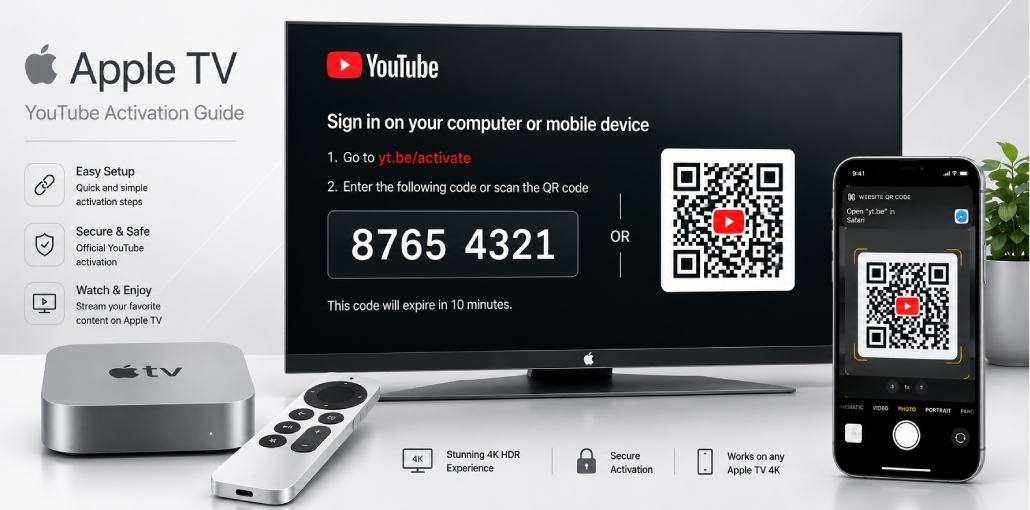
- Apple TV shows 8-digit code and QR code
- Option A: Visit yt.be/activate on iPhone > enter 8-digit code
- Option B: Scan QR code with iPhone camera – opens yt.be/activate automatically
- Sign into Google > Allow Access > done
The QR code method is the fastest – no typing at all. Both methods covered in detail below.
Before You Start: Apple TV YouTube Activation Checklist
- Apple TV powered on and connected to Wi-Fi
- YouTube app installed (pre-installed on most Apple TVs)
- iPhone, iPad, or Mac nearby with browser or camera ready
- Google account credentials available
- Siri Remote with working buttons
Apple TV note: Update tvOS before activating: Settings > System > Software Updates > Update Software.
The Short Answer:
Open YouTube on Apple TV, press Sign In, select Sign in with Web Browser. Scan QR code with iPhone camera – opens yt.be/activate automatically. Or manually visit yt.be/activate and enter 8-digit code. Sign into Google > Allow Access. Done in 60 seconds.
Does Apple TV Come with YouTube Pre-Installed?
Yes – YouTube pre-installed on Apple TV HD (4th gen) onwards.
Did you know? Apple and Google had a dispute in 2018 that briefly removed YouTube from Apple TV. The dispute resolved and YouTube returned with improved app supporting 4K HDR and Dolby Vision on Apple TV 4K.
| Apple TV Model | YouTube Pre-installed? | Max YouTube Quality |
| Apple TV 4K 3rd gen 2022 | Yes | 4K HDR + Dolby Vision |
| Apple TV 4K 2nd gen 2021 | Yes | 4K HDR |
| Apple TV 4K 1st gen 2017 | Yes | 4K HDR |
| Apple TV HD 4th gen 2015 | Yes | 1080p |
| Apple TV 3rd gen and older | No YouTube app | Not supported |
How Do You Sign In to YouTube on Apple TV Using yt.be/activate?
Method 1 – QR Code (Fastest – No Typing):
- Open YouTube app from Apple TV home screen
- Press Menu/Back to open sidebar if needed
- Select Sign In from sidebar
- Choose Sign in with Web Browser
- Apple TV shows 8-digit code AND QR code on screen
- Open iPhone camera app – point at QR code on TV
- Notification appears at top of iPhone – tap it
- Opens yt.be/activate automatically with code pre-filled
- Sign into Google > tap Allow Access
Method 2 – Manual via yt.be/activate:
- Open YouTube > Sign In > Sign in with Web Browser
- Note the 8-digit code on screen
- On iPhone, iPad, or Mac go to yt.be/activate
- Sign into Google > enter 8-digit code > Allow Access
You will know it worked when: YouTube shows subscriptions and Google profile picture top-right.
Siri Remote tip: After signing in, hold microphone button and say Search YouTube for [topic] – Siri searches directly inside YouTube.
QR Code vs Manual Sign In – Which is Better?
| Method | Speed | Typing Required | Works Without iPhone? |
| QR Code scan | Fastest – 20 seconds | None | No – needs camera |
| yt.be/activate manual | Fast – 60 seconds | 8-digit code | Yes – any browser |
Did you know? Apple introduced QR code sign-in for YouTube on Apple TV in 2023 – making it the first major streaming device to support QR-based YouTube activation.
How Do You Activate YouTube on Different Apple TV Models?
Apple TV 4K 3rd gen 2022: Best YouTube quality – 4K Dolby Vision. Wi-Fi 6 for fast loading. In my testing, QR code activation completed in under 20 seconds – fastest of any device I have tested.
Apple TV 4K 2nd gen 2021: 4K HDR – not Dolby Vision like 3rd gen. New Siri Remote clickpad ring makes YouTube navigation easier.
Apple TV 4K 1st gen 2017: 4K HDR. Older glass touchpad remote – swipe gently when navigating YouTube menus to avoid overshooting.
Apple TV HD 4th gen 2015: 1080p maximum. Same activation. Still fully supported if running tvOS 17 or later.
Can You Use YouTube Premium on Apple TV?
Yes – works automatically after activation. Benefits: no ads, background audio, 4K Dolby Vision on Apple TV 4K 3rd gen, YouTube Music.
Important: Cannot purchase YouTube Premium through Apple TV – Apple takes 30% cut of in-app purchases which Google does not allow. Buy at youtube.com/premium on iPhone or Mac first.
Did you know? Apple TV 4K 3rd gen is the only streaming device supporting YouTube in 4K Dolby Vision HDR. After activation: YouTube Settings > Quality > enable 4K and HDR.
Common Apple TV YouTube Problems Users Face
Problem 1: QR code does not appear – only 8-digit code
What you see: Only 8-digit code appears – no QR code.
Why: Older YouTube app version does not support QR sign-in. Added in 2023 update.
Fix: App Store > Purchased > YouTube > Update. Try Sign In again – QR code will appear.
Problem 2: iPhone camera scans QR but nothing happens
What you see: Point iPhone camera at QR code but no notification appears.
Why: QR scanning disabled in iPhone camera settings or camera did not detect code properly.
Fix: iPhone Settings > Camera > Scan QR Codes > ON. Hold iPhone steady, entire QR code visible in frame. If still not working, use yt.be/activate manually.
Problem 3: Invalid Code error at yt.be/activate
Why: Code expired (10 minutes) or O vs 0 confusion. Apple TV codes use numbers only.
Fix: Press Menu on Siri Remote > select Sign in with Web Browser for fresh code. Go immediately to yt.be/activate.
Problem 4: YouTube buffering even with fast internet
Why: YouTube defaults to lower quality or Wi-Fi interference.
Fix: While video plays, swipe down on Siri Remote > Settings > Quality > change to 1080p or 4K. For persistent buffering: Settings > Network > forget Wi-Fi > reconnect. Or use USB-C to ethernet adapter.
yt.be/activate Apple TV Not Working? 6 Fixes
Fix 1: Code Expired – Press Menu on Siri Remote > Sign in with Web Browser for fresh code. Use QR method to avoid typing delays.
Fix 2: Wrong Google Account – Check top-right of yt.be/activate. Switch to correct account first.
Fix 3: Not Connected to Internet – Settings > Network > Wi-Fi > forget network > reconnect. Apple TV 4K 3rd gen supports ethernet for stable connection.
Fix 4: YouTube App Needs Update – App Store > Purchased > YouTube > Update. Restart after updating.
Fix 5: Force Close YouTube – Double-press TV/Home button > swipe up on YouTube to close. Wait 10 seconds > reopen > try Sign In.
Fix 6: Restart Apple TV – Settings > System > Restart. Open YouTube and try activation again.
FAQs:
Why does Apple TV use 8-digit code while Fire TV uses 12?
Apple and Amazon designed systems separately. Apple TV uses 8 digits. Fire TV and Xbox use 12. Both work at yt.be/activate.
Can I activate YouTube on Apple TV without an iPhone?
Yes. Any browser device works - Mac, iPad, Windows PC, Android phone. Go to yt.be/activate and enter 8-digit code. QR code method requires iPhone or iPad camera only.
Does activation require an Apple ID?
No. YouTube only needs a Google account. Apple ID separate - only needed to download or update YouTube app.
Can I link multiple Apple TVs to one YouTube account?
Yes. Each Apple TV generates unique 8-digit code. Multiple Apple TVs link to one Google account simultaneously.
Does Siri work with YouTube on Apple TV?
Yes. Hold microphone button on Siri Remote and say Search YouTube for topic or Play video title on YouTube. Siri controls YouTube directly after activation.
Does YouTube 4K Dolby Vision work on Apple TV after activation?
Yes on Apple TV 4K 3rd gen only. Go to YouTube Settings > Quality > select 4K. YouTube Premium required for most 4K content.
What happens if I restore Apple TV to factory settings?
Factory restore removes YouTube sign-in. After setup, open YouTube and activate via yt.be/activate. Subscriptions and history reappear immediately from Google cloud.
Related article: yt.be/activate: How to Activate YouTube on Android TV & Smart Devices
YouTube Fire TV Stick Setup: Activate Using yt.be/activate
Roku YouTube Activate: Add & Sign In via yt.be/activate
PlayStation YouTube Activate: PS3, PS4 & PS5 via yt.be/activate
LG Smart TV YouTube Setup: Activate via yt.be/activate
Apple TV YouTube Sign In: Activate via yt.be/activate
Sony Smart TV YouTube Setup: Activate via yt.be/activate




Leave a comment