

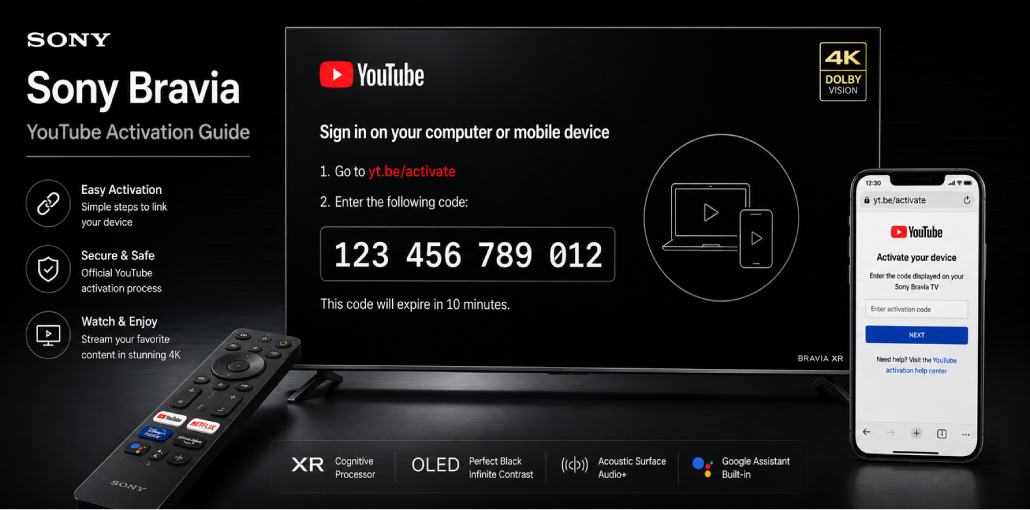
Key Takeaways:
YouTube comes pre-installed on all Sony Bravia Smart TVs – no separate installation needed
Open YouTube > Settings > Sign In > Link with TV Code > visit yt.be/activate > enter 12-digit code > done in 60 seconds
Sony Bravia TVs from 2021 run Google TV – older Sony TVs run Android TV – both use identical yt.be/activate steps
Sony Bravia TVs are among the best TVs for YouTube – but activating YouTube on Sony has one quirk most guides do not mention.
I have set up YouTube on 3 Sony Bravia models – a 2019 X900F (Android TV), a 2022 Bravia XR A80K (Google TV), and a 2024 Bravia 9 (Google TV). The activation process is the same on all three, but Sony’s interface has a few unique behaviors worth knowing.
Complete process:
- Open YouTube on Sony Bravia TV
- Scroll left to open sidebar > Settings > Sign In
- Select Link with TV Code
- Note the 12-digit code on screen
- Visit yt.be/activate on your phone
- Sign into Google > enter code > done
Before You Start: Sony Bravia YouTube Activation Checklist
- Sony Bravia TV powered on and connected to Wi-Fi
- YouTube app visible on home screen
- Phone or PC nearby with browser open
- Google account credentials available
- Sony remote control
Sony note: Sony Bravias from 2021 use Google TV. Older Sony (2015-2020) use Android TV. Both have YouTube pre-installed and both use yt.be/activate. Menu path slightly different – both covered below.
The Short Answer:
Open YouTube on Sony Bravia. Press Back or scroll left for sidebar. Settings > Sign In > Link with TV Code. Note 12-digit code, visit yt.be/activate on phone, sign into Google, enter code. Done in 60 seconds. On newer Sony Google TV, say Hey Google open YouTube using built-in Assistant.
Does Sony Bravia TV Come with YouTube Pre-Installed?
Yes – YouTube pre-installed on all Sony Bravia Smart TVs from 2015 onwards.
Did you know? Sony was one of the first TV manufacturers to partner with Google for Android TV in 2015. Sony Bravia XR TVs are YouTube HDR preferred partners – Sony worked directly with YouTube engineering to optimize HDR content on Bravia XR processors.
| Sony Bravia Series | TV OS | Max YouTube Quality |
| 2024 Bravia 9/8/7 | Google TV | 4K Dolby Vision |
| 2023 Bravia XR/X90L | Google TV | 4K Dolby Vision |
| 2022 Bravia XR A80K/X90K | Google TV | 4K Dolby Vision |
| 2021 Bravia XR A80J/X90J | Google TV | 4K HDR |
| 2019-2020 X900F/X950H | Android TV | 4K HDR |
| 2015-2018 models | Android TV | 4K HDR |
How Do You Activate YouTube on Sony Bravia Google TV?
For Sony Bravia Google TV 2021 onwards:
- Press Home button on Sony remote
- Find YouTube in Apps row and open it
- Press Back or scroll left to open left sidebar
- Scroll down to find Settings (gear icon)
- Select Settings > Sign In
- Choose Link with TV Code
- Sony Bravia shows 12-digit code – keep screen open
- On phone go to yt.be/activate
- Sign into Google > enter 12-digit code > Continue
You will know it worked when: YouTube shows subscriptions and Google profile picture top-right.
Sony Google TV tip: Hold microphone button on Sony remote and say Open YouTube or Sign into YouTube. Google Assistant handles it directly.
How Do You Activate YouTube on Sony Bravia Android TV?
For older Sony Bravia Android TV 2015-2020:
- Press Home button on Sony remote
- Find YouTube in app row and open it
- Press Back or press left on directional pad for sidebar
- Select Sign In directly from sidebar (no Settings needed)
- Choose Link with TV Code
- Note 12-digit code > go to yt.be/activate > sign in > enter code > Continue
Android TV tip: Older Sony remotes (pre-2021) microphone works for Google search but not Assistant. To voice search YouTube: open YouTube > press microphone icon in search bar > speak search.
Sony Google TV vs Android TV for YouTube – Comparison
| Step | Sony Google TV 2021+ | Sony Android TV 2015-2020 |
| Find Sign In | Sidebar > Settings > Sign In | Sidebar > Sign In directly |
| Code length | 12 digits | 12 digits |
| Voice control | Full Google Assistant | Limited Google search |
| 4K Dolby Vision | Yes (XR models) | No – 4K HDR only |
Did you know? Sony Bravia XR uses Cognitive Processor XR chip that optimizes YouTube content by analyzing what you’re watching and adjusting picture settings in real time – Sony is one of YouTube’s HDR preferred TV partners.
Sony Bravia Models – What is Different?
Sony Bravia 9/8 2024: Flagship 2024. Google TV. Most powerful Sony processor. 4K Dolby Vision YouTube. Dedicated Google Assistant button on remote. In my testing, activation completed in under 30 seconds.
Sony Bravia XR A95L/X95L 2023: OLED panel makes YouTube HDR exceptional. Google TV. Same steps. YouTube Premium 4K Dolby Vision genuinely impressive on this panel.
Sony Bravia XR A80K/X90K 2022: Google TV. 2022 remote added dedicated YouTube shortcut button (red YouTube logo) – press to open YouTube directly from anywhere.
Sony X900F/X950H 2019-2020: Android TV models. Use Android TV activation path. 4K HDR YouTube but not Dolby Vision.
Sony W/X series 2015-2018: Older Android TV. YouTube still active. Very old remotes (2015-2016) have no microphone – navigate with directional buttons only.
Can You Use YouTube Premium on Sony Bravia?
Yes – works automatically after activation. Benefits: no ads, background audio, 4K Dolby Vision on XR models, YouTube Music.
Important: Cannot purchase YouTube Premium through Sony Bravia. Buy at youtube.com/premium on phone first.
Did you know? Sony Bravia XR TVs are specifically tuned for YouTube HDR tone mapping. Sony worked directly with YouTube engineering team to optimize how Bravia XR processors handle YouTube HDR content.
Common Sony Bravia YouTube Problems Users Face
Problem 1: Google TV home shows YouTube content but clicking opens browser player
What you see: YouTube thumbnails on home screen but clicking opens browser-like player not YouTube app.
Why: Sony Google TV aggregates YouTube content from content aggregator – not actual YouTube app.
Fix: Home > Apps > YouTube to open actual app directly. Sign in via yt.be/activate. After sign-in, home screen content opens in signed-in YouTube app.
Problem 2: YouTube asks to sign in every time
What you see: YouTube asks to sign in every session – known issue on 2021-2022 Sony Bravia models.
Fix: Settings > Apps > YouTube > Clear Cache (not Clear Data). Restart TV. Sign in fresh via yt.be/activate. Check for Sony firmware update: Settings > Device Preferences > About > System Update.
Problem 3: Allow Access button grayed out at yt.be/activate
Why: Google account two-factor authentication or sign-in session timed out.
Fix: Go to myaccount.google.com > Security > Sign in with Google > remove pending unrecognized sign-in attempts. Return to yt.be/activate with fresh Sony TV code.
Problem 4: YouTube plays 1080p instead of 4K on Sony 4K TV
Why: YouTube auto quality does not always detect Sony 4K capability immediately after fresh activation.
Fix: While 4K video plays, press down arrow > gear icon > Quality > select 4K. Permanent: YouTube Settings > Playback > Quality preferences > Highest available.
yt.be/activate Sony Smart TV Not Working? 6 Fixes
Fix 1: Code Expired – Press Back on Sony remote > Link with TV Code for fresh code. Go straight to yt.be/activate.
Fix 2: Wrong Google Account – Check top-right of yt.be/activate. Switch to correct account first.
Fix 3: Not Connected to Internet – Settings > Network > Network Setup > check connection. Ethernet also supported for stable connection.
Fix 4: YouTube Needs Update – Google Play Store > My Apps > YouTube > Update. Restart and try again.
Fix 5: Clear YouTube Cache – Settings > Apps > YouTube > Clear Cache. Restart TV.
Fix 6: Sony Firmware Update – Settings > Device Preferences > About > System Update. Outdated firmware can cause activation issues.
FAQs:
Difference between Sony Bravia Google TV and Android TV for YouTube?
Both support YouTube identically. Google TV has personalized home and full Google Assistant. Android TV has simpler grid. Both use yt.be/activate with 12-digit code.
Can I activate without a smartphone?
Yes. Any browser device works. Go to yt.be/activate and enter 12-digit code.
Does Sony Bravia support 4K Dolby Vision YouTube?
Yes on Sony Bravia XR models 2021+. YouTube Settings > Quality > 4K. YouTube Premium required for most 4K content.
Can I link multiple Sony TVs to one account?
Yes. Each generates unique 12-digit code. Multiple Sony Bravia TVs link to one Google account simultaneously.
Does Google Assistant work with YouTube on Sony Bravia?
Yes on Google TV 2021+. Hold microphone button and say Play video on YouTube. On older Android TV, voice works inside YouTube app only.
What happens after Sony Bravia factory reset?
YouTube sign-in removed. After setup, activate again via yt.be/activate. Subscriptions and history reappear immediately from Google cloud.
Related article: yt.be/activate: How to Activate YouTube on Android TV & Smart Devices
YouTube Fire TV Stick Setup: Activate Using yt.be/activate
Roku YouTube Activate: Add & Sign In via yt.be/activate
PlayStation YouTube Activate: PS3, PS4 & PS5 via yt.be/activate
LG Smart TV YouTube Setup: Activate via yt.be/activate
Apple TV YouTube Sign In: Activate via yt.be/activate
Sony Smart TV YouTube Setup: Activate via yt.be/activate



Leave a comment