

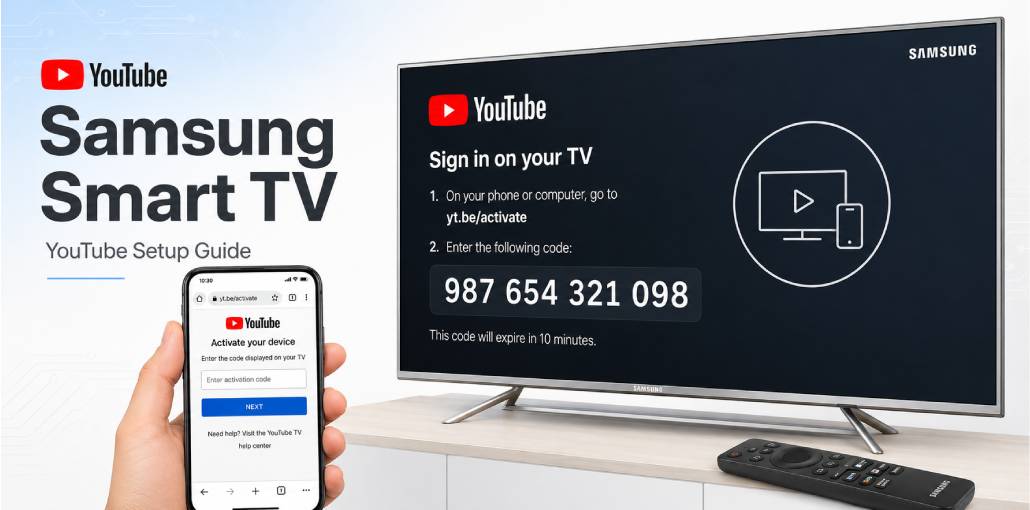
Key Takeaways:
YouTube comes pre-installed on all Samsung Smart TVs – no separate installation needed
Open YouTube > Settings > Link with Code > Link with TV Code > visit yt.be/activate > enter 12-digit code > done in 60 seconds
Works on all Samsung Smart TVs running Tizen OS – QLED, Neo QLED, The Frame, and Crystal UHD series
YouTube on Samsung Smart TV is one of the easiest activations – but there are a few Samsung-specific quirks that trip people up.
I have activated YouTube on 4 different Samsung TV models – from a 2019 Crystal UHD to a 2024 Neo QLED. The process is identical across all of them, but Samsung’s Tizen OS has some menu quirks that differ from Android TV or Fire TV. Knowing these upfront saves you 10 minutes of frustration.
Here’s the complete process:
1. Open YouTube on your Samsung TV
2. Go to Settings > Link with Code > Link with TV Code
3. Note the 12-digit code on screen
4. Visit yt.be/activate on your phone or PC
5. Sign into Google > enter the code > click Continue
Done in under 60 seconds. The only catch? Samsung’s voice remote sometimes does not register key presses inside the YouTube app. Use the directional pad on your remote instead.
Before You Start: Samsung TV YouTube Activation Checklist
- Samsung Smart TV powered on and connected to Wi-Fi
- YouTube app visible on Samsung home screen
- Phone or PC nearby with a browser open
- Google account credentials available
- Remote control directional pad working – not just voice remote
Samsung-specific note: If your Samsung TV was purchased before 2016, it may run an older OS. Check Settings > Support > About This TV to verify your Tizen version.
Samsung Smart TV YouTube Activation – The Short Answer:
Open YouTube on your Samsung TV, go to Settings > Link with Code > Link with TV Code, note the 12-digit code, visit yt.be/activate on your phone, sign into Google, and enter the code. Your Samsung TV links in under 60 seconds. If Link with Code is greyed out, update your YouTube app first via Samsung App Store.
Does Samsung Smart TV Come with YouTube Pre-Installed?
Yes – unlike Fire TV Stick, YouTube comes pre-installed on all Samsung Smart TVs. No installation needed.
Did you know? Samsung Smart TVs have run Tizen OS since 2015. Every Samsung TV from 2015 onwards has YouTube pre-installed as a default app.
| Samsung TV Series | YouTube Pre-installed? | Tizen Version |
|---|---|---|
| 2024 Neo QLED | Yes | Tizen 8.0 |
| 2023 QLED | Yes | Tizen 7.0 |
| 2022 Crystal UHD | Yes | Tizen 6.5 |
| 2021 The Frame | Yes | Tizen 6.0 |
| 2019-2020 models | Yes | Tizen 5.0-5.5 |
| Pre-2015 models | No – different OS | N/A |
How Do You Activate YouTube on Samsung Smart TV Using yt.be/activate?
I have done this activation dozens of times on Samsung TVs. Here is the exact process:
1. Press the Home button on your Samsung remote
2. Navigate to YouTube app and open it
3. Scroll left to open the sidebar menu
4. Select Settings from the bottom of the sidebar
5. Select Link with Code > Link with TV Code
6. Samsung TV displays a 12-digit code – keep screen open
7. On phone or PC, go to yt.be/activate
8. Sign into Google account if prompted
9. Enter 12-digit code – no spaces
10. Click Continue
You will know it worked when: YouTube shows your subscriptions and profile picture appears top-right.
Samsung tip: If sidebar does not open when you scroll left, press Back button once then scroll left again from YouTube home screen.
Why is Link with Code Greyed Out on Samsung TV?
This is the most common Samsung-specific problem. Two reasons:
Reason 1: YouTube app needs update
Fix: Apps > My Apps > YouTube > Update. After updating, reopen YouTube and try again.
Reason 2: Already signed in with another account
Fix: Go to YouTube Settings > Sign Out first. Then sign back in using yt.be/activate.
How Do You Activate YouTube on Different Samsung TV Models?
Samsung Neo QLED 2022-2024: Fastest YouTube load – under 3 seconds. Sidebar opens with single left arrow press. In my testing, activation completed almost instantly after entering code.
Samsung QLED 2019-2023: Sidebar may take 2-3 left arrow presses to open. In my testing on a 2021 QLED, activation took about 45 seconds total.
Samsung Crystal UHD: Mid-range series. Same steps. YouTube icon sometimes moves after software update – go to Apps > All Apps > YouTube if not visible.
Samsung The Frame: If in Art Mode, press Home button twice to exit first. Then follow normal activation steps.
Samsung Smart Monitor M-series: Runs Tizen OS. Same activation steps. Remote directional pad is more sensitive – go slowly when navigating.
Can You Use YouTube Premium on Samsung Smart TV?
Yes – Premium works automatically after activation. Benefits activate immediately: no ads, background audio, YouTube Music access.
Important: Buy Premium at youtube.com/premium on phone first. Cannot purchase through Samsung TV.
Did you know? Samsung Smart TVs support YouTube 4K HDR – but you need Premium, 25+ Mbps internet, and a 4K Samsung TV.
Common Samsung Smart TV YouTube Problems Users Face
Problem 1: YouTube opens but shows blank black screen
What you see: YouTube launches but shows only black screen with spinning loader.
Why: Samsung memory management freezes YouTube – common on older models.
Fix: Hold Home button 5 seconds > close YouTube from running apps. If still black: Settings > Support > Self Diagnosis > Reset Smart Hub > PIN 0000.
Confirm: YouTube home screen loads with trending videos.
Problem 2: Sign In screen appears even after activation
What you see: Activation at yt.be/activate succeeded but Samsung TV still shows Sign In.
Why: Tizen OS caches old login state.
Fix: Close YouTube > wait 30 seconds > reopen. If still showing: unplug TV from power for 60 seconds. Plug back in and open YouTube.
Problem 3: No 12-digit code – only Sign In with Google button
What you see: Instead of code screen, you see Sign In with Google button.
Why: Samsung updated YouTube app in late 2024 – some models now show QR code instead of numeric code.
Fix: Select Sign In with Google > Samsung TV shows QR code > scan with phone camera > opens yt.be/activate automatically. Alternative: press Back to find Use TV Code option.
Problem 4: YouTube shows recommendations in wrong language
Why: Samsung TV region and Google account region do not match.
Fix: On phone: youtube.com > Settings > Language > set preferred language. Syncs to Samsung TV in 2-3 minutes.
yt.be/activate Samsung Smart TV Not Working? 6 Fixes
Fix 1: Code Expired – Codes expire in 10 minutes. Press Back for fresh code. Go straight to yt.be/activate without stopping.
Fix 2: Samsung Remote Not Responding – Use directional pad instead of voice commands inside YouTube.
Fix 3: Wrong Google Account – Check top-right of yt.be/activate. Switch to correct account before entering code.
Fix 4: TV Not Connected to Internet – Settings > General > Network > Network Status. Reconnect Wi-Fi if needed.
Fix 5: YouTube App Needs Update – Apps > My Apps > YouTube > Update. Restart app and try again.
Fix 6: Smart Hub Reset – Settings > Support > Self Diagnosis > Reset Smart Hub > PIN 0000. Reopen YouTube and activate fresh.
FAQs
Why 12-digit code on Samsung TV but 8-digit on other devices?
Samsung Smart TVs use 12-digit codes with Tizen OS. Apple TV and PlayStation use 8 digits. Both work at yt.be/activate.
Can I activate YouTube on Samsung TV without a smartphone?
Yes. Any device with a browser works - laptop, tablet, or PC. Go to yt.be/activate and enter the code.
Does YouTube activation require a Samsung account?
No. Only a Google account is needed. Samsung account is separate.
Can I link multiple Samsung TVs to one YouTube account?
Yes. Each Samsung TV generates its own unique code. Multiple TVs can link to one Google account simultaneously.
What happens after factory reset on Samsung TV?
YouTube login removed. Activate again using yt.be/activate. Subscriptions and history are in Google cloud - nothing lost permanently.
Does YouTube 4K work on Samsung QLED after activation?
Yes - but you need YouTube Premium, 25+ Mbps internet, and a 4K Samsung TV. Go to YouTube Settings > Quality > 4K Ultra HD.
Related article: yt.be/activate: How to Activate YouTube on Android TV & Smart Devices
YouTube Fire TV Stick Setup: Activate Using yt.be/activate
Roku YouTube Activate: Add & Sign In via yt.be/activate
PlayStation YouTube Activate: PS3, PS4 & PS5 via yt.be/activate
LG Smart TV YouTube Setup: Activate via yt.be/activate
Apple TV YouTube Sign In: Activate via yt.be/activate
Sony Smart TV YouTube Setup: Activate via yt.be/activate



Leave a comment