

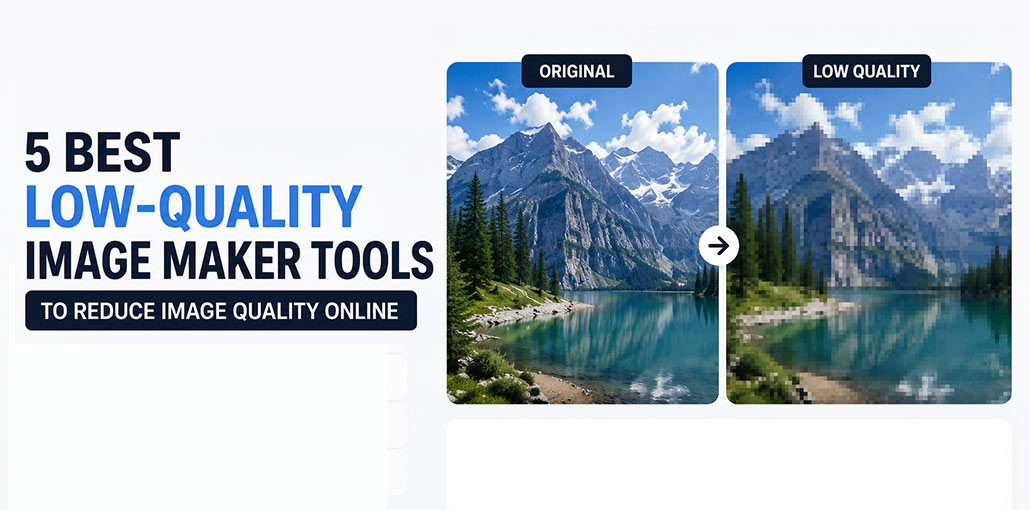
Are you searching for the best online low quality image maker? This article introduces three easy-to-use tools, such as Low Quality Image, LunaPic, IMGonline, and Online Tools, to help reduce image quality and make images low quality for sharing, compression, or other artistic effects.
What Is a Low Quality Image Maker
A low quality image maker is a tool designed to reduce the image quality. Instead of improving the resolution or sharpness of an image, it does the reverse by reducing clarity, introducing compression, or creating pixels or other effects. This procedure typically reduces file size and makes it easier to simplify image details.
A low quality image maker can prove useful in many situations. For instance, it can help reduce image quality online for faster uploads and sharing on social media or sites. It is also used to create certain visual styles, such as retro or glitchy Pixel artwork effects. Also, reducing image quality often meets file size limits for online submissions.
In the next section, I’ll discuss three online low quality image makers. Let’s look at each.
Also read: Top 10 Logo Makers and Logo Generators
Best Low Quality Image Maker Tools
1. Low Quality Image
The Low-Quality Image is an online tool designed to reduce image quality. In contrast to multifunctional editors, it focuses on one thing: making images appear less appealing by compression and resolution reduction. This makes it a great option for editing quickly with no complex configurations.
Low Quality Image supports JPG, PNG, and WebP formats. It allows me to process images up to 100MB. When I upload an image, I can alter the compression level to control how much the quality decreases. As the compression level grows, the image becomes sharper and loses fine details. The interface is small, and the whole process takes only a few minutes from upload to download.
Furthermore, the platform provides independent image tools, including background removal and the sepia effect. It is a good choice for those who need simple and fast ways to create low quality images without complicated editing software.
Pros:
- Easy to use
- Supports JPG, PNG, and WebP
- Adjustable compression levels
- No signup required
- Fast processing
Cons:
- Limited editing features
- No filters or effects
- Only focused on image compression
2. LunaPic
LunaPic is an online image editor that comes with an array of editing tools, including options to reduce image quality. Compared to tools that are solely for one purpose, it offers more flexibility, allows me to alter images in many ways, and also reduce image quality.
To produce a low-quality effect, you may upload an image and reduce its quality by moving the slider or entering a specific value. The platform will automatically reduce the image quality. In addition, it offers extra features, like image scaling or cropping, to reduce file size.
Another benefit of LunaPic is the extensive editing options. Apart from the ability to reduce quality, it is also possible to apply filters, apply effects, draw images or even make simple adjustments. This is why it’s not just about reducing image quality, but also about creating more personalized visual effects.
In the end, LunaPic is a good choice for users looking for more control and editing options while reducing quality online.
Pros:
- Completely free
- Includes many editing tools
- Supports filters and effects
- No account required
- Works in the browser
Cons:
- Outdated interface
- Can be confusing for beginners
- Slower with large images
3. Online Tools
Online Tools is a convenient web-based platform that provides various simple utilities. In terms of reducing image quality, it can strike an appropriate balance between visual quality and file size. I can use digital distortion effects that give an old-fashioned look by introducing blur, block, and digital grain to an image.
This tool allows me to adjust image brightness and balance color. It also includes settings for vintage effects and a sepia filter for additional design. Furthermore, Online Tools provides other useful photo editing tools, including skewing images, converting TIFF to BMP, and pixelating a license plate in an image. These tools are useful when I have to create pictures for distribution or to preserve.
All in all, Online Tools is a useful option for those seeking a straightforward and efficient method to reduce image quality online.
Pros:
- Simple interface
- Offers blur and pixelation effects
- Includes vintage filters
- No installation required
- Additional image utilities available
Cons:
- Limited advanced features
- Basic customization options
- Not suitable for professional editing
4. IMGonline Image Compressor
IMGonline is one of the easiest image compressor tools for creating intentionally compressed images. It lets users lower JPEG quality to extremely low levels while maintaining compatibility across websites and devices.
Pros
- Free to use.
- Extremely simple interface.
- Works directly in the browser.
Cons
- Limited editing features.
- Supports fewer formats than desktop software.
Also read: Best Free MP4 Editors in 2026: Edit Videos Without Paying
5. PineTools Image Pixelator
PineTools offers a dedicated pixelation tool that converts high-resolution images into blocky, low-resolution graphics with adjustable pixel sizes.
Pros
- Perfect for meme creators.
- Easy customization.
- No registration required.
Cons
- Limited advanced controls.
- Basic user interface.
Compare the Top Low Quality Image Maker Tools
| Tool | Best For | Ease of Use | Free Version | Key Strength | Main Limitation | Our Rating |
|---|---|---|---|---|---|---|
| Low Quality Image | Quick image compression | ⭐⭐⭐⭐⭐ | Yes | Simple compression controls and fast processing | Limited editing features | 4.8/5 |
| LunaPic | Image editing and quality reduction | ⭐⭐⭐⭐ | Yes | Powerful editing tools and effects | Interface feels outdated | 4.6/5 |
| Online Tools | Retro and vintage effects | ⭐⭐⭐⭐ | Yes | Blur, grain, and artistic distortion effects | Fewer advanced editing options | 4.4/5 |
| IMGonline Image Compressor | Extreme image compression | ⭐⭐⭐⭐⭐ | Yes | Excellent JPEG compression controls | Supports fewer file formats | 4.7/5 |
| PineTools Image Pixelator | Pixelated images and memes | ⭐⭐⭐⭐⭐ | Yes | Adjustable pixelation with instant preview | Limited customization features | 4.5/5 |
How to Choose the Best Low Quality Image Maker
Choosing the right low quality image maker depends on your specific needs.
- Compression Controls: Choose a tool that lets you adjust the compression level for better control over image quality.
- Supported Formats: Make sure the tool supports popular formats like JPG, PNG, and WebP.
- Pixelation Options: If you want retro or meme-style effects, look for tools with pixelation features.
- Editing Features: Some tools offer extra options such as filters, resizing, cropping, and color adjustments.
- Ease of Use: A simple interface can save time, especially if you only need to compress images quickly.
- File Size Limits: Check the maximum upload size if you plan to work with large images.
Consider factors such as supported file formats, compression levels, editing options, and ease of use before making your choice.
Final Thoughts
Low quality image makers are great tools for practical and creative reasons. For example, whether it’s to reduce image size to speed up uploads or create a vintage-looking, pixelated effect, the tools described above make the process straightforward and effective. I hope this article can help you in a big way.
FAQs: Low Quality Image Maker
Why would someone use a low quality image maker?
People use a low quality image maker to reduce file sizes, create retro or vintage effects, make meme images, add pixelation, or meet upload size restrictions on websites and social media platforms.
Is there a free low quality image maker available online?
Yes, several free online tools are available, including Low Quality Image, LunaPic, Online Tools, IMGonline Image Compressor, and PineTools Image Pixelator.
Which is the best low quality image maker for image compression?
IMGonline Image Compressor is one of the best options for image compression because it offers adjustable JPEG quality settings and can significantly reduce file sizes.
Can I create retro or vintage effects using a low quality image maker?
Yes, many low-quality image makers include pixelation, blur, grain, and sepia filters that help create retro, vintage, and glitch-style effects.




Leave a comment