

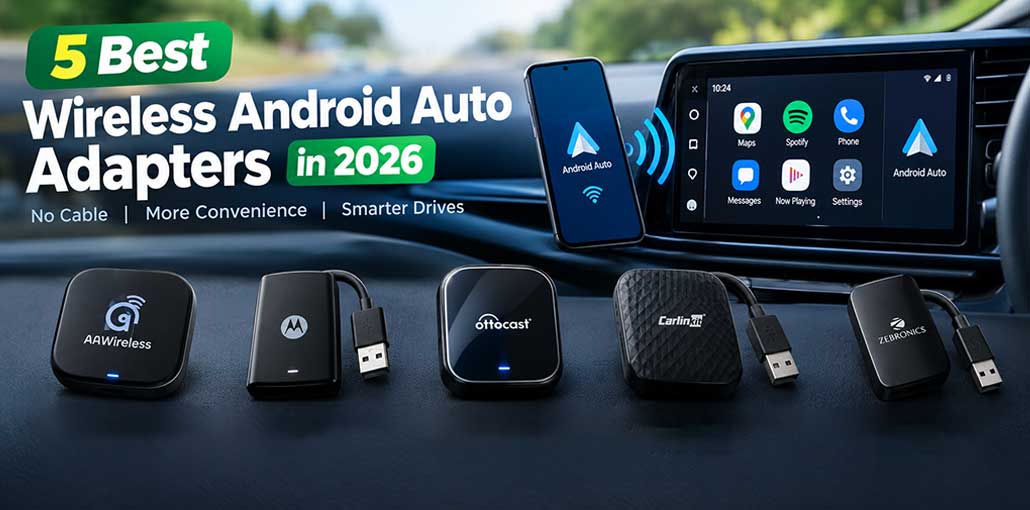
If you are tired of connecting your Android phone to your car with a USB cable every time you drive, a Wireless Android Auto Adapter can make your daily commute much more convenient. These small plug-in devices can turn compatible wired Android Auto systems into wireless connections, allowing your phone to connect automatically when you get into your car.
With several options available in 2026, choosing the right adapter can be confusing. In this guide, we compare five popular Wireless Android Auto Adapters based on connectivity, ease of use, compatibility, features, and overall value.
5 Best Wireless Android Auto Adapters in 2026
1. AAWireless TWO — Best Overall Wireless Android Auto Adapter
The AAWireless TWO is one of the strongest choices for drivers who primarily use Android Auto.
Its main advantage is its focus on the Android Auto experience. It is designed to provide a convenient wireless connection while offering features such as support for multiple phones and easier phone switching.
Key features:
- Wireless Android Auto
- Multiple-phone support
- Easy phone switching
- Compact design
- Automatic connection
- Designed specifically around Android Auto
Best for: Drivers who want a reliable, feature-rich Android Auto experience.
Why choose it: The AAWireless TWO is a great all-around choice if Android Auto is your main priority.
Also read: 5 Best Radar Detectors in 2025: Top Picks for Every Driver
2. Motorola MA1 — Best for Simple Setup
The Motorola MA1 is an excellent choice for users who want a simple Wireless Android Auto Adapter without complicated installation.
It connects to the vehicle’s USB port and uses wireless connectivity to communicate with your Android phone. Its straightforward design appeals to drivers who don’t want to spend time adjusting complicated settings.
Key features:
- Wireless Android Auto
- 5 GHz Wi-Fi
- Bluetooth-based connection
- Plug-and-play-style setup
- Compact form factor
Best for: Drivers who prioritize simplicity.
Why choose it: Motorola’s familiar brand name and straightforward design make the MA1 an attractive option for people looking for an uncomplicated wireless upgrade.
3. Ottocast A2Air Pro — Best Premium Alternative
Ottocast has become a popular name in the wireless car adapter market, and the A2Air Pro targets users looking for a more premium solution.
It provides wireless Android Auto without requiring your phone to stay connected to the vehicle through a USB cable. For drivers looking for a premium Wireless Android Auto Adapter, the A2Air Pro is a strong alternative.
Key features:
- Wireless Android Auto
- Compact design
- Fast wireless connection
- Designed for compatible wired Android Auto systems
- Premium-oriented build
Best for: Users who want a premium wireless Android Auto adapter.
Why choose it: The A2Air Pro is worth considering if you want a polished adapter and don’t mind spending more for additional features.
4. Carlinkit 5.0 — Best for Android Auto and CarPlay
The Carlinkit 5.0 is particularly interesting for households where different drivers use Android and iPhone devices.
Rather than focusing exclusively on Android Auto, Carlinkit’s solution is designed around both Android Auto and Apple CarPlay compatibility on supported vehicles. This makes it a versatile option for users who need a Wireless Android Auto Adapter that can work across different smartphone platforms.
Key features:
- Wireless Android Auto
- Wireless CarPlay
- Compact adapter
- Broad device compatibility
- Automatic wireless connection
Best for: Families and vehicles used by both Android and iPhone users.
Why choose it: Its cross-platform approach gives it an advantage when multiple smartphone ecosystems need to work with the same vehicle.
5. Zebronics 2-in-1 Wireless Adapter — Best Budget Option
If your main goal is to get wireless connectivity without spending a lot, the Zebronics 2-in-1 Wireless Adapter is worth considering.
Its 2-in-1 positioning makes it appealing for users who want support for both Android Auto and CarPlay on compatible systems. As a budget-friendly Wireless Android Auto Adapter, it can be a practical option for everyday drivers.
Key features:
- Wireless Android Auto
- CarPlay support
- Compact design
- Budget-friendly positioning
- Simple installation
Best for: Budget-conscious buyers.
Why choose it: It provides a more affordable way to explore wireless smartphone connectivity in a compatible vehicle.
Also read: Best Wireless Car Chargers 2025: Top Picks & Prices Guide
Wireless Android Auto Adapter Comparison
| Wireless Android Auto Adapter | Best For | Android Auto | Wireless CarPlay | Multiple Phones | Setup |
|---|---|---|---|---|---|
| AAWireless TWO | Best Overall | ✅ | ❌ | ✅ | Easy |
| Motorola MA1 | Simple Setup | ✅ | ❌ | Limited | Plug & Play |
| Ottocast A2Air Pro | Premium Alternative | ✅ | ❌ | Varies | Easy |
| Carlinkit 5.0 | Android + iPhone Users | ✅ | ✅ | ✅ | Easy |
| Zebronics 2-in-1 | Best Budget Option | ✅ | ✅ | Varies | Simple |
How to Choose the Best Wireless Android Auto Adapter
Before buying a Wireless Android Auto Adapter, consider these factors.
1. Check Vehicle Compatibility
This is the most important step. Your car should generally have factory or aftermarket wired Android Auto support.
A wireless adapter cannot normally add Android Auto to a vehicle that doesn’t support Android Auto at all.
2. Check Smartphone Compatibility
Make sure your Android phone meets the adapter’s supported Android version and connectivity requirements.
3. Look at Connection Stability
A good wireless adapter should maintain a stable connection without frequent disconnections, excessive lag, or repeated pairing problems.
4. Consider Multiple Phones
If more than one person regularly drives the vehicle, look for an adapter that makes switching between phones easy.
5. Decide Whether You Need CarPlay
If your vehicle is shared by Android and iPhone users, a 2-in-1 adapter supporting both Android Auto and CarPlay may be more convenient.
6. Consider Price
The most expensive adapter isn’t necessarily the best choice for every driver. Choose based on your vehicle, smartphone, and required features.
Wireless Android Auto vs. Wired Android Auto
Both wired and wireless Android Auto provide access to features such as navigation, music, calls, and compatible messaging apps through the vehicle’s infotainment system.
The main difference is convenience.
Wired Android Auto:
- Requires a USB cable
- Usually straightforward once connected
- Can charge your phone while connected
- No wireless adapter required
Wireless Android Auto:
- No cable required for Android Auto
- More convenient for short trips
- Cleaner setup
- Requires compatible wireless hardware
- Uses your phone’s wireless connectivity
If your vehicle already supports wired Android Auto, a wireless adapter can provide a convenient middle ground without replacing the infotainment system.
Final Verdict
Ready to ditch the USB cable? The best Wireless Android Auto Adapter can make every drive smarter, simpler, and more convenient. From AAWireless TWO to budget-friendly options, there’s a model for every driver. Check your car’s compatibility, choose the right adapter, and enjoy seamless wireless Android Auto today.
FAQs: Wireless Android Auto Adapter
Do wireless Android Auto adapters work with every car?
No. Your vehicle generally needs to support wired Android Auto through its factory or aftermarket infotainment system. Always check the adapter's compatibility list before buying.
Can I use a wireless Android Auto adapter with an iPhone?
It depends on the adapter. Some models support both Android Auto and Apple CarPlay, while others are designed specifically for Android Auto.
Can multiple phones connect to a wireless Android Auto adapter?
Some adapters support multiple paired phones and make it easier to switch between them. Check the specific model's features if more than one person regularly uses the vehicle.
Will a Wireless Android Auto Adapter charge my phone?
Generally, the adapter itself does not replace a phone charger. Because your phone isn't physically connected to the car's USB port, you may need a separate wireless charger or charging cable if you want to charge while driving.






Leave a comment