

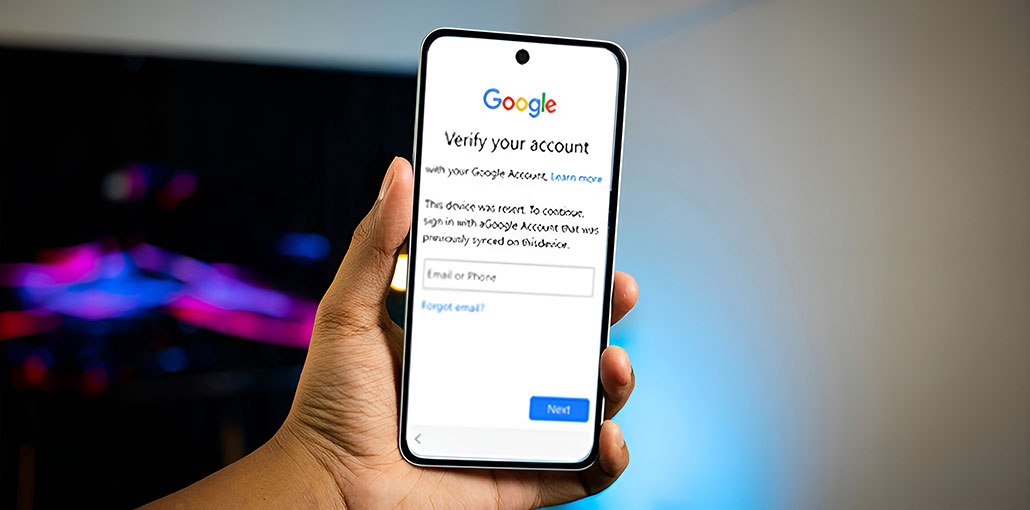
Factory reset protection was introduced by Google to protect users’ information. It requires confirming your identity using your Google account and your passwords. But if you forget your password and have lost access to the phone, you could be in trouble. So, how to bypass Google account verification after reset? In this article, we’ll outline the four options you could try. Let’s get started!
What Is Google Account Verification and How Does It Work?
Google account verification will require users to verify their identity after a factory reset or when they make any changes to their accounts. Simply, you must verify that you are the device owner. If you don’t, it will label you as an intruder who is trying to access personal information. This feature effectively protects your privacy and improves security. However, you’ll be locked out of your phone, just like other users, when you forget your Google account or password.
Also read: How to Bypass Activation Lock on iPhone/iPad: 4 Simple Solutions
How to Bypass Google Account Verification on Android Device?
If you reset the Android phone, all your settings and data will be erased. However, you will need to verify your Google account. Google account verification remains connected to your device. You must have the credentials to access your device. If you don’t remember your account credentials, there are several methods to bypass Google verification.
Bypass Google Account Verification Through the Reset Option
If you opt for this option, you will lose all the information linked to your account as you’re taking the account on your phone. Now, we’ll reset your device using the factory reset option. It will delete all applications connected to your Gmail account.
Let’s review the procedures followed to achieve the same results:
Step 1: Click reset account, and if you encounter a Google account verification on screen, click Back to go back to the Wireless Network selection screen.
Step 2: Click on Add Network.
Step 3: Insert some random letters into the network’s name.
Step 4: Press on and hold down the letters you have just entered until they’re highlighted. Select to share them on the list that pops up.
Step 5: Now select Gmail among the choices.
Step 6: Go to the next screen and click on Notifications from the App Settings.
Step 7: From the Settings menu, select Backup and Reset, and then Factory Data Reset.
After the process is completed, you configure your device and connect to your other Google account to access all features.
Bypass Google Verification After Reset via TalkBack
If you are unable to remember your Google account or password, you could use Talkback. It’s an integrated accessibility feature that allows you to bypass Google account verification process. Here are the steps you can follow to utilize this method:
Step 1. Turn on your device and connect to a Wi-Fi network. Tap the Home button three times to start TalkBack.
Step 2. Utilize finger movements to create the “L” shape anywhere on the TalkBack screen. From the list of options, you can double-tap the Talkback settings.
Step 3. When the screen is off, select the to speak option. Next, draw another “L” gesture on the screen. Click Pause Feedback.
Step 4. Next, use the search function to access Help and Comments > Voice> Get Started with Voice Access.
Step 5. Afterward, play the resultant video and then share it. You will be directed to YouTube.
Step 6. Now tap the icon button in the top right-hand corner of the YouTube interface. Choose the YouTube Terms of Service and the browser you prefer.
Step 7. When everything is finished, you will see the FRP removed, which allows you to use the device as usual.
Also read: Advance Turbo Flasher Review: How to Flash and Unlock Phones
Use an FRP Bypass APK to Bypass Google Account Verification
Android phones come with the factory reset feature, which is also known as Google Account Verification. To be able to verify. Let’s explore some of the best FRP Bypass tools to bypass Google verification on Android devices.
Bypass Google Verification Account via iDelock
You can use iDelock (Android) to bypass Google account verification after a factory reset. This professional program is secure and simple to use. It will allow you to gain access to your phone in a matter of minutes. Additionally, you can use it to unlock other Android locks, including not just FRP but also screen locks, like fingerprints, patterns, and passwords. With iDelock, unlocking is now much simpler.
Bypass Google Account Verification With FRP Hijacker
FRP Hijacker is yet another useful tool that can help to bypass Google account verification. Its unlocking procedures are simple and work on all Android devices.
Bypass Google Account Verification After Reset via SideSync
With SideSync, it is possible to bypass Google verification after a factory reset. However, this feature is only available for Samsung devices.
Visit an Authorized Service Center
If you are unable to access your account, an authorized service center may be able to assist after verifying ownership of the device.
Bring:
- Purchase receipt
- Device packaging (if available)
- Valid identification
Tips to Avoid Google Account Verification Problems
Before resetting or selling your Android phone:
- Remove all Google accounts from the device.
- Back up important files and data.
- Verify that you know your Google account credentials.
- Update your recovery phone number and email address.
- Complete the factory reset only after removing linked accounts.
Summing Up
After reading this article, you’ve discovered four methods to bypass Google account verification after a factory reset. Each method is helpful to resolve the issue.
FAQs: Bypass Google Account Verification
What should I do if I forgot my Google account password?
You can recover your account through Google's account recovery process. Once your identity is verified, you can reset your password and use the account to access your device.
Can I use a different Google account after a factory reset?
In most cases, you must first verify the Google account that was previously linked to the device. After verification is complete, you can add or switch to a different Google account.
Is Google Account Verification important?
Yes. It helps protect personal information, reduces unauthorized access, and discourages theft by ensuring that only authorized users can activate the device after a reset.
Is there an official way to bypass Google Account Verification after a factory reset?
Yes. The official method is to sign in with the Google account that was previously linked to the device. If you've forgotten your credentials, you can recover your account through Google's account recovery process.








Leave a comment