

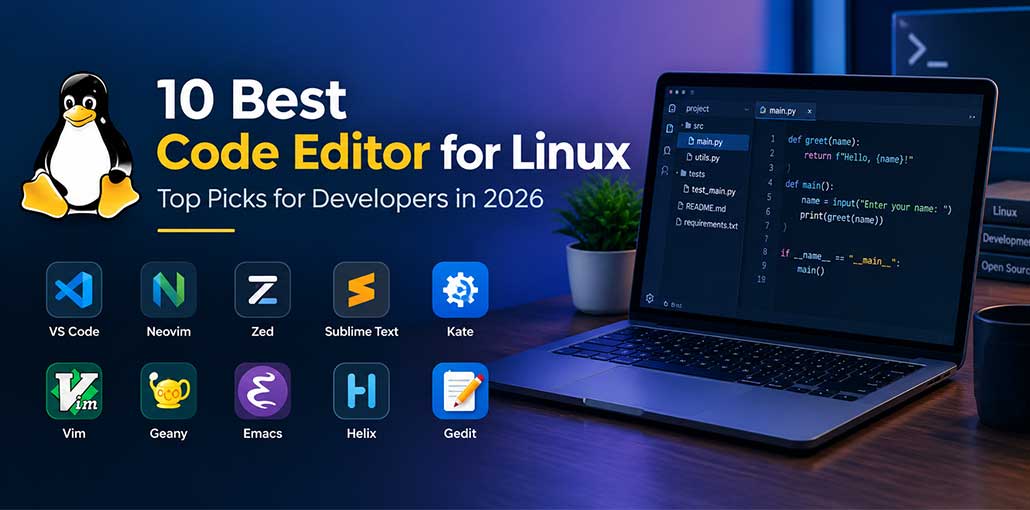
Coding is great fun. You can create applications or websites if you know coding. To become a developer, you need to know all the details of coding or programming in various software. Various code editors are available for different operating systems to make coding easier and faster, and some work really well. To develop new applications in Linux, there are many of the best code editor for Linux users.
IDEs or code editors are great for building new programs or applications with tons of handy features. We provide the 10 best code editor for Linux, with features like auto-complete for tags and classes, plugins for extra functionality, and even code snippets you can insert without typing them.
Best Code Editor for Linux in 2026
Our team spent 50 hours on the internet researching 30+ Linux code editors or text editors. These 10 are the best code editor for Linux users.
1. Visual Studio Code — Best Overall
Visual Studio Code (VS Code) is one of the most popular choices for Linux developers and is our top pick for the best code editor for Linux overall.
It combines a clean interface with powerful development features such as extensions, Git integration, debugging, an integrated terminal, code completion, and support for a huge range of programming languages.
Key features
- Large extension ecosystem
- Integrated terminal
- Git and source-control support
- Debugging tools
- Code completion and IntelliSense
- Support for numerous programming languages
- Remote development capabilities
Best for: Web developers, Python developers, full-stack developers, beginners, and professional programmers.
Also read: Top Markdown Editors for Linux (Free and Paid)
2. Neovim — Best for Keyboard-Focused Developers
Neovim is an excellent option for developers looking for the best code editor for Linux with a keyboard-focused workflow. It is a fast and highly customizable terminal editor with Lua configuration, plugins, and language-server support. Developers can build a complete coding environment around Neovim, making it especially suitable for experienced programmers and Linux power users.
Key features
- Extremely customizable
- Terminal-based
- Lua configuration
- Excellent keyboard workflow
- LSP support
- Large plugin ecosystem
- Very lightweight
Best for: Experienced developers, terminal users, and programmers who want maximum customization.
3. Zed — Best Modern Code Editor
Zed is a newer code editor focused on speed, modern development workflows, and collaboration.
It has attracted attention among Linux developers because it provides a modern interface while focusing heavily on performance. Current comparisons also highlight Zed for speed and collaborative development.
Key features
- Fast modern interface
- Collaborative editing
- AI-assisted development features
- Git integration
- Language-server support
- Cross-platform
Best for: Developers who want a modern alternative to traditional editors.
4. Sublime Text — Best for Speed
Sublime Text is the best code editor for Linux for its fast performance and clean interface. It provides syntax highlighting, powerful search features, multiple selections, and plugin support. Developers looking for the best text editor for Linux can consider Sublime Text for web development, scripting, and everyday programming tasks, particularly when speed is a priority.
Key features
- Very fast startup
- Lightweight
- Excellent search
- Multiple selections
- Powerful keyboard shortcuts
- Plugin support
- Cross-platform
Best for: Developers who prioritize speed and a clean interface.
5. Kate — Best Native Linux Editor
Kate is a feature-rich editor from the KDE ecosystem and works particularly well on Linux desktop environments. It includes syntax highlighting, project management, Git integration, split views, and language-server support. This free code editor provides many useful development features without requiring a full IDE, making it suitable for both small scripts and larger programming projects.
Key features
- LSP support
- Built-in terminal
- Git integration
- Split views
- Multiple cursors
- Project management
- Extensive syntax highlighting
Best for: Linux desktop users, especially KDE users.
6. Vim — Best for Remote Linux Servers
Vim is one of the classic editors in the Linux world and remains a strong choice for developers looking for the best Code Editor for Linux. It is particularly useful when working with remote servers through SSH. Once you learn Vim’s modal editing system, you can perform many coding and editing tasks efficiently without leaving the keyboard.
Key features
- Terminal-based
- Extremely lightweight
- Available on most Linux systems
- Highly customizable
- Excellent for SSH and server administration
- Powerful search and editing commands
Best for: System administrators, DevOps engineers, and experienced Linux developers.
7. Geany — Best Lightweight IDE-Like Editor
Geany combines the simplicity of a text editor with several useful IDE-style features. It supports syntax highlighting, code navigation, project management, and build tools while remaining lightweight. Users searching for the best Linux code editor on a low-resource computer can consider Geany. It is also easy to learn, making it suitable for students and beginner programmers.
Key features
- Lightweight
- Fast startup
- Syntax highlighting
- Code navigation
- Project management
- Build support
- Cross-platform
Best for: Beginners and developers using older or low-resource Linux computers.
8. GNU Emacs — Best for Customization
GNU Emacs is much more than a traditional code editor. It can be configured into an extensive development environment with packages and customizations.
Developers can use Emacs for programming, Git, terminal work, documentation, note-taking, and many other tasks.
Key features
- Extremely customizable
- Large package ecosystem
- Excellent keyboard workflow
- Supports many programming languages
- Git integration
- Terminal support
Best for: Developers who enjoy customizing their entire workflow.
Also read: 15 Websites To Test Online Your Codes
9. Helix — Best Modern Terminal Editor
Helix is a modern terminal editor designed for efficient keyboard-driven programming. It provides features such as multiple selections, syntax highlighting, and language-server integration. Its lightweight design makes it suitable for developers who spend much of their time in the terminal. Users exploring alternatives to Vim or Neovim may find Helix useful for their development workflow.
Key features
- Terminal-based
- Modal editing
- Multiple selections
- Built-in LSP support
- Fast and lightweight
- Open source
Best for: Developers looking for a modern alternative to Vim and Neovim.
10. Gedit — Best Simple Linux Editor
Gedit is a simple and beginner-friendly code editor for Linux that works well for editing scripts, configuration files, and source code. It offers syntax highlighting, search and replace, and plugin support. If you need the best code editor for Linux for basic coding tasks, Gedit is a great option.
Key features
- Simple interface
- Syntax highlighting
- Search and replace
- Plugins
- Lightweight workflow
- Easy to learn
Best for: Beginners and users who want a simple graphical editor.
Best Code Editor for Linux — Which One Should You Choose?
| Editor | Best For | Why Choose It? | Skill Level |
|---|---|---|---|
| Visual Studio Code | Most developers | Easy to use, powerful extensions, Git, debugging | Beginner–Advanced |
| Neovim | Custom workflows | Fast, keyboard-driven, highly customizable | Advanced |
| Zed | Speed & modern UI | Fast and clean coding experience | Beginner–Advanced |
| Sublime Text | Lightweight coding | Very fast and responsive | Beginner–Advanced |
| Kate | Everyday Linux coding | Simple interface with useful developer tools | Beginner–Intermediate |
| Vim | SSH & servers | Lightweight and works directly in the terminal | Intermediate–Advanced |
| Geany | Beginners & older PCs | Simple, lightweight, and easy to learn | Beginner |
| GNU Emacs | Maximum customization | Powerful packages and customization options | Advanced |
| Helix | Modern terminal editing | Fast, modern, and built around multiple selections | Intermediate–Advanced |
| Gedit | Simple editing | Clean interface for basic coding and text editing | Beginner |
Wrap up
We have selected these ten best code editor for Linux based on their features, performance, ease of use, and overall value for developers. In this article, you can compare key features and choose the one for developing your own project or a client’s project.
FAQs: Best Code Editor for Linux
Which is the best Linux code editor for beginners?
Visual Studio Code is beginner-friendly, easy to customize, and supports many programming languages through extensions.
What is the best free code editor for Linux?
VS Code, Neovim, Vim, Kate, Geany, and Helix are popular free options for Linux developers.
What is the best code editor for low-end Linux PCs?
Geany, Vim, Neovim, and Helix are lightweight options that work well when system resources are limited.
How do I choose the best Code Editor for Linux?
Choose an editor based on your programming language, system resources, experience, and preferred workflow. VS Code is a good all-around starting point.
What is the best Code Editor for Linux for web development?
Visual Studio Code is a popular choice for web development because it supports HTML, CSS, JavaScript, frameworks, Git, and many useful extensions.







Leave a comment