

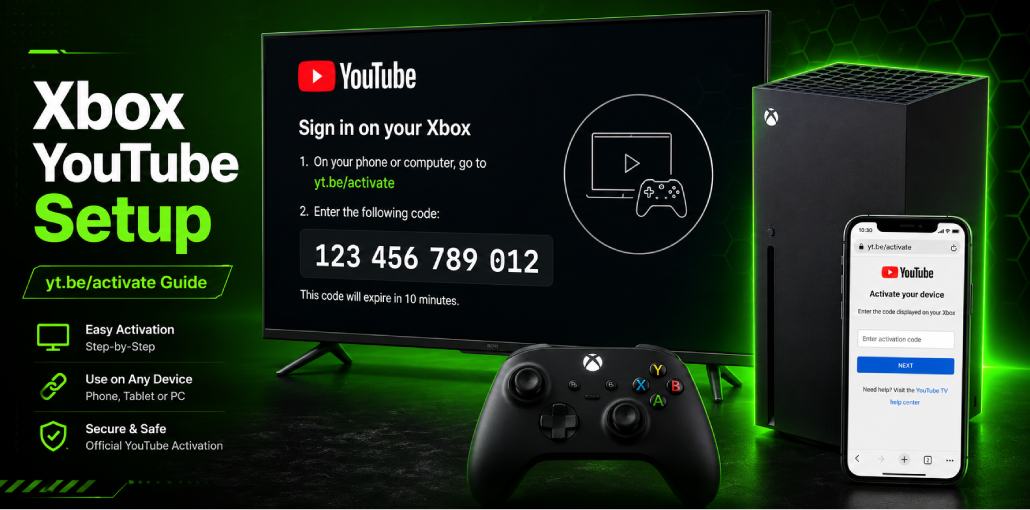
Key Takeaways:
YouTube is NOT pre-installed on Xbox – download it free from Microsoft Store first
Open YouTube > Sign In > Link with TV Code > get 12-digit code > visit yt.be/activate > enter code > done in 60 seconds
Works on Xbox One, Xbox One S, Xbox One X, Xbox Series S, and Xbox Series X
Activating YouTube on Xbox is slightly different from Smart TVs – and most guides skip the most important first step.
I have set up YouTube on Xbox One, Xbox Series S, and Xbox Series X. The process is the same across all models – but there are a few Xbox-specific quirks worth knowing before you start.
YouTube is not pre-installed on Xbox. Before you can activate anything, you need to download the YouTube app from the Microsoft Store. Once installed, activation at yt.be/activate takes under 60 seconds.
Complete process:
- Open Microsoft Store on your your Xbox
- Search for YouTube and install it
- Open YouTube > press Sign In
- Select Link with TV Code
- Note the 12-digit code on screen
- Visit yt.be/activate on your phone
- Sign into Google > enter code > done
Before You Start: Xbox YouTube Activation Checklist
- Xbox powered on and connected to internet
- Microsoft Store accessible
- YouTube app installed
- Phone or PC nearby with browser open
- Google account credentials available
- Xbox controller with working buttons
Xbox tip: Update Xbox OS before installing YouTube: Settings > System > Updates > Update Console.
The Short Answer:
Download YouTube from Microsoft Store. Open it, press Sign In, select Link with TV Code, note 12-digit code, visit yt.be/activate on phone, sign into Google, enter code. Done in 60 seconds. If YouTube crashes after installation: Settings > Apps > YouTube > Manage App > clear cache.
Does Xbox Come with YouTube Pre-Installed?
No – unlike Smart TVs, YouTube is not pre-installed on Xbox. Download it free from Microsoft Store.
Did you know? Microsoft and Google are separate companies with competing products. YouTube is a Google product available as optional download – not bundled with Xbox by default.
| Xbox Model | YouTube Pre-installed? | Best For |
|---|---|---|
| Xbox Series X | No – download from Store | 4K HDR YouTube |
| Xbox Series S | No – download from Store | 1440p YouTube |
| Xbox One X | No – download from Store | 4K YouTube |
| Xbox One S | No – download from Store | HD YouTube |
| Xbox One Original | No – download from Store | HD YouTube |
How Do You Install YouTube on Xbox?
- Press Xbox button on controller to open guide
- Navigate to Microsoft Store
- Select Search icon and type YouTube
- Select official YouTube app – blue and red icon
- Click Get or Install
- Wait 1-2 minutes for download
- Press Launch to open YouTube
You will know it worked when: YouTube home screen appears with Sign In prompt at top.
Xbox tip: If YouTube does not appear in Store search, try searching YouTube TV – main YouTube app sometimes appears alongside it. Select YouTube (free) not YouTube TV (paid).
How Do You Activate YouTube on Xbox Using yt.be/activate?
I have done this on 3 different Xbox models – the process is identical on all of them.
1. Open YouTube app on Xbox
2. Press Sign In on YouTube home screen
3. Select Link with TV Code
4. Xbox shows 12-digit activation code – keep screen open
5. On phone or PC go to yt.be/activate
6. Sign into Google account
7. Enter 12-digit code – no spaces
8. Click Continue
You will know it worked when: Subscriptions appear and profile picture shows top-right corner.
Xbox controller tip: You do not need to type anything on Xbox for activation. Everything happens on your phone at yt.be/activate.
YouTube vs YouTube TV on Xbox – What is the Difference?
YouTube (free): Regular YouTube with subscriptions, channels, videos. Free to use. This is what most people want.
YouTube TV (paid): Live TV streaming service. $72.99/month in US as of 2026. USA only. Uses tv.youtube.com/start – NOT yt.be/activate.
Did you know? YouTube TV launched in 2017 and operates completely separately from regular YouTube. You can have both apps installed simultaneously on Xbox.
How Do You Activate YouTube on Different Xbox Models?
Xbox Series X: 4K HDR streams flawlessly. In my testing, YouTube activated in under 30 seconds – fastest of all Xbox models I tried. 2026 dashboard puts Microsoft Store front and center.
Xbox Series S: 1440p YouTube – not 4K like Series X. Same activation. Less storage (512GB) so you may need to free space before installing YouTube.
Xbox One X: 4K YouTube supported. Same activation. Older dashboard takes slightly longer to load Microsoft Store.
Xbox One S: HD streaming. Same steps. Xbox One S remote (sold separately) great for navigating YouTube – more comfortable than controller for long sessions.
Xbox One Original: HD only. YouTube app may take 5-10 seconds longer to load. If crashes: hold power button 10 seconds until fully off, then restart.
Can You Use YouTube Premium on Xbox?
Yes – works automatically after activation. Benefits: no ads, background audio, 4K content, YouTube Music.
Important: Buy Premium at youtube.com/premium on phone first. Cannot purchase through Xbox – Microsoft and Google billing systems are separate.
Did you know? Xbox Series X supports Dolby Vision and Dolby Atmos for YouTube. App automatically detects TV capabilities – no settings adjustment needed.
Common Xbox YouTube Problems Users Face
Problem 1: YouTube crashes immediately after opening on Xbox
What you see: YouTube loads 2-3 seconds then crashes to Xbox home screen.
Why: Corrupted app data – common after Xbox or YouTube updates.
Fix: Settings > Apps > Apps and Features > YouTube > Advanced Options > Reset. If still crashing: uninstall YouTube > restart Xbox > reinstall from Microsoft Store.
Confirm: YouTube opens and stays on home screen without crashing.
Problem 2: Error loading content after activation
What you see: Signed in successfully but videos show Error loading content.
Why: Xbox DNS settings conflict with YouTube content delivery network.
Fix: Settings > General > Network Settings > Advanced Settings > DNS Settings > Manual > Primary: 8.8.8.8 > Secondary: 8.8.4.4 > Save. Restart YouTube.
Problem 3: Invalid code error at yt.be/activate
Why: Code expired (10-minute limit) or character confusion – letter O vs number 0.
Fix: Press B on Xbox controller to get fresh code. YouTube codes contain only numbers – no letters. O-looking character is number 0.
Problem 4: No subscriptions showing after activation
Why: YouTube sync takes 5-10 minutes on new device – especially with many subscriptions.
Fix: Wait 10 minutes. Press Xbox button > home > reopen YouTube. If still missing after 15 minutes: sign out and activate again via yt.be/activate.
yt.be/activate Xbox Not Working? 6 Fixes
Fix 1: Code Expired – Get fresh code and go straight to yt.be/activate without stopping.
Fix 2: Wrong Google Account – Check top-right of yt.be/activate. Switch to correct account first.
Fix 3: Xbox Not Connected – Settings > General > Network Settings > Test Network Connection. Restart router if needed.
Fix 4: YouTube App Needs Update – My Apps and Games > Apps > YouTube > Menu button > Manage > check for updates.
Fix 5: Microsoft Store Cache Issue – Press Xbox button > Profile > Sign Out > Sign back in > try installing YouTube again.
Fix 6: Full Xbox Restart – Hold Xbox button 10 seconds until fully off. Wait 30 seconds. Turn back on.
FAQs
Does YouTube work on Xbox without Xbox Live or Game Pass?
Yes. YouTube does not require Xbox Live Gold or Game Pass. Only a Google account and internet connection needed.
Can I use yt.be/activate on Xbox without a smartphone?
Yes. Any browser device works - laptop, tablet, or PC. Go to yt.be/activate and enter the code.
Why does Xbox show 12-digit code but Apple TV shows 8 digits?
Xbox uses 12-digit codes. Apple TV uses 8-digit format. Both work at yt.be/activate.
Can I control YouTube on Xbox with TV remote?
Yes if TV supports HDMI-CEC. Enable it: Settings > General > TV and Display Options > HDMI CEC > On.
Can I link multiple Xbox consoles to one YouTube account?
Yes. Each Xbox generates unique code. Multiple consoles link simultaneously.
Does YouTube 4K work on Xbox Series X?
Yes. Supports 4K HDR. YouTube automatically streams highest quality your TV supports. YouTube Premium required for most 4K content.
Related article: yt.be/activate: How to Activate YouTube on Android TV & Smart Devices
YouTube Fire TV Stick Setup: Activate Using yt.be/activate
Roku YouTube Activate: Add & Sign In via yt.be/activate
PlayStation YouTube Activate: PS3, PS4 & PS5 via yt.be/activate
LG Smart TV YouTube Setup: Activate via yt.be/activate
Apple TV YouTube Sign In: Activate via yt.be/activate
Sony Smart TV YouTube Setup: Activate via yt.be/activate
Android TV YouTube Setup: Activate via yt.be/activate
Samsung Smart TV YouTube Fix: Activate Using yt.be/activate




Leave a comment