
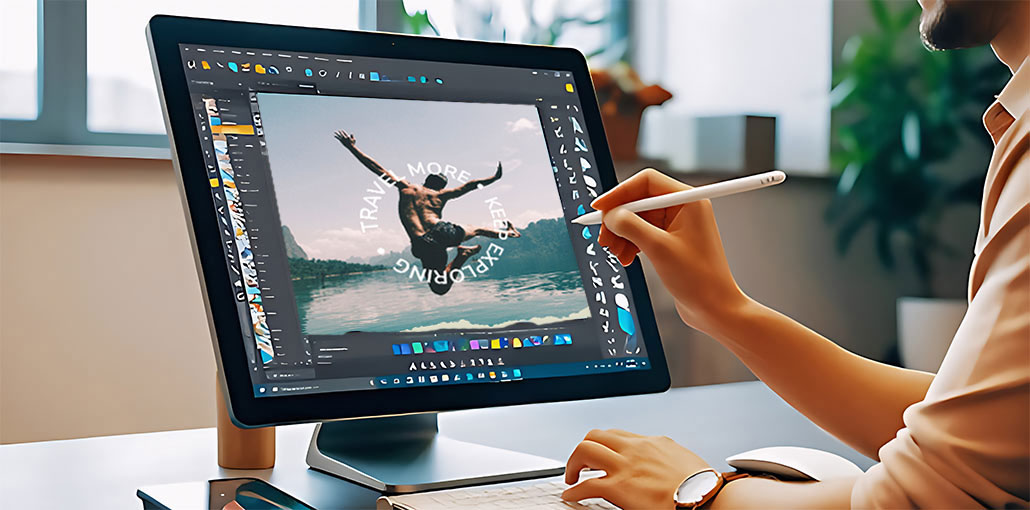
Are you looking for a curved text generator that can create stylish, wavy, and arched text? If you’re designing your social media banner or a product mockup, adding curved text will help your product stand out. It’s a good thing that you can find a range of text curve generators that help you blend text without complicated software.
Follow this guide to learn about the seven amazing curved text generators that can create stunning curved text on an image.
Quick Comparison of the Best Curved Text Generators
| Curved Text Generator | Best For | Ease of Use | Key Advantage | Price |
|---|---|---|---|---|
| Canva | Beginners & complete designs | ⭐⭐⭐⭐⭐ | Templates, fonts, graphics & easy curved text | Free and Pro paid |
| MockoFUN | Circular & creative text | ⭐⭐⭐⭐ | Curved, spiral, wave & text-on-path effects | Free and Pro $4.99/month billed annually |
| Adobe Express | Professional designs | ⭐⭐⭐⭐⭐ | Professional templates & text effects | Free and Premium paid |
| CurvedText.io | Quick curved text | ⭐⭐⭐⭐⭐ | Simple, focused curved-text creation | Free |
| PicMonkey | Social media & marketing | ⭐⭐⭐⭐ | Strong editing & typography tools | From $7.99/month |
| Flaming Text | Text logos | ⭐⭐⭐⭐ | Ready-made text & logo styles | Free and Premium from $2.99/month |
| HitPaw FotorPea | AI-powered creative designs | ⭐⭐⭐⭐ | AI image generation & editing | From $21.99/month |
7 Best Curved Text Generators
1. Canva — Best Overall Curved Text Generator
Canva is an easy-to-use curved text generator for creating arched and circular typography. Its intuitive interface lets beginners quickly curve text and customize fonts, sizes, spacing, and positioning.
Beyond curved lettering, Canva provides templates, graphics, illustrations, and editing tools for complete designs. It works well as a curved text maker for social posts, logos, invitations, banners, and marketing visuals.
Pros
- Easy-to-use interface for beginners
- Multiple fonts, templates, and design elements
- Quickly create curved and circular text
- Useful for social media and branding
- Available on web and mobile
Cons
- Some features require a paid plan
- Advanced typography controls can be limited
- Export options vary by design and plan
Also read: Top 10 Free Online AI Photo Editors
2. MockoFUN — Best for Creative Curved Text
MockoFUN is a flexible curved text generator designed for creating circular, arched, spiral, and wave-shaped typography. Its text effects give users more creative control for distinctive lettering styles.
You can use MockoFUN as a round text generator for badges, logos, stickers, and decorative designs. It also provides different text-on-path effects that make curved typography more visually interesting.
Pros
- Supports curved, circular, spiral, and wave text
- Offers many text-on-path effects
- Good customization options
- Useful for logos and badges
- Works directly in a browser
Cons
- Interface can feel less intuitive for beginners
- Free version has limitations
- Less suitable for complex full-scale designs
3. Adobe Express — Best for Professional Designs
Adobe Express offers a convenient curved text generator experience through its text effects and design features. Users can customize typography and create curved lettering while working within a professional design environment.
The platform is especially useful when curved text needs to become part of a larger graphic. As a curved text maker, Adobe Express suits posters, advertisements, social media content, and branded visuals.
Pros
- Professional-looking design tools
- Easy text customization
- Large selection of fonts and templates
- Suitable for marketing and social media
- Integrates well with the Adobe ecosystem
Cons
- Some features require a premium subscription
- Advanced options may take time to learn
- Can be more than you need for simple curved text
4. CurvedText.io — Best for Simple Designs
CurvedText.io is a straightforward curved text generator for users who want to create curved lettering without dealing with complicated design software. Its simple interface makes creating different text shapes quick and accessible.
If you need a lightweight round text generator, CurvedText.io can be useful for basic circular and curved typography. It is a practical option for quick graphics, labels, badges, and decorative text projects.
Pros
- Simple and easy to use
- Designed specifically for curved text
- Quick results without complicated editing
- Suitable for basic circular text designs
- Beginner-friendly workflow
Cons
- Fewer advanced design features
- Limited templates and creative assets
- Not ideal for complete graphic-design projects
5. PicMonkey — Best for Social Media Graphics
PicMonkey is a versatile curved text generator option that combines typography effects with templates and graphic-design features. Users can incorporate curved lettering into polished social media posts and other visual content.
Its broader editing toolkit makes it more than a basic text tool. PicMonkey works well as a curved text maker when you want to combine curved typography with photos, backgrounds, graphics, and branding elements.
Pros
- Strong collection of design and editing tools
- Useful templates for social media content
- Good typography customization
- Suitable for branding and marketing
- Easy to combine text with images
Cons
- Many features require a paid plan
- Can feel feature-heavy for simple text projects
- Some advanced tools have a learning curve
6. Flaming Text — Best for Text Logos
Flaming Text is a useful curved text generator for creating decorative text and logo-style graphics. Its collection of customizable text styles makes it convenient for users who want eye-catching typography without advanced design skills.
The platform is particularly helpful for creating stylized headings, logos, and badges. As a round text generator, it can help produce circular-looking text effects for creative and branding projects.
Pros
- Large selection of text and logo styles
- Quick logo creation
- Easy to customize decorative typography
- Useful for badges and text-based graphics
- Beginner-friendly
Cons
- Less flexible than full graphic-design platforms
- Some features and downloads may have restrictions
- Design options can feel template-focused
Also read: How Do You Put Text at the Top and Bottom of a Video?
7. HitPaw FotorPea — Best for AI-Powered Designs
HitPaw FotorPea provides an AI-focused approach to creating creative graphics and typography. It can serve as a curved text generator option for users who want to combine text effects with AI-assisted image creation and editing.
Its AI capabilities make it useful for more experimental visual projects beyond simple curved lettering. Users can create customized graphics and incorporate typography into images for social media, promotional content, and creative designs.
Pros
- AI-powered image creation and editing
- Useful for creative visual projects
- Supports various image-editing features
- Suitable for users exploring AI-generated designs
- Can combine typography with broader image creation
Cons
- Better suited to complete image projects than simple curved text
- Some features may require a paid plan
- AI workflows can be more complex than dedicated curved-text tools
Which Curved Text Generator Should You Choose?
The best curved text generator depends on what you want to create:
- Canva: Best overall for easy design and templates.
- MockoFUN: Best for circular, spiral, and text-on-path effects.
- Adobe Express: Best for professional-looking designs.
- CurvedText.io: Best for quick and simple curved text.
- PicMonkey: Best for social media and marketing graphics.
- Flaming Text: Best for text logos.
- HitPaw FotorPea: Best for AI-assisted creative image generation.
If you want the simplest all-around solution, Canva is a strong choice. For dedicated circular and text-on-path effects, MockoFUN is worth trying. For AI-powered creative image generation, HitPaw FotorPea is the better fit.
FAQs About Curved Text Generator
What is a curved text generator?
A curved text generator is an online tool that bends text into different shapes, such as circles, arches, waves, or spirals. It is commonly used for logos, social media posts, badges, invitations, and creative designs.
Can I create curved text for free?
Yes. Several tools offer free options for creating curved text, including Canva, CurvedText.io, and other online generators. However, premium fonts, templates, exports, or advanced editing features may require a paid plan.
What is the difference between curved text and circular text?
Curved text can follow many shapes, including arches, waves, and partial circles. Circular text usually follows a complete circle. The right option depends on the design and shape you want to create.
What is the best curved text generator for beginners?
Canva is one of the best curved text generators for beginners because it has a simple interface, ready-made templates, and easy-to-use text customization tools. You can quickly create curved, circular, or arched text without advanced design skills.









Leave a comment