

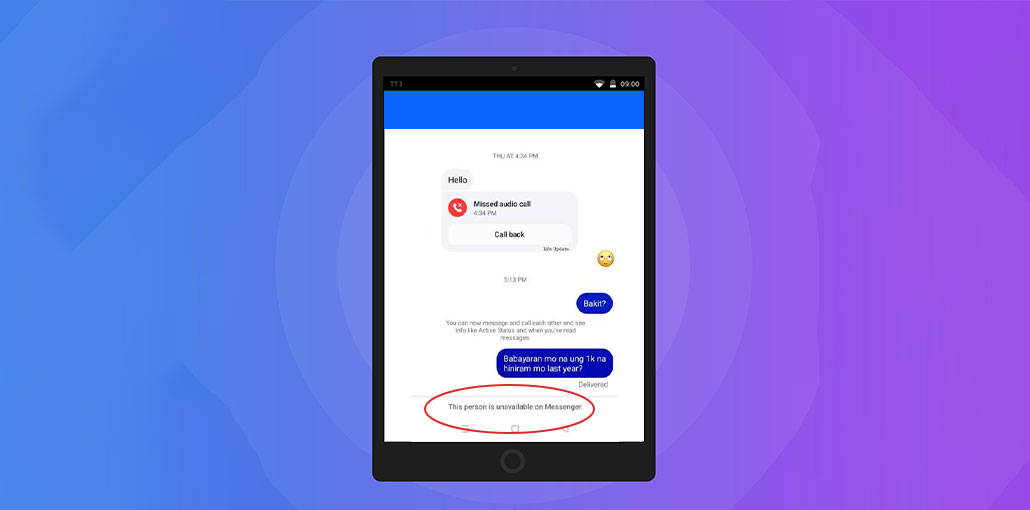
Facebook isn’t always clear and transparent about its applications, and why Facebook isn’t working effectively. For example, if you receive a message “This person is unavailable on messenger,” you can reach out to the Facebook Support Center, just to receive a message that says you’re not able to communicate with the person. That’s not very helpful and is obvious from the message.
It is important to know why this happens and then figure out how to resolve it. We’ll provide you with the most common reasons for the Facebook Messenger issue that appears and show you how to fix it.
Common Reasons for the “This Person Is Unavailable on Messenger” Error
There are a variety of reasons you receive the warning “This person is unavailable on Messenger” when trying to connect with someone on your friend list. It could be because someone blocked you, but it could also be a sign of different reasons. Don’t jump to conclusions and look into the real reason for this message.
Here are all possible reasons that could be behind the “this person is unavailable on messenger” error:
- The person who blocked you.
- You blocked the person.
- The User Deactivated Their Facebook or Messenger Account.
- Facebook Disabled or Suspended the Account.
- This profile has been set as private.
- The User Permanently Deleted Their Account.
- Temporary Messenger or Facebook Server Issues
Also read: Does Facebook Notify Screenshots? Here’s the Truth Revealed
How to Fix “This Person Is Unavailable on Messenger”
Sometimes, the social media apps go down (Hey! It occurs). All you have to do is wait a while and then try contacting your friend later. If the issue persists, then there are steps you can take to resolve it. In the first place, you must determine the true root of this “This person is unavailable on messenger” message.
1. Check Whether You Have Been Blocked
The person you’re trying to reach may have blocked you. They can block you on Facebook or just on Messenger. To determine whether this is true, you must look for warning signs. Can you invite them to join a group? Can you see their profile image? Can you see their blog posts? Can you see their profile if you search for them by name? Are they still in your list of friends?
If all answers to these questions are “No”, it might be the case that the person has blocked you from Facebook. But it could also be that you still look up the person’s profile and posts, but you aren’t messaging them. This means you were blocked only on Messenger. Find other methods to contact your friend who blocked you, for example, via email or phone, and request that they unblock you.
2. Unblock the Person if You Blocked Them
It’s possible to happen. It could be the case that you’ve blocked a friend you’re trying to contact. Perhaps you blocked them several years ago, but you don’t recall. Do not worry, you can determine if this was the case and then unblock your friend so you can message them.
- Open Facebook.
- Click your profile picture.
- Select Settings & Privacy.
- Click Settings.
- Choose Blocking from the left menu.
- Review your blocked users list.
- Click Unblock next to the person’s name.
3. Try Updating Your Application
If you’re using the Messenger App on your smartphone, you’re receiving notifications because the app is outdated or there’s an additional Messenger issue. Try updating your app and fixing the issue.
4. Clear Messenger Cache
Corrupted cache files can interfere with Messenger’s functionality.
For Android users:
- Open Settings.
- Select Apps.
- Choose Messenger.
- Tap Storage.
- Select Clear Cache.
Launch Messenger again and check whether the error persists.
5. Use the Web Version
Sometimes, the Messenger App may simply stop working even if it’s updated. Instead, open Facebook using a web browser and contact your friend via there.
If you can contact your friend using the web-based version of Facebook without issues, but if you’re still getting an error message in the app, you can uninstall and reinstall Messenger. You can download Messenger from the app store.
6. Check Your Internet Connection
The Facebook Messenger app might not perform as it should if your internet connection is poor. Try switching the network to high-speed and see if this helps.
Also read: Solve: This Content Isn’t Available Right Now Facebook Error in 6 Steps
7. Wait for Facebook Server Issues to Be Resolved
Facebook’s services sometimes experience issues. When Messenger is down globally, many users are experiencing issues with messaging. In this scenario, the only option is to be patient till Facebook reinstates its normal services.
8. Contact the Facebook Support Team
If none of the suggestions work and you keep getting a “This person is unavailable on Messenger” notification, you will have no option but to contact Facebook support.
Facebook App can be prone to glitches and bugs even when Facebook developers make every effort to ensure it runs smoothly. Contact them at their primary email address: support@fb.com and explain the issue in detail. They will contact you with possible solutions and will work with you to solve any issues you encounter on Facebook Messenger.
Final Remarks
The reasons listed above will help you understand why the message, ” This person is unavailable on Messenger,” appears. If you are receiving this message, try all the methods listed above to resolve the issue on time.
FAQs: This Person Is Unavailable on Messenger
What does This Person Is Unavailable on Messenger mean?
The 'This Person Is Unavailable on Messenger' message means Messenger cannot connect you with the recipient. This may happen because the person blocked you, deactivated their account, deleted their Facebook profile, or Facebook disabled their account.
Can I still see old messages if someone is unavailable on Messenger?
Yes. In most cases, previous conversations remain visible even if the person becomes unavailable. However, you won't be able to send new messages until the issue is resolved.
Can Facebook suspend an account and cause this error?
Yes. If Facebook disables or suspends a user's account for violating its policies, Messenger may show the 'This Person Is Unavailable on Messenger' message.
Is the 'This Person Is Unavailable on Messenger' error temporary?
Sometimes. If the issue is caused by a Messenger outage, app bug, or temporary account deactivation, the error may disappear once the problem is resolved.





Leave a comment